web
You’re offline. This is a read only version of the page.
close
Skip to main content

Notifications

Announcements

No record found.

Community site session details

Community site session details

Session Id :
Customer experience | Sales, Customer Insights,...
Answered

HTML/WYSIWYG editor for Dynamics 365 Portals

(0) ShareShare
ReportReport
Posted on by 155

Hi,

I have Multiline text field on CRM contact entity, I am displaying Contact data in the Web Page using Web Template and Entity Form so user can edit his/her information. I'm trying to display that multiline text field in HTML/WYSIWYG Or Rich Text Editor

pastedimage1583683322084v1.jpeg

on the Portal Page.

I tried adding Portal Web Resource HTML Editor on the Contact CRM form and checked check box on the Entity form to display that Web Resoruce on the Portal but it did not work. 

Does anyone know how can i achieve this?

Many thanks

I have the same question (0)
  • RaviKashyap Profile Picture
    55,410 Moderator on at

    So you have a html web resource for Rich Text editor and you put that on form but is not visible on portal form? Is it visible in crm?

  • Verified answer
    cloflyMao Profile Picture
    25,210 on at

    Hi Dev Dex,

    Actually you can't replace any input field with custom editor in Portal even if multiple line text field.

    Because when an entity form is rendered by System, every input fields will be binded with some special attributes, these attributes are used for validation and submission,

    system won't recognize our own element. (You can open inspector to check these attributes).

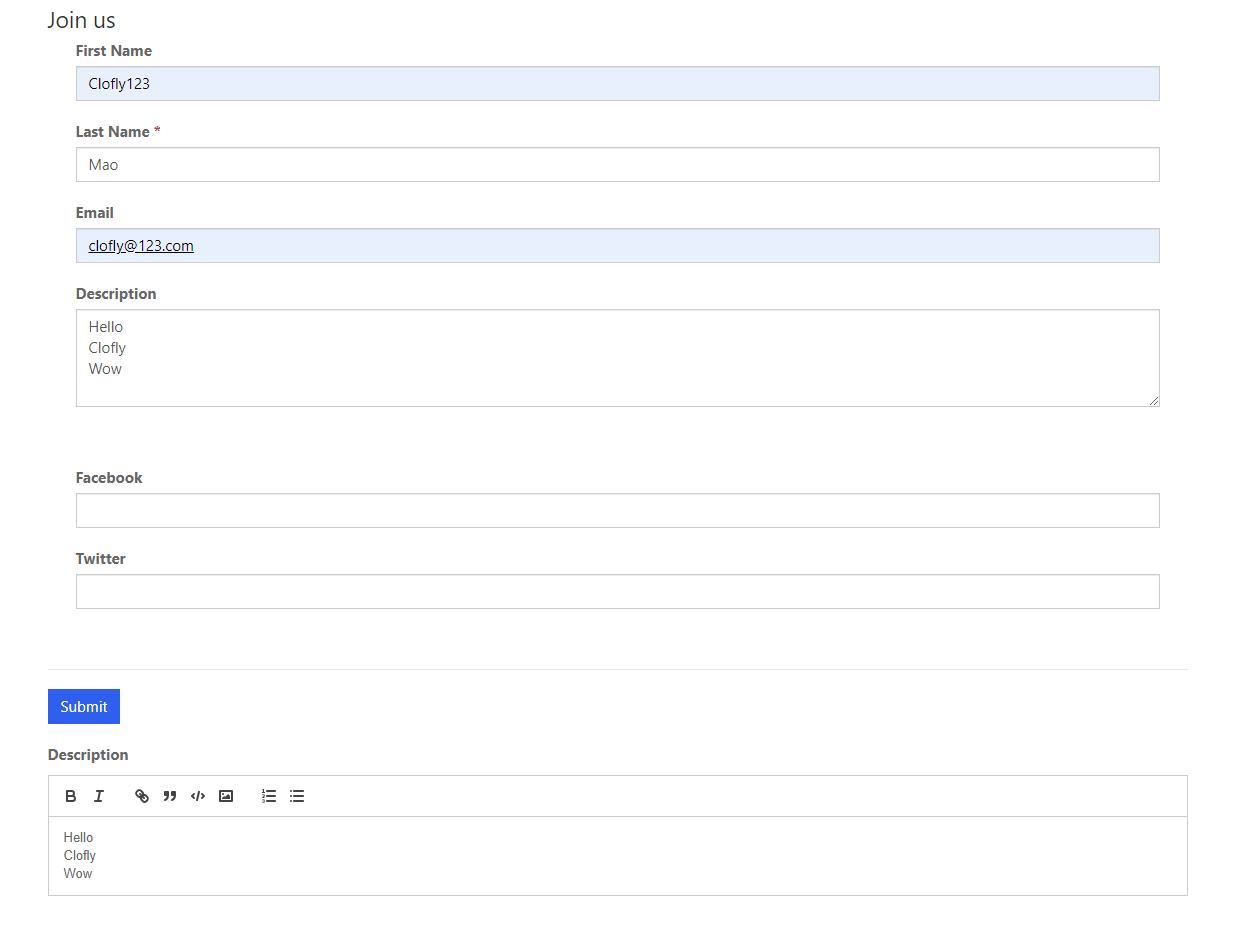
    So we should instead load rich text editor on a blank element(just add CDN libraries in Web template source code), then use javascript to populate default multi line text field with content in rich text editor,

    when everything is tested well, hide the default input field with js or css.

    E.g:

    When I leave rich text editor, description field will be populated content in the editor.(For presentation, I don't hide the default field)
     pastedimage1583739434774v1.png

    Web template code:


    {% entityform name: 'My Portal Contact Form' %}

    Description

    You can use it for your own entity form for test.

    Another thing which we should pay attention to is that content in rich text editor is formatted as HTML code,

    we need regex to match HTML tags and replace them with corrensponding symbols.

    e.g:

    Clofly 

    Mao

    is actually

    <p>Clofly</p><p>Mao</p>

    In my demo, I replace <p> with ""(blank space), replace "</p>" with "\n".(new line)

    You could add more regex to do converting work.

    e.g:

      1. Dynamics 

       2. 365

    is actually

      <ol>

          <li>Dynamics </li>

          <li>365</li>

      </ol>

    I'm not familiar with regex, but there are many existing samples, just add them to final line of my source code.

    Regards,

    Clofly

  • Dev Dex Profile Picture
    155 on at

    It was one of the many ways i tried to display multine text field/ text area as HTML/Rich Text Editot.

    do you have any suggestion how to display Rich Text Editor on the Portal Web Page, i am happy with any approach for example build it using Web Template, Javascript etc

  • Dev Dex Profile Picture
    155 on at

    Thank you very much Clofy Mao, It works

  • Cheeta Profile Picture
    40 on at

    Thank you Clofly. This appears to be a step right direction for me. We have customer-self-service portal and in the create case form I want to enable rich text..

    on the web template you had mentioned using a blank template, can u please advice which built-in web template to use and how to inset the cdn link and then does the javascript go into the custom javascript section of the portal pages?

Under review

Thank you for your reply! To ensure a great experience for everyone, your content is awaiting approval by our Community Managers. Please check back later.

Helpful resources

Quick Links

Responsible AI policies

As AI tools become more common, we’re introducing a Responsible AI Use…

Neeraj Kumar – Community Spotlight

We are honored to recognize Neeraj Kumar as our Community Spotlight honoree for…

Leaderboard > Customer experience | Sales, Customer Insights, CRM

#1
Tom_Gioielli Profile Picture

Tom_Gioielli 96 Super User 2025 Season 2

#2
Jimmy Passeti Profile Picture

Jimmy Passeti 50 Most Valuable Professional

#3
Gerardo Rentería García Profile Picture

Gerardo Rentería Ga... 49 Most Valuable Professional

Last 30 days Overall leaderboard

Product updates

Dynamics 365 release plans
