web
You’re offline. This is a read only version of the page.
close
Skip to main content

Notifications

Announcements

No record found.

Community site session details

Community site session details

Session Id :
Microsoft Dynamics AX (Archived)

Unauthorized access exception in D365

(0) ShareShare
ReportReport
Posted on by 1,089

Hi,

When i execute the below line of code in order to open the text file from the path.

str     filepath = @"D:\";

System.IO.FileStream fs;
fs = new System.IO.FileStream(filepath , System.IO.FileMode::Open, System.IO.FileAccess::Read);
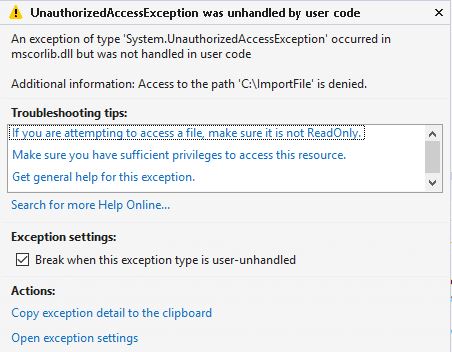
Unauthorized.JPG

I am getting below error but I have full permission on the that drive.

Can anyone please suggest me how can i solve this ?

Thanks in advance 

Guru

*This post is locked for comments

I have the same question (0)
  • Suggested answer
    Fedir Kryvyi Profile Picture
    1,026 on at

    The issue is that you are trying to use str filepath = @"D:\"; as a filepath, but AX7 is hosted in Azure and cannot access files on your local drive in that way.

    Depending on your scenario, you would either need to upload file to docuRef table via FileUpload control in AX7(You can use File::GetFileFromUser() or create new dialog with FileUploadStrategy class), or if you need to create new file, from some data, you need to initialize System.IO.MemoryStream to work with memory.

    Also, you can get Stream from docuValue with Documentmanagement framework.

    Please see this link about document upload control:

    community.dynamics.com/.../how-to-work-with-files-in-ax-7-part-1-upload-download-read-and-store-files-in-db

    And this one:

    community.dynamics.com/.../file-upload-and-download-in-ax-7

  • André Arnaud de Calavon Profile Picture
    301,037 Super User 2025 Season 2 on at

    Hi guruprasanna,

    What is the business requirement to access local drives? In a production environment, you don't have access to the machine, so why are you trying to access local drives? Is it because of temporary files? Please elaborate.

  • Guruprasanna Profile Picture
    1,089 on at

    Hi Fedir Kryvyi and André Arnaud de Calavon,

    Thanks for the reply, I have checked those links. But my requirement is to export the on-hand item quantity details to text file(including all company details in single file),  i have exported this to azure drive and I wanted to give browse link to user so that they can download the text file. Can you please tell how can we achieve these type of requirements. 

    Thank you in advance

    Guru

Under review

Thank you for your reply! To ensure a great experience for everyone, your content is awaiting approval by our Community Managers. Please check back later.

Helpful resources

Quick Links

Responsible AI policies

As AI tools become more common, we’re introducing a Responsible AI Use…

Neeraj Kumar – Community Spotlight

We are honored to recognize Neeraj Kumar as our Community Spotlight honoree for…

Leaderboard > 🔒一 Microsoft Dynamics AX (Archived)

#1
Martin Dráb Profile Picture

Martin Dráb 4 Most Valuable Professional

#1
Priya_K Profile Picture

Priya_K 4

#3
MyDynamicsNAV Profile Picture

MyDynamicsNAV 2

Last 30 days Overall leaderboard

Featured topics

Product updates

Dynamics 365 release plans



