web
You’re offline. This is a read only version of the page.
close
Skip to main content

Notifications

Announcements

No record found.

Community site session details

Community site session details

Session Id :
Finance | Project Operations, Human Resources, ...
Answered

Lookup search for inventLocationid with XDS policy

(0) ShareShare
ReportReport
Posted on by 928

Dear All,

I have already implement XDS Security Policy for invent location and is working fine.
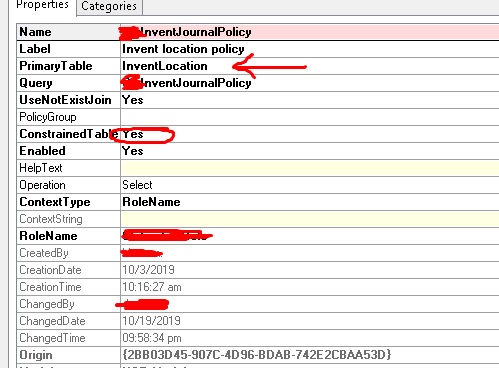
dd.jpg

In my transfer order form, I want to restrict my fromWarehouse lookup and it is working fine 

For Towarehouse I bypass XDS by adding the below code.

public void lookup(FormControl _formControl, str _filterStr)
{
    XDSServices xXDS = new XDSServices();

    xXDS.setXDSState(0); // Disable XDS
    super(_formControl, _filterStr);
    xXDS.setXDSState(1); // Enable XDS
}

It is working fine for lookup but when I try to filter lookup by ctrl G It did not find the restricted warehouses.

Please help me in this regard how can I override Filter or search method to bypass XDS.

regards,

Khurshid Wali

I have the same question (0)
  • André Arnaud de Calavon Profile Picture
    301,109 Super User 2025 Season 2 on at

    Hi Khurshid,

    What exactly do you mean with the filtering that it did not find the restricted warehouses? Is it in the lookup form or the transfer orders? Did it find other warehouses? Can you possibly also share a screenshot?

  • Khurshid Wali Profile Picture
    928 on at

    Thank You Andre Arnaud de Calavon,

    Screenshot_5F00_11.jpg

    Here Lahore is restricted through XDS (restricted warehouse) but I have bypass xds for To warehouse. which means Lahore is available in lookup but when I search through ctrl+G It did not find it.

    how to override this search option.

  • Verified answer
    André Arnaud de Calavon Profile Picture
    301,109 Super User 2025 Season 2 on at

    Hi Khurshid,

    I do understand that Lahore should not be visible in the From warehouse, but it should be visible in the To warehouse.

    Your coding is relaxing the XDS policy on the form, but a new instance is created when opening the lookup form. I do think you can solve it with creating a lookup in coding using x++ instead of using the standard lookup form. You can also create a new lookup form which you can link to the field for lookup on the To warehouse. Then on this new lookup form, you can use coding to disable the XDS policy temporary.

    I do think the easiest it to created a lookup with x++ coding. Here is an example: community.dynamics.com/.../ax-2012-create-lookup-in-x

  • Khurshid Wali Profile Picture
    928 on at

    Thank You Andre,

    As Per your suggestion I have created a lookup form

    like this.

    daxbeginners.wordpress.com/.../

    And bypass executes query method for xds and now search is also working.

    regards,

    Khurshid Wali

Under review

Thank you for your reply! To ensure a great experience for everyone, your content is awaiting approval by our Community Managers. Please check back later.

Helpful resources

Quick Links

Responsible AI policies

As AI tools become more common, we’re introducing a Responsible AI Use…

Neeraj Kumar – Community Spotlight

We are honored to recognize Neeraj Kumar as our Community Spotlight honoree for…

Leaderboard > Finance | Project Operations, Human Resources, AX, GP, SL

#1
Martin Dráb Profile Picture

Martin Dráb 451 Most Valuable Professional

#2
André Arnaud de Calavon Profile Picture

André Arnaud de Cal... 428 Super User 2025 Season 2

#3
BillurSamdancioglu Profile Picture

BillurSamdancioglu 239 Most Valuable Professional

Last 30 days Overall leaderboard

Product updates

Dynamics 365 release plans
