web
You’re offline. This is a read only version of the page.
close
Skip to main content

Announcements

No record found.

News and Announcements icon
Community site session details

Community site session details

Session Id :
Microsoft Dynamics AX (Archived)

How to add AOT Fields to AOT table via X++?

(0) ShareShare
ReportReport
Posted on by 85

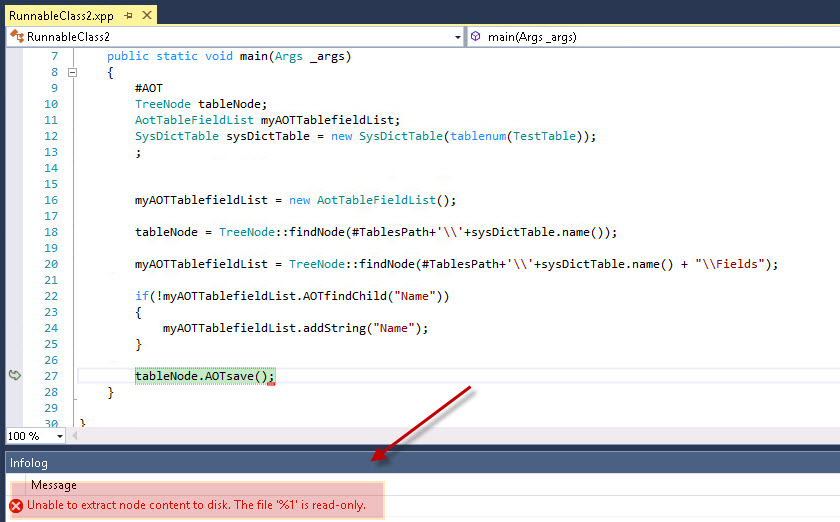
I tried to  add AOT Fields to AOT table via  below X++ in D365, but it get error "Unable to etract node content to disk. The file '%1' is read-only".

Can anyone give me a idea on  how  to add AOT Fields to AOT table via X++ in D365?

public static void main(Args _args)
{
        #AOT
        TreeNode tableNode;
        AotTableFieldList myAOTTablefieldList;
        SysDictTable sysDictTable = new SysDictTable(tablenum(TestTable));
        ;        
        myAOTTablefieldList = new AotTableFieldList();

        tableNode = TreeNode::findNode(#TablesPath+'\\'+sysDictTable.name());

        myAOTTablefieldList = TreeNode::findNode(#TablesPath+'\\'+sysDictTable.name() + "\\Fields");

        if(!myAOTTablefieldList.AOTfindChild("Name"))
        {
            myAOTTablefieldList.addString("Name");
        }

        tableNode.AOTsave();
    }
0184.error.jpg

Thanks in advance!

*This post is locked for comments

I have the same question (0)
  • Community Member Profile Picture
    on at

    Another approach could be like since now, objects are stored as xml files, those files could be directly opened and edited as xml files.

    Fields could be added using a similar to below node. I guess a refresh of AOT would be required to view the fields in front end.

    <Fields>

    <AxTableField xmlns=""

    i:type="AxTableFieldString">

    <Name>Name</Name>

    <ExtendedDataType>FMRentalAdditionName</ExtendedDataType>

    <Mandatory>Yes</Mandatory>

    </AxTableField>

    </Fields>

  • André Arnaud de Calavon Profile Picture
    303,780 Super User 2026 Season 1 on at

    Hi Fred,

    AOTsave is not working as the development environment and runtime are split. You cannot edit the AOT on runtime. What are you exactly trying to achieve?

  • Fred Xu Profile Picture
    85 on at

    I want to add a new field to a table when a button is clicked on a form. Then display the new field on form, and user can specify a value to the new field.

  • Fred Xu Profile Picture
    85 on at

    Thanks, is there a way  to get xml file path for the table?

  • Martin Dráb Profile Picture
    239,057 Most Valuable Professional on at

    Your technical design can't be implemented. If you explain the business problem you tried to solve by this design, we may be able to suggest an alternative that is possible.

    There won't be any XML to edit in production; source code isn't deployed there.

Under review

Thank you for your reply! To ensure a great experience for everyone, your content is awaiting approval by our Community Managers. Please check back later.

Helpful resources

Quick Links

Introducing the 2026 Season 1 community Super Users

Congratulations to our 2026 Super Stars!

Meet the Microsoft Dynamics 365 Contact Center Champions

We are thrilled to have these Champions in our Community!

Congratulations to the March Top 10 Community Leaders

These are the community rock stars!

Leaderboard > 🔒一 Microsoft Dynamics AX (Archived)

#1
Joris dG Profile Picture

Joris dG 5

#2
Andrew Jones a1x Profile Picture

Andrew Jones a1x 2

#3
GL-01081504-0 Profile Picture

GL-01081504-0 1

Last 30 days Overall leaderboard

Featured topics

Product updates

Dynamics 365 release plans
