




 22,533
 Like
Like Share
Share
 Report
Microsoft Dynamics 365 Business Central 2026 Wave 1 (BC28): Reverse Drop Shipments Before Invoicing
Managing drop shipments in Business Central has always required careful handling. Previously, if a mistake occurred when posting a drop shipment receipt, correcting it could be complicated and time-consuming.
With Business Central 2026 Wave 1 (BC28), Microsoft introduces an important improvement: the ability to reverse drop shipments when the related sales shipment and purchase receipt haven't been invoiced yet.
This feature makes it much easier to correct errors without needing manual adjustments or additional documents.
However, once this happens:
Step-by-step process
Open Posted Sales Shipments.
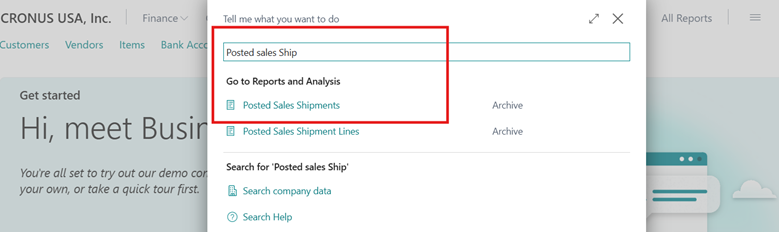
Locate the sales shipment related to the drop shipment.
Open the document.
Choose Undo Shipment.
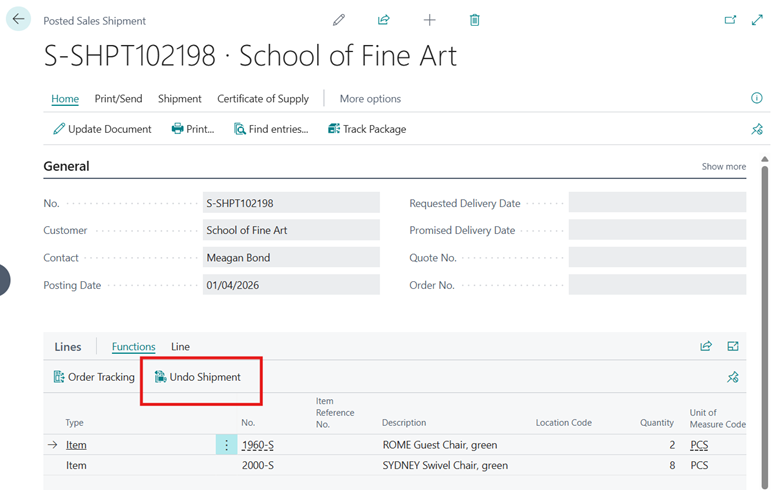
Business Central will automatically:
Thanks For Reading…!!
Regards,
Khushbu Rajvi
With Business Central 2026 Wave 1 (BC28), Microsoft introduces an important improvement: the ability to reverse drop shipments when the related sales shipment and purchase receipt haven't been invoiced yet.
This feature makes it much easier to correct errors without needing manual adjustments or additional documents.
The Challenge with Drop Shipments Before
In a typical drop shipment process, when a purchase receipt is posted, Business Central automatically posts the linked sales shipment.However, once this happens:
- The purchase receipt cannot be undone
- The sales shipment remains posted
- Fixing mistakes requires:
- Creating credit memos
- Adjusting quantities manually
- Recreating sales and purchase lines
What’s New in BC28
Business Central now allows users to reverse posted drop shipments, provided that:- The sales shipment has not been invoiced
- The related purchase receipt has not been invoiced
- Business Central reverts the linked purchase receipt
- Correction entries are automatically created
- The system reapplies purchase and sales entries to their reversal entries
How to Reverse a Drop Shipment
Reversing a drop shipment in BC28 is simple.Step-by-step process
Open Posted Sales Shipments.
Locate the sales shipment related to the drop shipment.
Open the document.
Choose Undo Shipment.
Business Central will automatically:
- Reverse the sales shipment
- Revert the linked purchase receipt
- Create the necessary correction entries
Thanks For Reading…!!
Regards,
Khushbu Rajvi
*This post is locked for comments