Source policy
All factual product claims, dates and availability statuses in this article are grounded in official Microsoft documentation. Editorial diagrams are syntheses created from those facts and are not official Microsoft diagrams. Microsoft states that release-plan timelines and projected functionality can change.
Microsoft’s 2026 Release Wave 1 covers capabilities released or planned from April through September 2026. The official plan contains hundreds of changes across Power Apps, Power Pages, Power Automate, Dataverse, and governance and administration.
The most important story is not a single Copilot button. It is the convergence of three directions: AI agents are moving inside business workflows, professional developers are getting stronger code-first entry points, and administrators are receiving controls designed for an estate where apps, automations and agents all operate side by side.
This edition of the Power Platform Cameroon Monthly therefore does not reproduce the entire release plan. It focuses on the changes that are most likely to influence architecture choices, delivery practices and the day-to-day experience of makers, developers, admins and business users.
One roadmap change to know
Microsoft states that Release Plans will no longer be published starting in September 2026. New Dynamics 365, Power Platform and Dataverse capabilities move to the AI at Work roadmap, while existing release plans remain available for historical reference.
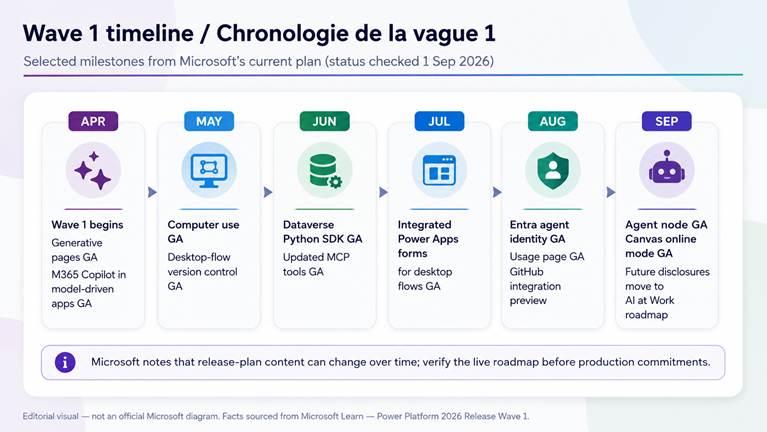
Figure 1 — Editorial timeline based on the Microsoft Power Platform 2026 Release Wave 1 plan. Not an official Microsoft diagram.
Microsoft sources: Wave 1 overview • Power Apps plan • Power Automate plan • Governance plan
Topic 1 — Power Apps: AI-assisted building becomes genuinely code-first
1. Generative pages can be built from external AI coding tools
Generative pages are one of the clearest signs that the boundary between low-code and pro-code is changing. Microsoft now supports a workflow in which makers and developers can create, refine and deploy generative pages for model-driven apps from external AI coding tools such as GitHub Copilot CLI or Claude Code.
The tools can connect to the Dataverse environment, use table structures and existing page metadata, and push the resulting page back into the Power Apps environment. Once imported, the page remains compatible with the native generative-page experience, including restore, undo, code comparison and code editing.
Why this matters
For solution architects, this is more than faster UI generation. It introduces an AI-assisted code-first path that still lands inside the Power Platform application lifecycle and Dataverse context. The architectural question becomes less “low-code or code?” and more “which authoring experience is best for this component?”
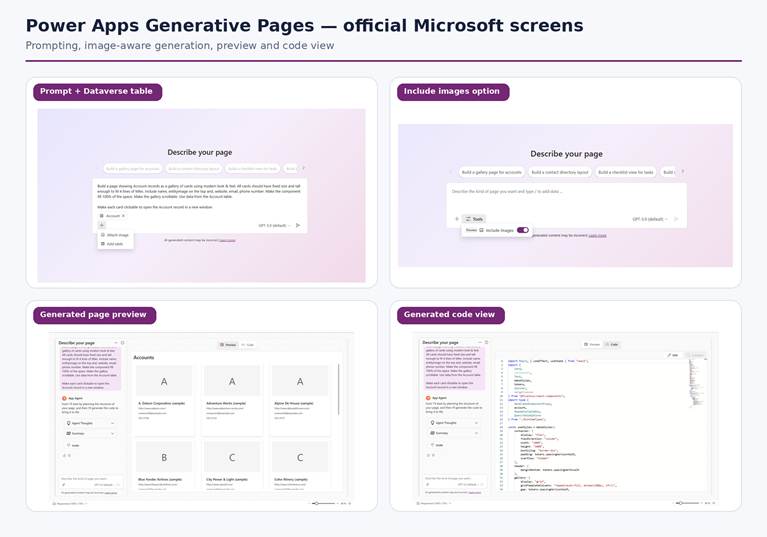
Official Microsoft product screens — Power Apps Generative Pages: prompting with Dataverse data, image-aware generation, generated preview and code view.
Microsoft sources: Release-plan feature • Generative Pages product documentation • External AI code-generation tools
2. Microsoft 365 Copilot is embedded directly in model-driven apps
Microsoft 365 Copilot in model-driven apps reached general availability in April 2026. When enabled, users get a conversational assistant alongside the business app. Microsoft describes it as able to answer questions, analyze app data and help automate common tasks without forcing the user to leave the application context.
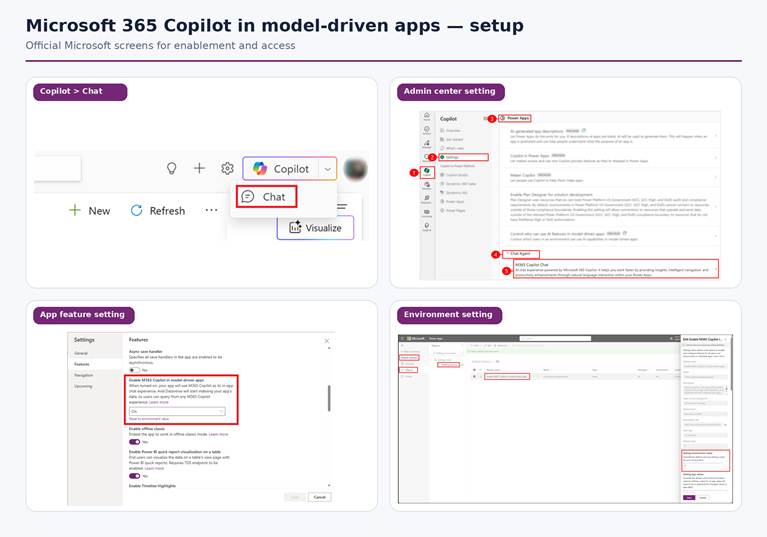
Official Microsoft product screens — Microsoft 365 Copilot in model-driven apps: enablement and configuration.
Microsoft sources: Add Microsoft 365 Copilot for app users
The same Power Apps wave also moved several end-user AI experiences to general availability in April: data exploration and visualization, Smart Paste, AI record summaries, enhanced form filling and Visualize with Copilot. Together, these changes make AI part of the operational screen rather than a separate destination.
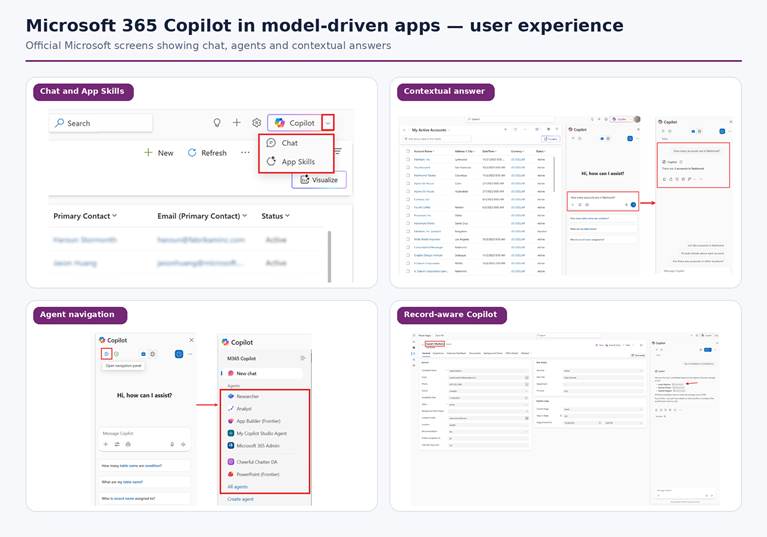
Official Microsoft product screens — Microsoft 365 Copilot in model-driven apps: Chat, App Skills, agent navigation and contextual answers.
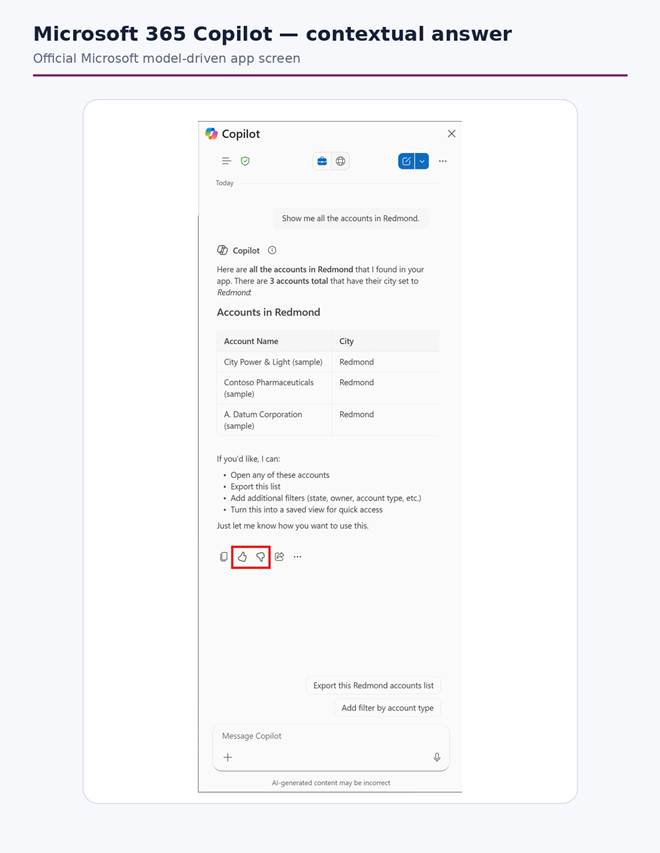
Official Microsoft product screen — detailed contextual answer returned by Microsoft 365 Copilot inside a model-driven app.
Microsoft sources: Use Microsoft 365 Copilot chat in model-driven apps • Power Apps planned features
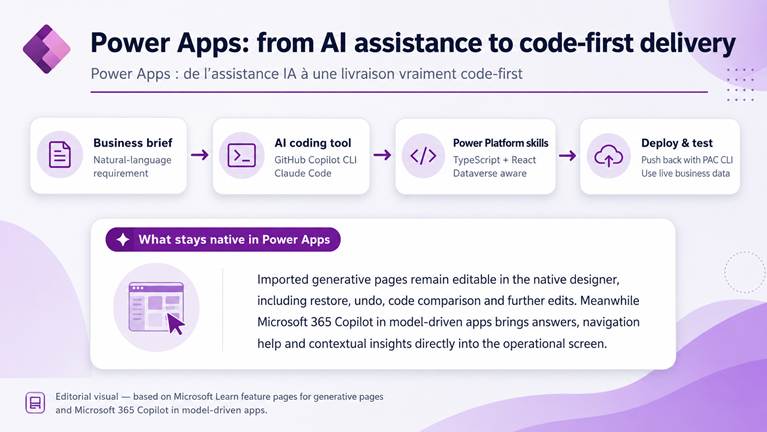
Figure 2 — Editorial synthesis of the Power Apps generative-page workflow. Based on Microsoft Learn; not an official Microsoft diagram.
Topic 2 — Copilot Studio: agents move from conversation to execution
3. Computer use reaches general availability
Computer use lets a Copilot Studio agent operate graphical interfaces in websites and desktop applications using a virtual mouse and keyboard. Microsoft positions it for cases where no API is available, including data entry, invoice processing and data extraction. The capability combines computer vision and reasoning so the agent can navigate a GUI from natural-language instructions.
Architecture impact
Computer use does not remove the value of APIs or deterministic automation. It adds another execution option for the “last mile” — especially legacy or third-party interfaces that cannot be integrated cleanly. It should therefore be treated as a governed automation surface, not a universal replacement for connectors and APIs.
Microsoft sources: Computer use — product documentation • Computer use — release plan
4. The agent node and MCP make agentic workflows composable
The agent node allows a workflow to call a published Copilot Studio agent as one step in a larger automated process. The workflow keeps control of sequencing and downstream actions, while the agent contributes reasoning, knowledge retrieval and tool usage. Microsoft also states that the node executes with the triggering user’s credentials and can be governed through DLP policies.
In parallel, Microsoft is standardizing integrations around Model Context Protocol (MCP). Custom MCP servers can package connector actions, tools from other cloud providers and custom APIs into reusable governed servers. The Wave 1 plan also includes MCP-compliant tools inside agent workflows; because availability dates have moved across plan updates, production planning should always verify the current Microsoft roadmap.
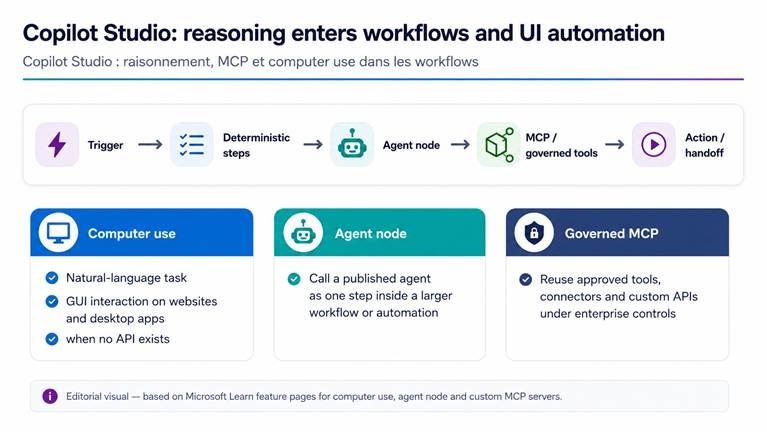
Figure 3 — Editorial view of Copilot Studio agent workflows, MCP and computer use. Based on Microsoft Learn; not an official Microsoft diagram.
Microsoft sources: Agent node • Custom MCP servers • MCP tools in agent workflows
Topic 3 — Power Automate: RPA matures as an engineering discipline
5. Desktop flows get version history, comparison and stronger testing
Power Automate for desktop now treats automation versions much more like software artifacts. Microsoft documents drafts, published versions, a version-history pane, restore, and comparison between versions. The Wave 1 plan also lists a test suite for subflows and other diagnostic capabilities.
The current product documentation explains that versions are backed by Dataverse and can be inspected to see who changed what and when. That is a meaningful improvement for enterprise support, debugging and controlled release practices.
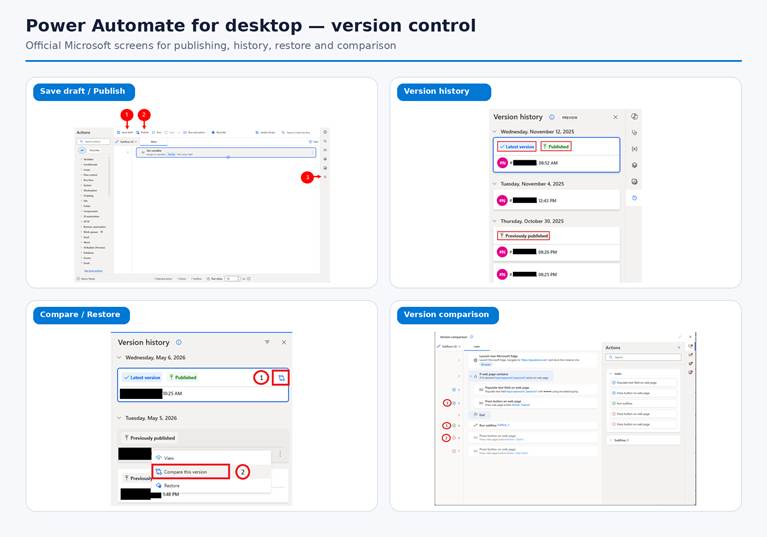
Official Microsoft product screens — Power Automate for desktop version control: draft/publish, version history, compare/restore and version comparison.
Microsoft sources: Version control — release plan • Version control — product documentation • Power Automate planned features
6. Attended RPA can use Power Apps as its form layer — and local AI models as an action
Integrated Power Apps lets a canvas app become the user interface of an attended desktop flow. A desktop flow can pass context and values into the app, receive structured output back, and even trigger subflows from app events. Microsoft explicitly positions this as a way to reduce brittle selectors and screen scraping for form scenarios.
A second Wave 1 capability adds a desktop-flow action for locally hosted AI models. Makers provide an endpoint URL, prompts and optional files; the model response is returned as a variable for downstream steps. Microsoft says the action works with OpenAI-compatible APIs and names Ollama, vLLM and LM Studio as examples.
Where this is interesting
This combination is particularly relevant to attended automation: a governed Power Apps UI for human input, deterministic desktop automation for execution, and optional local AI for scenarios where data locality or control is a priority.
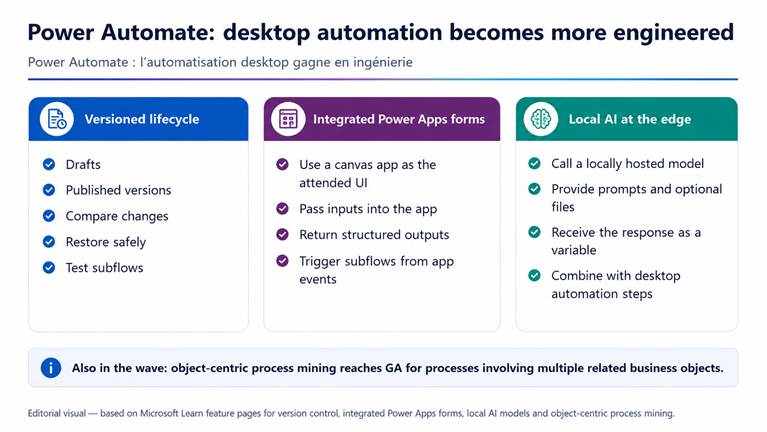
Figure 4 — Editorial synthesis of the Power Automate desktop-flow capabilities highlighted in Wave 1. Based on Microsoft Learn; not an official Microsoft diagram.
Microsoft sources: Integrated Power Apps forms • Local AI models
7. Object-centric process mining reaches general availability
Object-centric process mining analyzes processes that involve multiple related business objects rather than forcing every analysis into one case identifier. Microsoft gives examples such as orders, items, deliveries and invoices. For organizations with complex end-to-end processes, this provides a richer foundation for finding bottlenecks and automation opportunities.
Microsoft sources: Object-centric process mining
Topic 4 — Dataverse: an agentic data platform, not just the backend of Power Apps
8. Dataverse MCP and the Python SDK open new pro-code paths
Microsoft’s Wave 1 Dataverse overview explicitly puts agent programmability at the center, through APIs, MCP servers and a Python SDK. The updated Dataverse MCP tool surface separates discovery from data retrieval, adds structured and unstructured search, and adds business-skill management tools. The Python SDK provides a native Python experience for CRUD, bulk operations, metadata and observability, while Microsoft also positions it for agentic primitives such as MCP and agent-to-agent collaboration.
Why architects should care
Dataverse is becoming directly consumable by a wider set of AI and developer tooling. That makes security roles, auditing, API boundaries, environment strategy and data quality even more important, because agents can become active consumers and actors on business data.
Microsoft sources: Dataverse Wave 1 overview • Updated MCP tools • Dataverse MCP product docs • Dataverse Python SDK
9. Dataverse data enters Microsoft 365 Copilot — with dedicated agent identities
In public preview, administrators can enable Dataverse environment data for Microsoft 365 Copilot so users can search and reason over business data alongside information from Microsoft 365. Microsoft’s example combines account information from Dataverse with context from email, Word and PowerPoint.
At the same time, Microsoft introduces Dataverse agent users backed by Microsoft Entra agent identity. Agents can receive dedicated least-privileged security roles and their actions can be audited, providing a clearer separation between human users and autonomous or interactive agents.
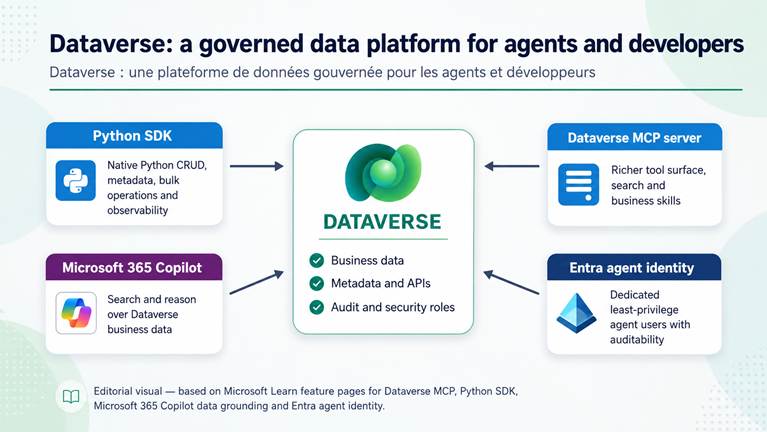
Figure 5 — Editorial view of Dataverse as an agentic data backbone. Based on Microsoft Learn; not an official Microsoft diagram.
Microsoft sources: Dataverse business data in Microsoft 365 Copilot • Microsoft Entra agent identity
Topic 5 — Power Pages: pro-code capabilities grow, but security grows with them
10. Secure server-side JavaScript and Power Pages-aware AI coding tools
Power Pages now supports secure server-side JavaScript for custom business logic, advanced data operations and calls to external services without exposing sensitive credentials in client code. This removes the need for some client-side workarounds and creates a cleaner extension point for portal solutions.
Microsoft also ships AI coding skills designed specifically for Power Pages. The release-plan page states that these skills understand platform concepts such as web roles, table permissions and Web APIs, which is materially different from asking a generic coding assistant to generate portal code without platform context.
Microsoft sources: Secure server-side logic • Server logic product documentation • AI coding tools for Power Pages
11. The Power Pages security agent guides authentication and authorization
The security agent is embedded in the Power Pages security workspace. It can help makers review risks, configure identity providers, strengthen authentication settings and suggest appropriate web roles and data permissions. Microsoft states that its recommendations follow least-privilege principles and that suggested changes require explicit user approval before they are applied.
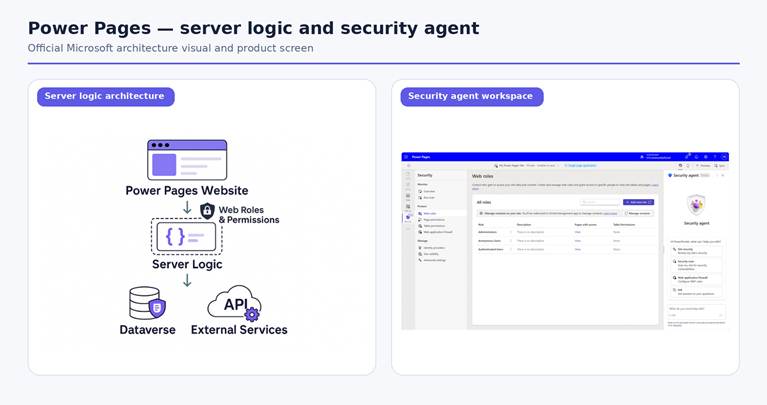
Official Microsoft visual and product screen — Power Pages server logic architecture and Security Agent workspace.
Microsoft sources: Power Pages Security Agent — product docs • Power Pages security agent — release plan
Topic 6 — Governance and ALM: the admin center becomes a command center for apps, flows and agents
12. GitHub source integration, Usage analytics and an Agentic Center of Enablement
The governance story is as important as the AI story. Native source-code integration is being extended from Azure DevOps Git to GitHub, giving teams another supported Git provider in the solution experience. Microsoft also introduces a Usage page in the Power Platform admin center with authoritative usage metrics across Power Apps, Power Automate and Copilot Studio, including trends and per-resource adoption.
The Agentic Center of Enablement (Agentic CoE) goes further by adding three governance agents to the admin center: Highlights for daily activity snapshots, Insights for continuous detection and prioritization of issues, and Action Plan for remediation plans that an administrator reviews and approves. Microsoft states that agent activity is recorded for audit.
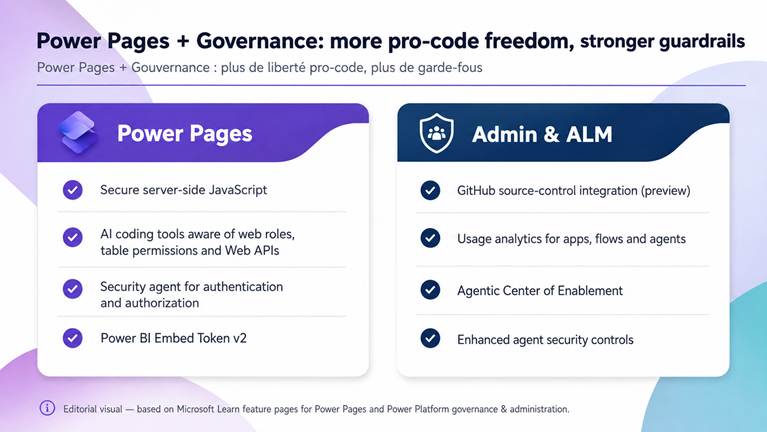
Figure 6 — Editorial synthesis of Power Pages and governance highlights. Based on Microsoft Learn; not an official Microsoft diagram.
Microsoft sources: GitHub source integration • Usage page • Agentic Center of Enablement
Also worth watching in Wave 1
The refreshed modern look is enforced across model-driven apps from April 1, 2026.
Canvas apps designed for offline use gain an online mode to access current Dataverse data directly; the current plan lists public preview in August and general availability in September 2026.
Code apps continue to mature: the Power Apps plan lists CLI support to discover, create and wire connectors, with general availability on July 31, 2026.
Power Pages adds Power BI Embed Token v2 support, generally available July 15, 2026.
Governance adds enhanced agent-security controls, sensitivity-label visibility and expanded Virtual Network support.
Microsoft sources: Power Apps plan • Power Pages plan • Governance plan
What this wave means strategically
1. AI is becoming an execution layer, not only an assistant.
Computer use, agent nodes, MCP and Dataverse agent identities all point toward agents that can participate directly in processes and access governed business data.
2. Low-code and pro-code are converging.
Generative pages from external coding assistants, the Dataverse Python SDK, Power Pages server-side JavaScript and GitHub source integration give professional developers more natural entry points without abandoning Power Platform governance.
3. RPA is being professionalized.
Version control, comparison, testing, richer form experiences and process intelligence reduce the gap between desktop automation and standard software-engineering practices.
4. Governance is moving from inventory to continuous action.
Usage analytics, agent security controls and Agentic CoE reflect an admin experience designed for continuous monitoring and remediation across apps, flows and agents.
Power Platform Cameroon — practical recommendation
Start with one controlled pilot per capability family: one model-driven app for embedded Copilot/generative pages, one desktop automation to adopt versioning and testing, one governed MCP scenario around Dataverse, and one admin workstream to inventory agent identities, DLP and usage. Treat previews as experiments until your organization has validated availability, licensing, security and supportability for its tenant and region.
Official Microsoft references
Primary Microsoft sources only. The release plan is updated over time; always check the live page before a production decision.
Power Platform 2026 Release Wave 1 overview
Power Apps — planned features
Power Apps — generative pages with external codegen tools
Power Apps — generative pages product docs
Power Apps — external AI code-generation tools
Power Apps — Microsoft 365 Copilot in model-driven apps
Power Apps — use Microsoft 365 Copilot in model-driven apps
Copilot Studio — computer use
Copilot Studio — computer use release plan
Copilot Studio — agent node
Copilot Studio — custom MCP servers
Copilot Studio — MCP tools in agent workflows
Power Automate — planned features
Power Automate — desktop-flow version control
Power Automate — version control product docs
Power Automate — integrated Power Apps forms
Power Automate — local AI models
Power Automate — object-centric process mining
Dataverse — Wave 1 overview
Dataverse — updated MCP tools
Dataverse — MCP product docs
Dataverse — Python SDK
Dataverse — business data in Microsoft 365 Copilot
Dataverse — Microsoft Entra agent identity
Power Pages — planned features
Power Pages — secure server-side logic
Power Pages — server logic product docs
Power Pages — AI coding tools
Power Pages — security agent
Governance — planned features
Governance — GitHub source integration
Governance — Usage page
Governance — Agentic Center of Enablement


