




 23,118
 Like
Like Share
Share
 Report
Here comes the error..
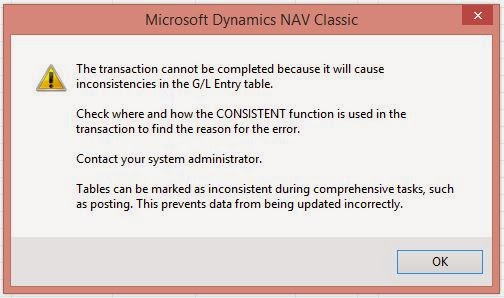
To find the problem and a solution I started to surf. I found 2 fine articles and I have used both these article to provide the solution for this issue.
How to find why this is happening and which entry is actually triggering this error.
First created a new codeunit using following code,
 OBJECT Codeunit 50000 Single Instance CU
{
  OBJECT-PROPERTIES
  {
    Date=14-10-23;
    Time=12:54:04 PM;
    Modified=Yes;
    Version List=MOD01;
  }
  PROPERTIES
  {
    SingleInstance=Yes;
    OnRun=BEGIN
             IF NOT StoreToTemp THEN BEGIN
              StoreToTemp := TRUE;
            END ELSE
              FORM.RUNMODAL(0,TempGLEntry);
          END;
  }
  CODE
  {
    VAR
      TempGLEntry@1000000000 : TEMPORARY Record 17;
      StoreToTemp@1000000001 : Boolean;

    PROCEDURE InsertGL@1000000000(GLEntry@1000000000 : Record 17);
    BEGIN
      IF StoreToTemp THEN BEGIN
        TempGLEntry := GLEntry;
        IF NOT TempGLEntry.INSERT THEN BEGIN
           TempGLEntry.DELETEALL;
           TempGLEntry.INSERT;
       END;
      END;
    END;
    BEGIN
    END.
  }
}
And in Codeunit 12 add the following code in function "FinishCodeunit()
Once you completed the creating of new object and modification to the codeunit 12, follow the below steps,
1. Run the Single "Single Instance CU" ONLY ONCE.
2. Then try to unapply the entry which generate the above error.
3. Then once again run the "Single Instance CU" and you will see the actual transaction that generate the error.
How to fix this error.
 FinishCodeunit()
 WITH GenJnlLine DO BEGIN
  IF GLEntryTmp.FIND('-') THEN BEGIN
   REPEAT
    GLEntry := GLEntryTmp;
    IF GLSetup."Additional Reporting Currency" = '' THEN BEGIN
     GLEntry."Additional-Currency Amount" := 0;
     GLEntry."Add.-Currency Debit Amount" := 0;
     GLEntry."Add.-Currency Credit Amount" := 0;
    END;
    GLEntry.INSERT;
    //Modification 01 Start
    SingleCU.InsertGL(GLEntry);
    //Modification 01 End
    IF NOT InsertFAAllocDim(GLEntry."Entry No.") THEN
Once you completed the creating of new object and modification to the codeunit 12, follow the below steps,
1. Run the Single "Single Instance CU" ONLY ONCE.
2. Then try to unapply the entry which generate the above error.
3. Then once again run the "Single Instance CU" and you will see the actual transaction that generate the error.
How to fix this error.
In order to fix this you need to modify 3 codeunits.
- Codeunit 12 - "Gen. Jnl.-Post Line"
- Codeunit 226 - "CustEntry-Apply Posted Entries"
- Codeunit 227 - "VendEntry-Apply Posted Entries"
Existing code
 NextDtldLedgEntryEntryNo := NextDtldLedgEntryEntryNo + 1;
       DtldCVLedgEntryBuf.TRANSFERFIELDS(NewDtldCustLedgEntry);
      //Delete the following line.
      GenJnlLine."Source Currency Code" := DtldCustLedgEntry2."Currency Code";
      IF GLSetup."Additional Reporting Currency" <> DtldCVLedgEntryBuf."Currency Code" THEN
       DtldCVLedgEntryBuf."Additional-Currency Amount" :=
        CalcAddCurrForUnapplication(DtldCVLedgEntryBuf."Posting Date",DtldCVLedgEntryBuf."Amount (LCY)")
Replacement code
  NextDtldLedgEntryEntryNo := NextDtldLedgEntryEntryNo + 1;
      DtldCVLedgEntryBuf.TRANSFERFIELDS(NewDtldCustLedgEntry);
      IF GLSetup."Additional Reporting Currency" <> DtldCVLedgEntryBuf."Currency Code" THEN
       DtldCVLedgEntryBuf."Additional-Currency Amount" :=
        CalcAddCurrForUnapplication(DtldCVLedgEntryBuf."Posting Date",DtldCVLedgEntryBuf."Amount (LCY)")
2. Change the code in the UnapplyVendLedgEntry function in the Gen. Jnl.-Post Line codeunit (12) as follow:
Existing code
Replacement code
3. Change the code in the PostUnApplyCustomer function in the CustEntry-Apply Posted codeunit (226) as follow:
Existing code
Replacement code
4. Change the code in the PostUnApplyVendor function in the VendEntry-Apply Posted Entries codeunit (227) as follow:
Existing code
Replacement code
** You must have Microsoft Dynamics NAV 2009 Service Pack 1 installed to apply this hotfix.
********************** You cannot remove this hotfix. **********************
Click here to get the link to hot Fix
Click here to get the article about the first section
Thank you and Regards,
Tharanga Chandrasekara
Existing code
  NextDtldLedgEntryEntryNo := NextDtldLedgEntryEntryNo + 1;
      DtldCVLedgEntryBuf.TRANSFERFIELDS(NewDtldVendLedgEntry);
      //Delete the following line.
      GenJnlLine."Source Currency Code" := DtldVendLedgEntry2."Currency Code";
      IF GLSetup."Additional Reporting Currency" <> DtldCVLedgEntryBuf."Currency Code" THEN
       DtldCVLedgEntryBuf."Additional-Currency Amount" :=
        CalcAddCurrForUnapplication(DtldCVLedgEntryBuf."Posting Date",DtldCVLedgEntryBuf."Amount (LCY)")
 ...
Replacement code
   NextDtldLedgEntryEntryNo := NextDtldLedgEntryEntryNo + 1;
      DtldCVLedgEntryBuf.TRANSFERFIELDS(NewDtldVendLedgEntry);
      IF GLSetup."Additional Reporting Currency" <> DtldCVLedgEntryBuf."Currency Code" THEN
       DtldCVLedgEntryBuf."Additional-Currency Amount" :=
        CalcAddCurrForUnapplication(DtldCVLedgEntryBuf."Posting Date",DtldCVLedgEntryBuf."Amount (LCY)")
 ...
3. Change the code in the PostUnApplyCustomer function in the CustEntry-Apply Posted codeunit (226) as follow:
Existing code
 GenJnlLine."Source Type" := GenJnlLine."Source Type"::Customer;
      GenJnlLine."Source No." := "Customer No.";
      GenJnlLine."Source Code" := SourceCodeSetup."Unapplied Sales Entry Appln.";
      //Delete the following line.
      GenJnlLine."Source Currency Code" := DtldCustLedgEntry2."Currency Code";
      GenJnlLine."System-Created Entry" := TRUE;
      Window.OPEN(Text008);
      GenJnlPostLine.UnapplyCustLedgEntry(GenJnlLine,DtldCustLedgEntry2);
Replacement code
 GenJnlLine."Source Type" := GenJnlLine."Source Type"::Customer;
      GenJnlLine."Source No." := "Customer No.";
      GenJnlLine."Source Code" := SourceCodeSetup."Unapplied Sales Entry Appln.";
      GenJnlLine."System-Created Entry" := TRUE;
      Window.OPEN(Text008);
      GenJnlPostLine.UnapplyCustLedgEntry(GenJnlLine,DtldCustLedgEntry2);
4. Change the code in the PostUnApplyVendor function in the VendEntry-Apply Posted Entries codeunit (227) as follow:
Existing code
  GenJnlLine."Source Type" := GenJnlLine."Source Type"::Vendor;
      GenJnlLine."Source No." := "Vendor No.";
      GenJnlLine."Source Code" := SourceCodeSetup."Unapplied Purch. Entry Appln.";
      //Delete the following line.
      GenJnlLine."Source Currency Code" := DtldVendLedgEntry2."Currency Code";
      GenJnlLine."System-Created Entry" := TRUE;
      Window.OPEN(Text008);
      GenJnlPostLine.UnapplyVendLedgEntry(GenJnlLine,DtldVendLedgEntry2);
Replacement code
  GenJnlLine."Source Type" := GenJnlLine."Source Type"::Vendor;
      GenJnlLine."Source No." := "Vendor No.";
      GenJnlLine."Source Code" := SourceCodeSetup."Unapplied Purch. Entry Appln.";
      GenJnlLine."System-Created Entry" := TRUE;
      Window.OPEN(Text008);
      GenJnlPostLine.UnapplyVendLedgEntry(GenJnlLine,DtldVendLedgEntry2);
** You must have Microsoft Dynamics NAV 2009 Service Pack 1 installed to apply this hotfix.
********************** You cannot remove this hotfix. **********************
Click here to get the link to hot Fix
Click here to get the article about the first section
Thank you and Regards,
Tharanga Chandrasekara
*This post is locked for comments