Many finance teams manage recurring SaaS revenues using spreadsheets, copied sales invoices, manual reminders, or duplicated sales orders.
At the beginning, this may look acceptable.
But as soon as the number of customers, users, contract changes, renewals, and billing periods increases, the process becomes fragile. The risks are clear:
- missed invoices;
- incorrect quantities;
- manual price adjustments;
- poor visibility on recurring revenue;
- weak control over contract start dates and billing cycles;
- time-consuming month-end checks.
For a CFO, this is not only an operational issue. It affects revenue accuracy, cash flow predictability, and the reliability of financial reporting.
Microsoft Dynamics 365 Business Central includes Subscription Billing capabilities that can help companies manage recurring services in a more structured way.
In this article, we will walk through a practical SaaS scenario: a customer subscribes to three monthly Business Central licenses, and the finance team needs to manage the full flow from item setup to recurring invoice creation.
The objective is simple: move from manual recurring invoicing to a controlled subscription billing process.
First of all you need to select this role:

Business Scenario
Customer Mantovani subscribes to three monthly SaaS licenses.
For this example, we will use a sample commercial amount of €95.00 per user per month. This is not intended to represent an official price list. It is only a practical value used to explain the billing logic.
| Element | Value |
|---|
| Customer | Mantovani |
| Service | Business Central SaaS monthly license |
| Quantity | 3 users |
| Sample monthly unit amount | €95,00 |
| Monthly recurring amount | €285,00 |
| Billing frequency | Monthly |
The monthly recurring amount is calculated as follows:
€95,00 × 3 users = €285,00 per month
The process includes the following main steps:
- create the customer;
- create the SaaS license item;
- reate the subscription package;
- assign the package to the item;
- create and post the sales order;
- verify the generated subscription;
- create the customer subscription contract;
- generate the recurring billing proposal;
- create and post the sales invoice.
Step 1 – Create the Customer
The first step is to create the customer card for Mantovani.
From the Customers page, create a new customer and complete the required financial setup, including:
- Customer Posting Group;
- General Business Posting Group;
- VAT Business Posting Group;
- Payment Terms Code;
- Invoicing information.
This setup is important because the customer will become the contractual party for the recurring subscription.
A common mistake is treating the customer card as a purely administrative step. It is not. Incorrect posting groups, VAT setup, or payment terms can generate wrong accounting entries or inconsistent invoice data later in the process.
For recurring billing, master data quality is critical.
Step 2 – Create the SaaS License Item
The next step is to create the item that represents the SaaS license.
Example setup:
| Field | Example Value |
|---|
| Item No. | LIC-BC-PREMIUM |
| Description | Business Central Premium - SaaS Monthly License |
| Type | Non-Inventory |
| Base Unit of Measure | PZ |
| Sales Unit of Measure | PZ |
| Subscription Option | Subscription Item |
The key field is Subscription Option.
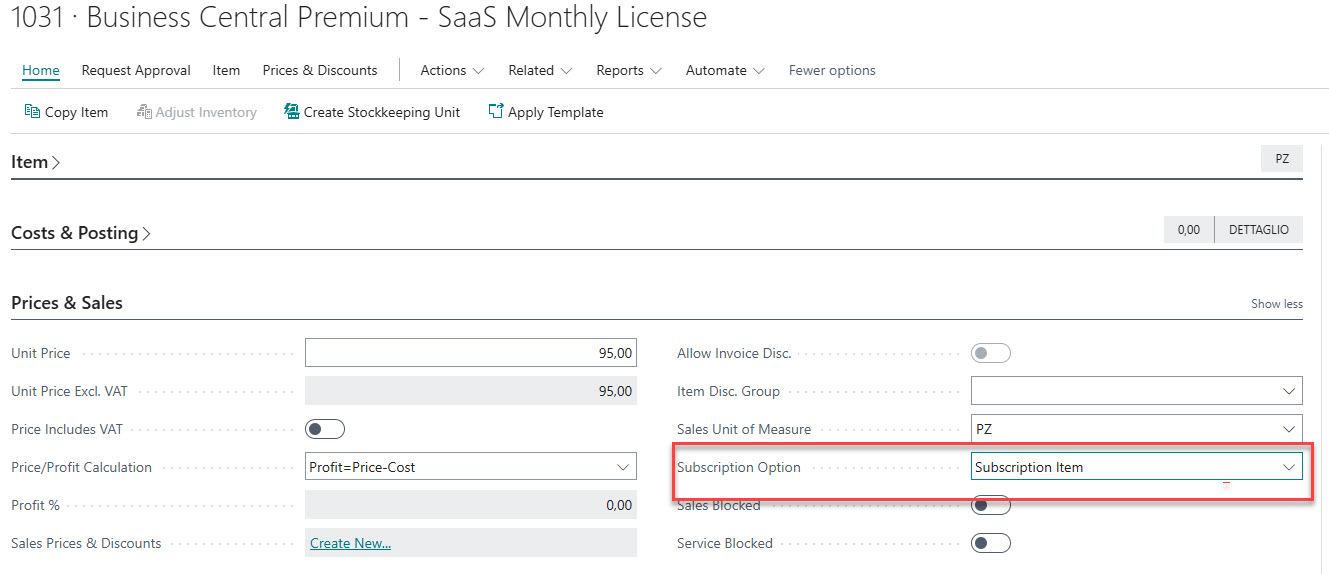
For a SaaS license sold as a recurring service, the correct logic is to configure the item as a Subscription Item. This means that the item is not managed as a one-time sale only, but as a service that can generate subscription lines and be invoiced through the recurring billing process.
This distinction matters.
If the item is configured like a normal sales item without the correct subscription logic, the finance team may end up creating invoices manually every month. That brings the company back to spreadsheet-based control, which is exactly what the subscription process should eliminate.
Step 3 – Create the Subscription Package
The Subscription Package defines the recurring billing rules.
Example:
| Field | Example Value |
|---|
| Code | BC-ESS-MONTHLY |
| Description | Business Central Premium Monthly Subscription |
| Billing Base Period | 1 Month |
| Billing Rhythm | 1 Month |
| Invoicing | Via Contract |
| Calculation Base Type | Item Price |
The subscription package is where the recurring logic is defined.
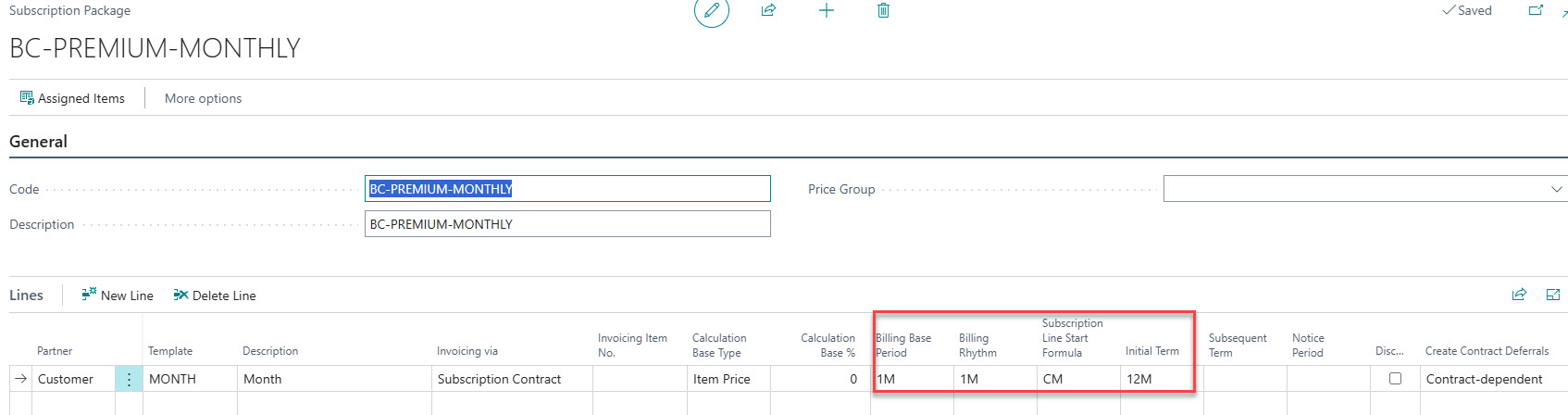
It answers questions such as:
- How often should the customer be billed?
- Should billing be managed through a contract?
- What is the recurring billing period?
- Which calculation basis should be used?
For CFOs, this is one of the most important configuration points. It defines whether recurring revenue will be managed consistently or whether every customer contract will require manual intervention.
A best practice is to standardize subscription packages as much as possible. For example:
- monthly SaaS licenses;
- annual maintenance fees;
- quarterly service retainers;
- recurring support packages.
The more standardized the packages are, the easier it becomes to control billing cycles and revenue streams.
Step 4 – Assign the Subscription Package to the Item
After creating the subscription package, assign it to the SaaS license item.
In the item card, use the subscription package assignment function and link:
| Item | Subscription Package |
|---|
| LIC-BC-PREMIUM | BC-PREMIUM-MONTHLY |
This step tells Business Central what should happen when the item is sold.
When the sales order is posted, Business Central can use this setup to generate the related subscription and subscription lines.
This is a small configuration step, but it has a major impact. Without the link between the item and the subscription package, the sales process will not trigger the correct subscription billing flow.
Step 5 – Create the Sales Order
Now create a sales order for customer Mantovani.
Example sales order line:
| Field | Value |
|---|
| Customer | Mantovani |
| Type | Item |
| Item No. | LIC-BC-PREMIUM |
| Quantity | 3 |
| Unit Amount | €95,00 |
| Line Amount | €285,00 |
The sales order represents the activation of the service.
This is another point where companies often make a mistake. The sales order should not be treated as the document used to manually invoice all future months. Its role is to start the subscription process.
The recurring invoices will be generated later from the customer subscription contract and the recurring billing proposal.
This separation is important:
- the sales order activates the subscription;
- the subscription represents the active service;
- the contract controls the recurring billing;
- the billing proposal generates the invoice for the selected period.
When this logic is clear, the finance process becomes much easier to govern.
Step 6 – Post the Sales Order
After reviewing the sales order, post it according to the normal Business Central process.
Once the order is posted, Business Central creates the subscription and the related subscription lines based on the item and subscription package configuration.
At this stage, the company has moved from a simple sales transaction to an active recurring service.
For the finance team, this is where operational control begins. The subscription can now be reviewed, connected to a customer contract, and included in future recurring billing runs.
Step 7 – Review the Generated Subscription
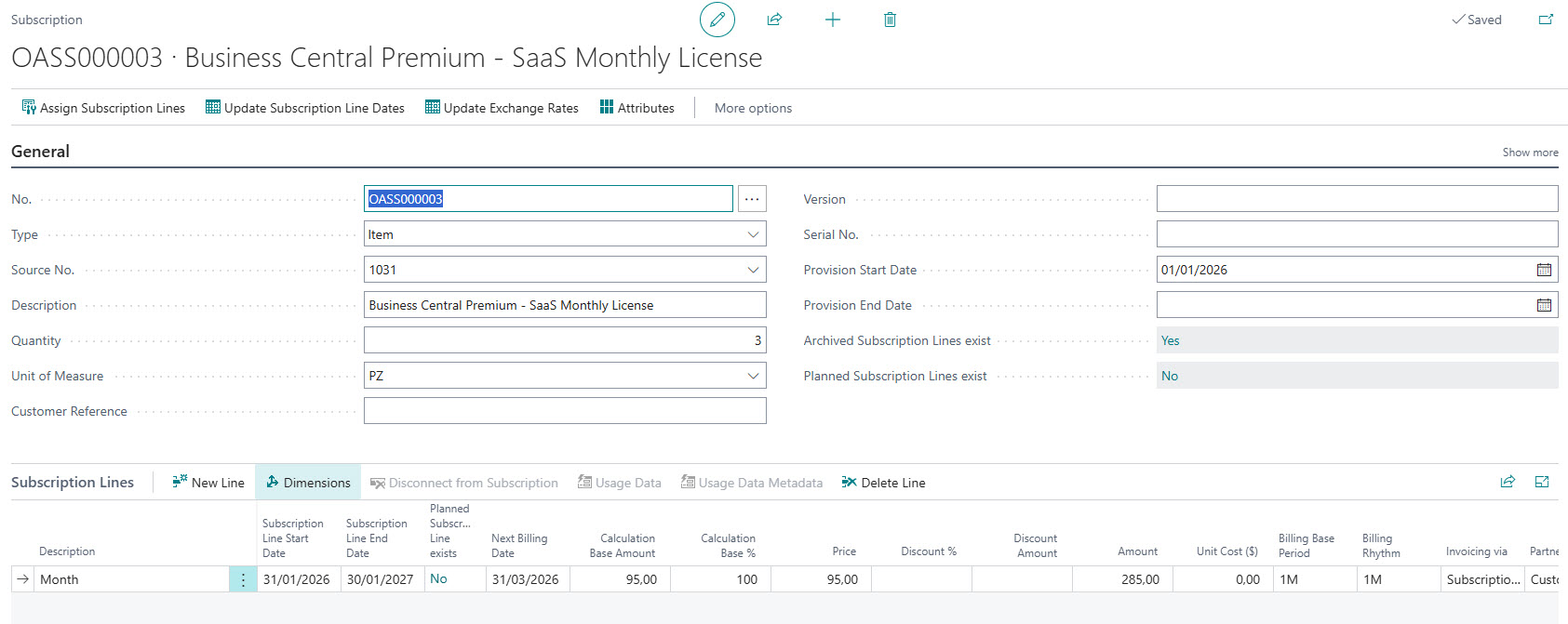
Open the Subscriptions page and verify the subscription generated for Mantovani.
Key elements to check:
| Element | Expected Value |
|---|
| Item | LIC-BC-PREMIUM |
| Customer / End User | Mantovani |
| Quantity | 3 |
| Billing Rhythm | Monthly |
| Monthly Amount | €285,00 |
| Next Billing Date | First valid billing date |
The subscription represents the active SaaS service purchased by the customer.
This review step should not be skipped. It allows the finance team to validate that the quantity, billing rhythm, and amount are correct before the service is connected to the customer subscription contract.
In real projects, this is where many billing errors can be prevented.
For example, if the sales order was entered with the wrong quantity, the subscription will also reflect that wrong quantity. Detecting the issue before the billing proposal is generated avoids credit notes, invoice corrections, and customer disputes.
Step 8 – Create the Customer Subscription Contract
The next step is to create the Customer Subscription Contract for Mantovani.
Example:
| Field | Example Value |
|---|
| Customer | Mantovani |
| Description | Mantovani - SaaS Monthly Subscription |
| Billing Frequency | Monthly |
| Start Date | First day of the billing period |
Then assign the generated subscription lines to the contract.
This is a fundamental step. Subscription lines must be assigned to a customer subscription contract to be billed through the recurring billing process.
From a finance perspective, the contract is the control object.
It allows the company to manage:
- the customer relationship;
- the billing frequency;
- the billing start date;
- the subscription lines included in the recurring invoice;
- the next billing date.
A good practice is to define a clear naming convention for subscription contracts. For example:
Customer Name – Service Type – Frequency
This makes contract review and recurring billing control much easier, especially when the number of active subscriptions grows.
Step 9 – Check the Contract Lines
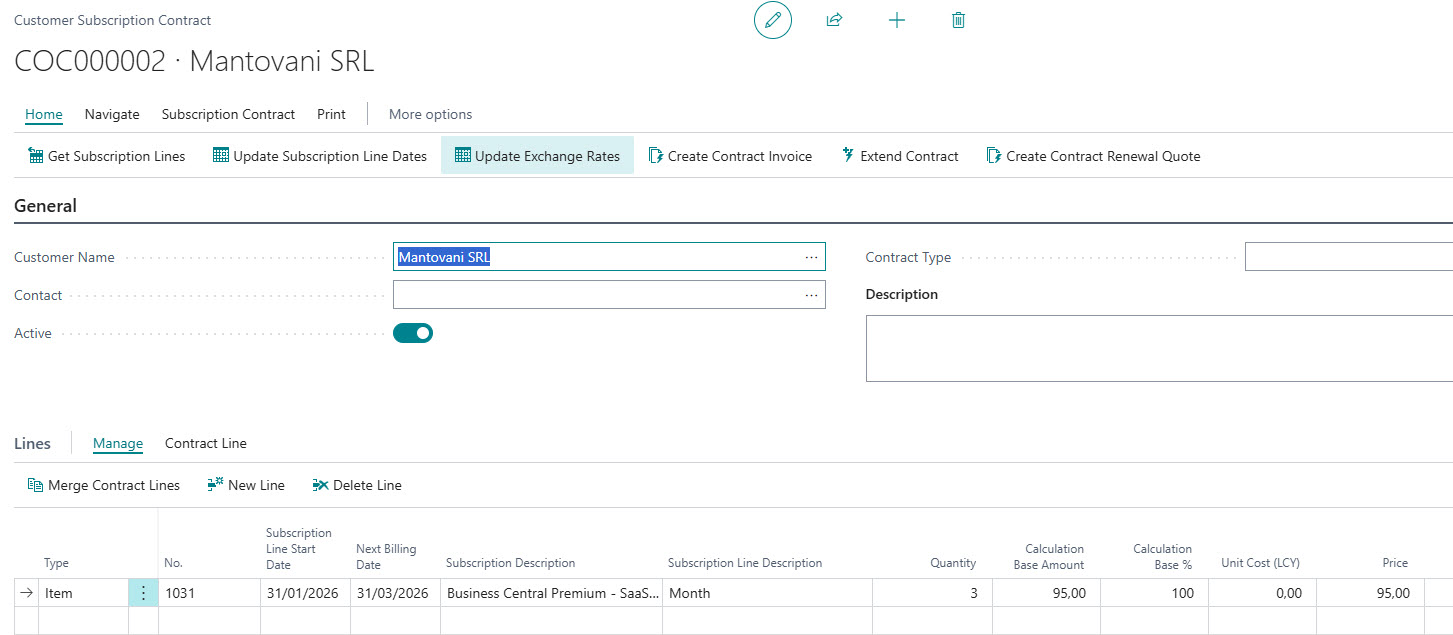
After assigning the subscription lines, review the contract lines.
Expected result:
| Description | Quantity | Unit Amount | Monthly Amount |
|---|
| Business Central SaaS Monthly License | 3 | €95,00 | €285,00 |
The calculation is simple:
€95.00 × 3 users = €285,00 per month
This is the recurring amount that will be proposed for invoicing during the monthly billing run.
For CFOs and Finance Managers, this is the point where recurring revenue becomes visible and controllable inside Business Central.
Instead of relying on external spreadsheets, the finance team can review contract lines directly in the system.
Step 10 – Create the Recurring Billing Proposal
Open the Recurring Billing page.
Apply the relevant filters, for example:
| Field | Value |
|---|
| Contract Type | Customer |
| Customer | Mantovani |
| Billing Date | Month-end or beginning of the month |
| Billing Period | Monthly |
Then run Create Billing Proposal.
Business Central prepares the recurring billing proposal for the selected period.
This is a very useful control step because the invoice is not created blindly. The proposal gives the finance team the opportunity to verify what will be invoiced before generating the sales invoice.
This is especially important when managing many subscriptions, because it allows the team to identify exceptions before posting.
Examples of exceptions include:
- missing contract lines;
- wrong quantities;
- incorrect billing dates;
- subscriptions not assigned to a contract;
- amounts that do not match expectations.
Step 11 – Review the Billing Proposal
Before creating the invoice, review the billing proposal.
Expected values:
| Element | Value |
|---|
| Customer | Mantovani |
| Service | Business Central SaaS Monthly License |
| Quantity | 3 |
| Unit Amount | €95,00 |
| Monthly Amount | €285,00 |
| Period | Selected billing period |
This is the point where recurring billing becomes transparent.
The finance team can check the proposed invoice lines before creating accounting documents. This reduces errors and improves control over monthly billing operations.
In companies with recurring revenue models, this review should become part of the standard month-end billing procedure.
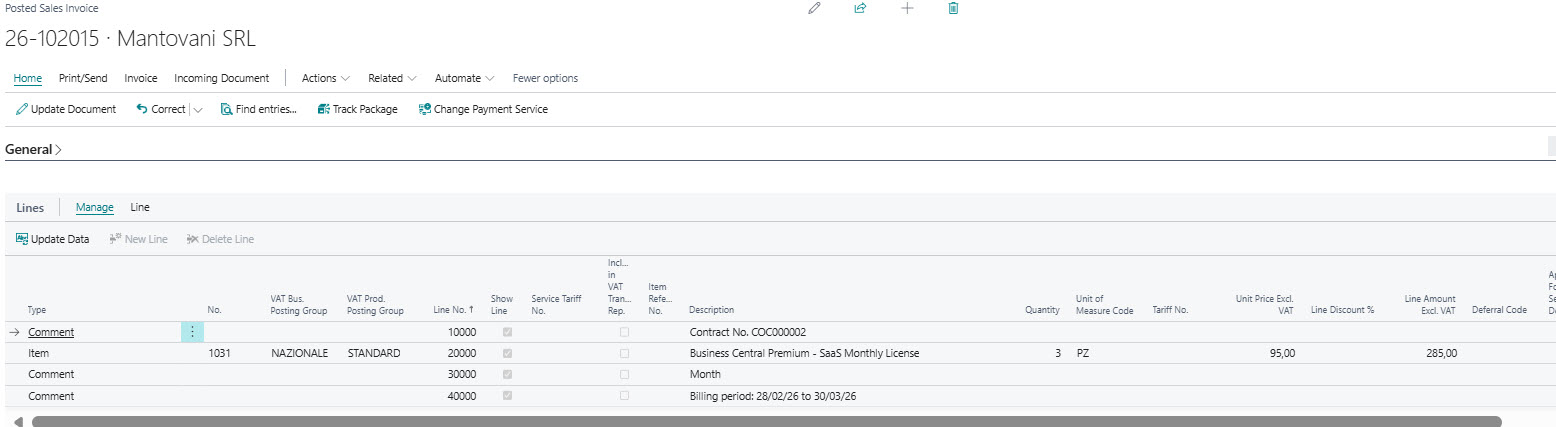
Step 12 – Create the Sales Invoice
From the billing proposal, create the sales invoice.
The invoice will contain the recurring SaaS subscription line for Mantovani.
Example:
| Description | Quantity | Unit Amount | Amount |
|---|
| Business Central SaaS Monthly License | 3 | €95,00 | €285,00 |
Again, these values are used only as an example to explain the process.
The important point is that the invoice is generated from the recurring billing flow, not manually recreated every month.
Step 13 – Post the Invoice
After reviewing the sales invoice, post it.
Business Central updates the relevant entries, including:
- customer ledger entries;
- general ledger entries;
- VAT entries;
- billing information for the next recurring cycle.
At this point, the monthly invoice has been created and posted.
For the next billing period, the finance team can repeat the process from the Recurring Billing page, using the customer subscription contract as the source for the next invoice cycle.
Practical Recommendations for Finance Teams
1. Do Not Use Sales Orders as a Manual Recurring Billing Tool
The sales order should activate the subscription. It should not become a monthly workaround for recurring invoicing.
If the finance team copies sales orders or sales invoices every month, the process is not scalable.
2. Standardize Subscription Packages
Define clear packages for recurring services:
- monthly licenses;
- yearly contracts;
- support subscriptions;
- maintenance fees;
- recurring consulting retainers.
This reduces configuration complexity and improves reporting consistency.
3. Review Billing Proposals Before Creating Invoices
The billing proposal is a control point.
Use it to detect mistakes before they become posted accounting documents.
4. Keep Customer and VAT Setup Clean
Recurring billing depends heavily on correct master data.
Wrong posting groups, VAT setup, or payment terms can create recurring errors every month.
5. Monitor Next Billing Dates
The next billing date is essential for recurring revenue control.
Incorrect dates can lead to missed invoices or duplicate billing periods.
Conclusion
Subscription Billing in Microsoft Dynamics 365 Business Central helps companies manage recurring revenues in a structured and controlled way.
In this example, customer Mantovani subscribes to three monthly SaaS licenses. The process starts with the customer and item setup, continues with the subscription package and sales order, and then moves into the customer subscription contract and recurring billing proposal.
The real value for the finance team is not just invoice automation.
The real value is control.
With the right setup, Business Central allows Finance Managers and CFOs to manage recurring billing with better accuracy, fewer manual activities, and stronger visibility over recurring revenue.
For companies that sell SaaS licenses, support contracts, maintenance fees, or recurring services, this is not a technical feature only. It is a finance process that should be designed carefully from the beginning.


