In many countries, closing the fiscal year in an ERP system is mainly a financial procedure: close the income statement, transfer the result, open the new year.
In Italy, it is rarely that simple.
Italian companies often need to manage not only the closing of the income statement, but also the closing and reopening of balance sheet accounts. And there is one detail that is easy to underestimate: the official date used for fiscal book printing.
In Business Central, this is not just a technical date. It determines where the closing and opening entries will appear in the Libro Giornale. If the Work Date is wrong, the accounting entries may be correct from a debit/credit perspective, but wrong from a fiscal book perspective.
That is why year-end closing in Italy must be treated as a controlled accounting process, not as a simple batch job.
Microsoft confirms that the Close Income Statement process transfers the year result to a balance sheet account and creates journal lines that must then be reviewed and posted. Business Central also requires accounting periods when closing an income statement.
The Italian Complexity: Closing Is Not Only the Income Statement
In a standard Business Central closing process, the key step is the Close Income Statement batch job.
For Italian companies, the process usually includes three separate accounting moments:
Closing of the income statement
Closing of the balance sheet
Opening of the balance sheet in the new fiscal year
This is where many mistakes happen.
A company may correctly close the income statement, but forget to manage the balance sheet closing and opening entries with the correct dates. Or it may post everything correctly, but with the wrong Work Date, creating problems later when printing the fiscal journal.
Your internal procedure correctly highlights that the Work Date determines the month in which the closing/opening entries are printed in the journal book.
The Work Date Is Not a Detail
In Business Central Italy, the Work Date deserves special attention during year-end closing.
For example, when closing fiscal year 2025, the Work Date for the closing entries is normally set to:
31/12/2025
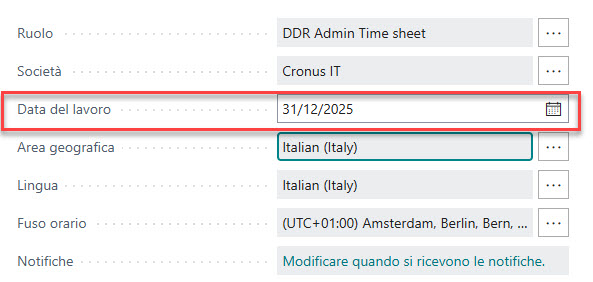
This is important because the Work Date influences the official date used when the entries are printed in the fiscal journal. Your procedure explicitly states that the Work Date determines the period in which the closing/opening accounting entries are printed on the Libro Giornale.
The typical Italian logic is:
- Income statement closing: 31/12
- Balance sheet closing: 31/12
- Balance sheet opening: 01/01 of the following year
So, after posting the closing entries at 31/12, the Work Date must usually be changed to the first day of the new fiscal year before posting the opening entries.
This is not just an operational habit. It protects the consistency between accounting, official dates, and fiscal book printing.
Recommended Closing Sequence in Business Central Italy
A controlled Italian year-end closing process should follow a clear sequence.
1. Complete preliminary accounting checks
Before closing, verify that all year-end accounting activities are complete:
- depreciation entries have been posted;
- accruals and deferrals have been recorded;
- provisions and adjustments have been posted;
- inventory value has been fixed;
- inventory closing entries have been recorded, when applicable.
Your procedure specifically includes these preliminary checks before starting the closing process.
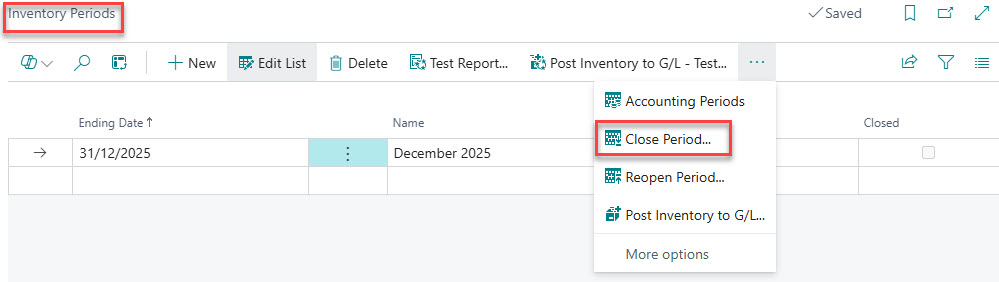
2. Close inventory periods, if relevant
For companies using inventory management, the inventory period should be closed before the final accounting closure.
This prevents unwanted changes to inventory values after the accounting result has been calculated.
3. Verify profit or loss before running the closing batch
Do not run the closing process blindly.
Before posting, the finance team should verify the profit or loss from the chart of accounts and compare it with the final approved financial statements.
Your procedure recommends checking the result from the chart of accounts and using Excel or account schedule-style analysis to validate the amount.
4. Check G/L account classification
This is one of the most practical checks.
Before closing, verify that accounts are correctly classified as:
- Income Statement accounts;
- Balance Sheet accounts.
If an income statement account is incorrectly classified as balance sheet, it may not be closed correctly. If a balance sheet account is incorrectly classified as income statement, it may be incorrectly zeroed.
Your procedure correctly recommends checking whether income statement accounts are present in the balance sheet section and whether balance sheet accounts are present in the income statement section.
5. Set the Work Date before generating closing entries
Before running the Close Income Statement process, set the Work Date to the correct fiscal closing date, typically 31/12/YYYY.
This is one of the most important Italian localization controls.
6. Run Close Income Statement
Run the Close Income Statement batch job only after the fiscal year has been closed in accounting periods. Microsoft states that the fiscal year must be closed before the Close Income Statement batch job can be run.
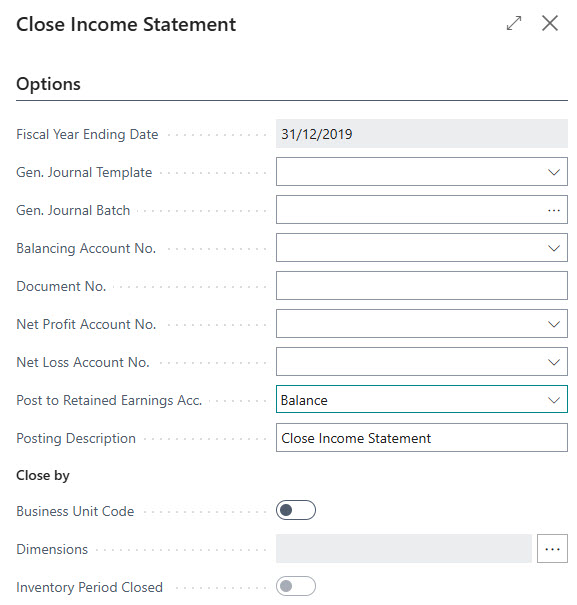
The system creates journal lines. These lines should not be posted immediately without review.
7. Review the journal with the test report
Before posting, use the test report / preview function.
The key control is simple:
The profit or loss account must show the same amount as the approved financial statements.
This is where the consultant and the finance team should stop and validate the result before posting.
8. Close and open the balance sheet
After the income statement closure, proceed with the balance sheet closing and opening.
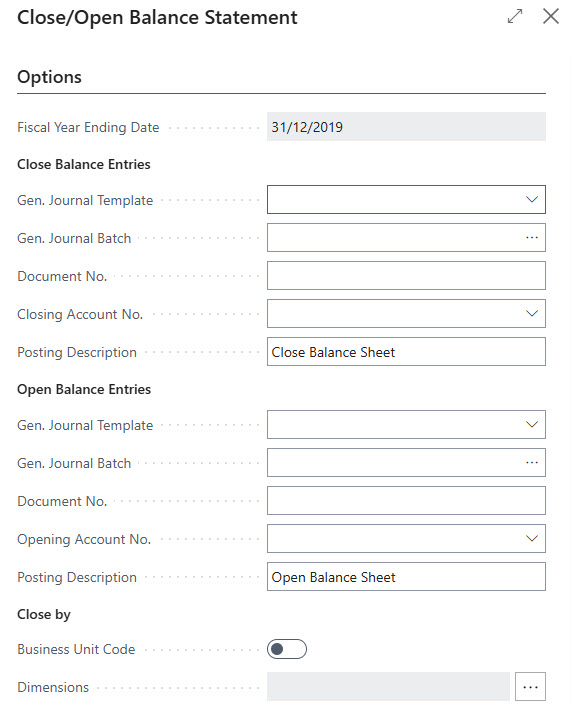
The correct sequence is:
- post the balance sheet closing;
- change the Work Date to 01/01/YYYY+1;
- post the balance sheet opening.
Your procedure explicitly notes that for the opening of the balance sheet, a new Work Date is required, usually the first day of the following fiscal year.
Final Controls After Closing and Opening
After the closing and opening entries have been posted, the finance team should perform at least these checks:
Check 1: The closed fiscal year must be zero
After closing, the balance for the closed fiscal year should be zero where expected.
This confirms that the income statement and closing logic have worked correctly.
Check 2: Profit or loss must match the official financial statements
The amount transferred to the profit/loss account must match the approved financial statements.
A difference here is not a small issue. It usually means that something was changed after the result was calculated, or that account classification was wrong.
Check 3: Closing and opening balance sheet entries must be opposite
The balance sheet closing and opening entries must be consistent, with opposite signs between closing and reopening.
Your procedure includes this type of post-closing control, including verification that the economic and balance sheet totals reconcile with opposite signs.
Check 4: Dimensions must be consistent
If the company uses dimensions, they must be managed during closing.
A common mistake is closing only at G/L account level and ignoring dimensions. This creates reporting issues in the new year, especially for companies using cost centers, business units, projects, or branches.
At the end of the process, a final check should be performed in the G/L Registers summary. You should find three separate batches, one for each operation:

This is a critical point for Italian fiscal books: the official date recorded in table 12144, which determines how entries are printed in the Libro Giornale, comes from the Work Date and not from the Posting Date. Therefore, before posting closing or opening entries, the Work Date must be carefully checked.
Practical Advice for CFOs
The best way to manage year-end closing in Business Central Italy is to create a formal checklist.
At minimum, the checklist should include:
- preliminary accounting checks completed;
- inventory periods closed, if applicable;
- profit/loss verified before closing;
- G/L account classification checked;
- journal batches empty before use;
- Work Date set to 31/12 before closing entries;
- income statement closing journal reviewed with test report;
- balance sheet closing journal reviewed;
- Work Date changed to 01/01 before opening entries;
- opening journal reviewed;
- post-closing reconciliation completed;
- fiscal journal printing impact verified.
The most important point is this:
In Italy, year-end closing is not finished when the journal is posted. It is finished when accounting, official dates, dimensions, and fiscal book printing are consistent.
Conclusion
Business Central gives finance teams the tools to manage year-end closing efficiently. But in Italy, efficiency is not enough.
The process must be controlled.
The Work Date, the official date, the closing of the balance sheet, the opening of the new fiscal year, the classification of accounts, and the final fiscal book impact all matter.
For CFOs, the risk is not only an unbalanced accounting entry. The real risk is discovering too late that the entries are correct in accounting but wrong in the official fiscal book sequence.
A senior finance team should treat the Italian year-end closing as a governed process, with clear responsibilities, documented checks, and no blind posting of system-generated journals.
Because in Business Central Italy, the question is not only:
“Did we close the year?”
The real question is:
“Did we close it correctly for accounting, reporting, and fiscal books?”


