




 Like
Like Share
Share
 Report
Introduction:
In this blog we will be demonstrating how to call an unbound action using Xrm.WebApi which provides properties and methods to use Web API to create and manage records and execute Web API actions and functions in Customer Engagement
The available methods are createRecord, deleteRecord, retrieveRecord, retrieveMultipleRecords,execute and executeMultiple.The execute method executes a single action, function or CRUD operation.
Implementation:
The syntax for execute method is as follows:
Xrm.WebApi.online.execute(request).then(successCallback,errorCallback);
Note: This method isn’t supported for Unified Interface and it is only for online mode hence we have to use Xrm.WebApi.online object to execute the method, else it will fail.
Step 1: First we create an unbound action. Here in our example we have created an action with the name “new_ActionTest” and we have activated it.
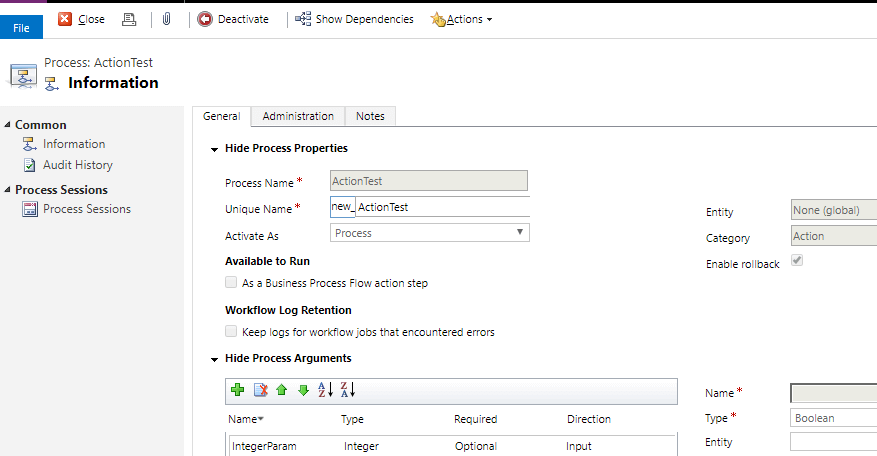
In the action steps we have written a step to create a new contact with the name “Jessy David”. Here in our action we an Integer parameter. Any steps can be added as required.
Step 2: Below shown code is function used to call the unbound action.
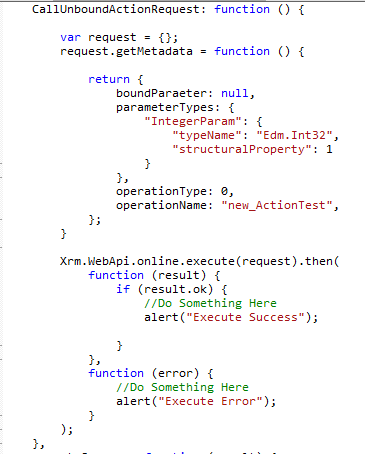
Here “boundParameter” parameter is an optional String parameter, we have specified it as null as our action is not bound to any entity. “operationName” is an optional String parameter which is the name of the action.“operationType” is an optional Number parameter which indicates the type of operation we are executing is an Action hence we have specified 0. We can specific 1 for Functions and 2 for CRUD operations.
When we run this, the action is called and a new contact is created according to the steps mentioned.
The post Calling unbound actions using Xrm.WebApi in D365 v9 appeared first on CloudFronts - Microsoft Dynamics 365 | Power BI | Azure.
*This post is locked for comments