




 Like
Like Share
Share
 Report
Introduction:
This blog explains how to Integrate PowerApps with Dynamics 365.
Keep the following restrictions in mind:
- Only PowerApps users in the same tenant can access the embedded app.
- To access PowerApps using Internet Explorer 11, you must turn off Compatibility View.
Steps to be followed:
- In powerapps.com, on the Apps tab, click or tap the ellipsis ( . . . ), then Details.
- Copy the App ID.
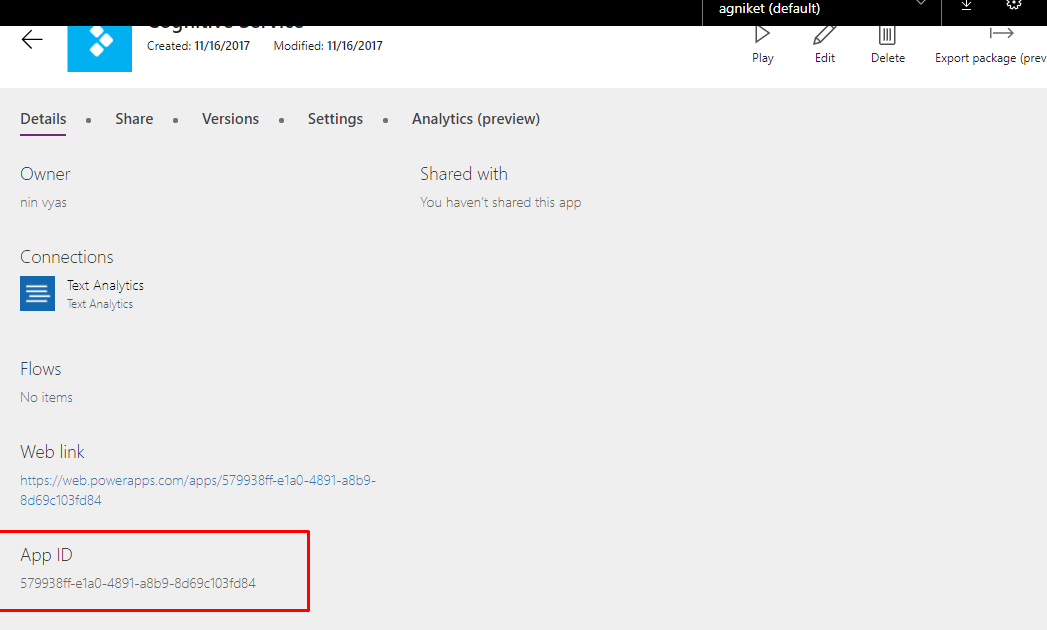 3. Substitute the [App ID]value in the URI.: https://web.powerapps.com/webplayer/iframeapp?hideNavBar=true&source=iframe&appId=/providers/Microsoft.PowerApps/apps/579938ff-e1a0-4891-a8b9-8d69c103fd84
 - Embed your app in a website: Embedding your app is now as simple as adding the iframe to the HTML code for your site.
http://<iframe width=”[W]” height=”[H]” src=”https://web.powerapps.com/webplayer/iframeapp?hideNavBar=true& source=website&screenColor=rgba(165,34,55,1)&appId=/providers/Microsoft.PowerApps/apps/[AppID]”/>
To add PowerApp inside CRM as web resource:
Keep the following points in mind for authenticating users of your app:
- If your website uses Azure Active Directory (AAD) based authentication, no additional sign-in is required.
- If your website uses any other sign-in mechanism or is not authenticated, your users see a sign-in prompt on the iframe. After they sign-in, they will be able to run the app as long as the author of the app has shared it with them
Steps:
- Specify the width and height for App.
- Specify the app id.
Sample HTML code:
<!DOCTYPE html>

<html>  <head>

<title>HTML Iframes</title>

</head>

<body>

<p>App Goes here...</p>

<iframe width="250" height="250" src="https://web.powerapps.com/webplayer/iframeapp?hideNavBar=true&source=website&screenColor=rgba(165,34,55,1)&appId=/providers/Microsoft.PowerApps/apps/579938ff-e1a0-4891-a8b9-8d69c103fd84" />

</body>

</html>
The post Integrate PowerApps with Dynamics 365 appeared first on CloudFronts - Microsoft Dynamics 365 | Power BI | Azure.
*This post is locked for comments