Introduction
For businesses operating in India, GST compliance goes far beyond tax calculation and return filing. One of the most important aspects of the GST process is the utilization of Input Tax Credit (ITC) against tax liabilities. Since GST law prescribes a specific order in which available credits can be used, organizations must ensure that their ERP system follows these rules accurately during GST settlement.
As companies adopt Microsoft Dynamics 365 Finance & Operations (D365 FO), there is a growing need to automate GST settlement and eliminate manual calculations. Clients expect the system to determine the correct utilization of IGST, CGST, and SGST credits, ensuring both compliance and operational efficiency.
Business Need
In many organizations, GST settlement is still supported by spreadsheets and manual adjustments. This increases the risk of errors, incorrect tax payments, reconciliation issues, and compliance challenges.By incorporating GST utilization rules within D365 FO, organizations can:- Automate GST settlement calculations.
- Reduce manual effort and dependency on spreadsheets.
- Improve accuracy of GST return preparation
Legal Background
The utilization of GST credits is governed by Section 49, Section 49A, Section 49B of the CGST Act, 2017, along with Rule 88A of the CGST Rules. These provisions define how Input Tax Credit can be utilized for payment of GST liabilities.
The key principle introduced by these provisions is that IGST credit must be utilized first before CGST or SGST credits can be used. Rule 88A further allows the remaining IGST credit, after settling IGST liability, to be utilized against CGST and SGST liability in a flexible manner
GST utilisation rule
| ITC type | First utilisation | Second utilisation | Restrictions |
| IGST ITC | IGST liability | CGST/ SGST liability (in any order) | IGST ITC must be completely exhausted before utilising CGST or SGST ITC |
| CGST ITC | IGST liability | CGST liability | Can not be utilised for SGST/ UTGST liability |
| SGST/ UTGST ITC | IGST liability | SGST/ UTGST liability | Can not be utilised for CGST liability |
Steps to configure in D365 as per above rule
1. Go to sales tax hierarchy in Tax module
2. Create tax hierarchy as GTE as per steps mentioned in screenshot
3. First synchronise so that all the newly created GSTIN sync with created tax hierarchy. After that click on Setoff rules for tax hierarchy
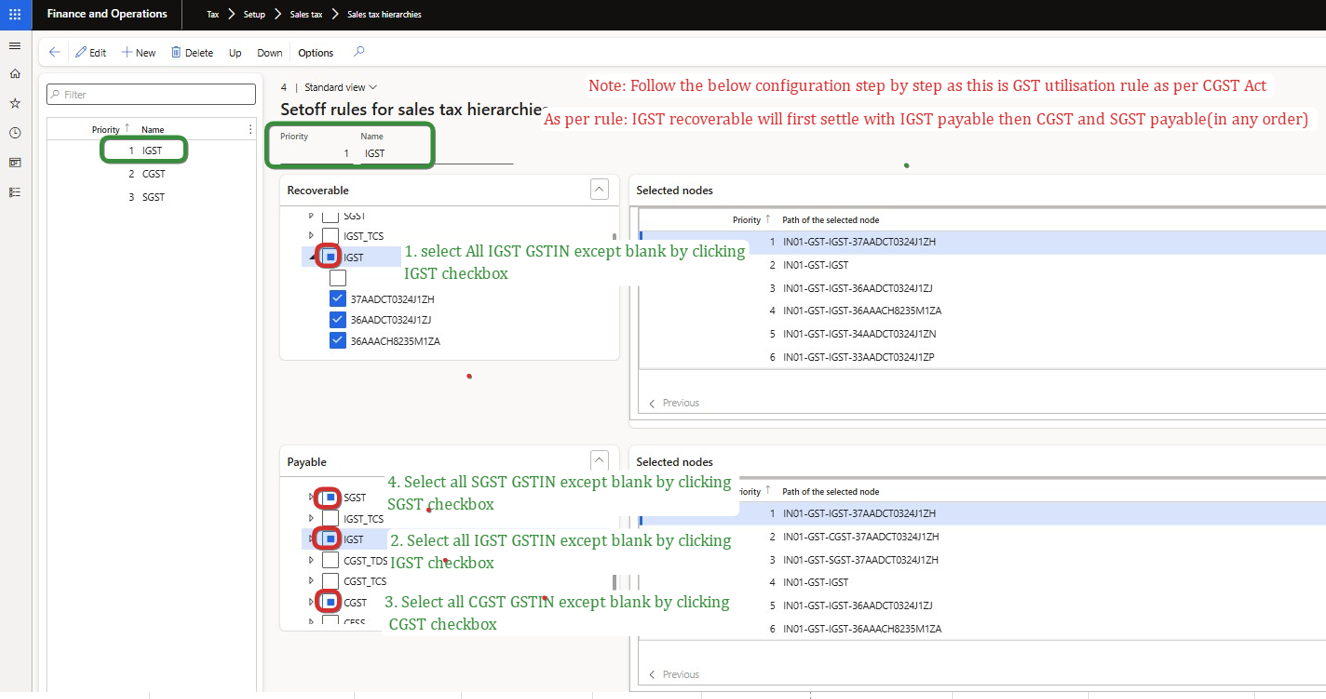
4. Create GST component (IGST, CGST and SGST) as per priority. Make sure IGST should be on the first priority and CGST and SGST could be on any order 2 or 3 this is aligned as per CGST act.
4.1 Then make the GST utilisation rule setup as per above table
Utilisation rule setup for IGST:
4.2 Utilisation rule setup for CGST:
4.3 Utilisation rule setup for SGST:
5. Update this tax hierarchy version where GST utilisation rule is setup (in step 4) on "maintain setoff hierarchy profile"
It can be activated via batch processing also (it takes some time to active - 2-3 minutes usually). Once activated activate button will be grayed out.
Thank You
Happy Learning 🙂


