







Sharepoint 2010 How to stop sending automatic task notifications email from workflow
Views (24553)
 Dilip
Dilip
 1,164
1,164
 Like
Like Share
Share
 Report
Hi!
Trust you all are doing good.
I thought to share with you today a sharepoint troubleshooting tip which helped me in solving an issue with automatic task notification emails being sent from Sharepoint workflow.
We are using a custom built Sharepoint workflow in our intranet site.
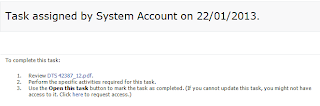
Recently, it came to my notice that the workflow keeps on sending Task notification emails apart from the normal emails configured in workflow actions. An example of such an email is shown below:
Troubleshooting:
If you are using Sharepoint, you would be knowing that on any list or library we can setup alerts, so my first guess was that there would have been some alert configured on the workflow library.
Couldn't find any user defined alerts configured, so I had to look into other areas.
After some debugging, found out that this was due to default setting on Task List which sends email whenever the ownership is assigned.
So, Go to your site > Tasks > List > Advanced Settings,
and on E-mail notification change "No" to send e-mail when ownership is assigned

Hope this troubleshooting tip will help someone out there.
Trust you all are doing good.
I thought to share with you today a sharepoint troubleshooting tip which helped me in solving an issue with automatic task notification emails being sent from Sharepoint workflow.
We are using a custom built Sharepoint workflow in our intranet site.
Recently, it came to my notice that the workflow keeps on sending Task notification emails apart from the normal emails configured in workflow actions. An example of such an email is shown below:

Troubleshooting:
If you are using Sharepoint, you would be knowing that on any list or library we can setup alerts, so my first guess was that there would have been some alert configured on the workflow library.
Couldn't find any user defined alerts configured, so I had to look into other areas.
After some debugging, found out that this was due to default setting on Task List which sends email whenever the ownership is assigned.
So, Go to your site > Tasks > List > Advanced Settings,
and on E-mail notification change "No" to send e-mail when ownership is assigned

Hope this troubleshooting tip will help someone out there.
This was originally posted here.
*This post is locked for comments