







Dynamics SL and Sage Fixed Assets 2018

 Like
Like Share
Share
 Report
Dynamics SL and Sage Fixed Assets 2018
A newly released version of Sage Fixed Assets 2018 uses Crystal Reports 2016. Unfortunately, the 2016 version of Crystal Reports is not compatible with Dynamics SL 2011 or 2015 — which both use Crystal Reports version 2008 (Service Pack 3 for 2011 and Service Pack 5 for 2015).
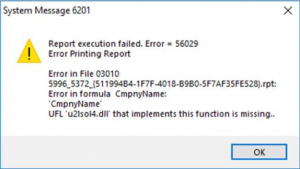
Once Sage Fixed Assets is installed on the same workstation as a Dynamics SL client, a similar error message to the one below will display whenever you run any Dynamics SL report.
To work around this issue and make the two co-exist:
- If the full version of Crystal Reports for Fixed Assets is installed, uninstall.
- Uninstall the Dynamics SL client.
- Reinstall the Dynamics SL client and then install any Cumulative Update and hot fixes that are required.
If that does not work, copy the u2lsol4.dll from:
C:\program files (x86)\common files\Microsoft shared\DynamicsSL
to:
C:\Program files (x86)\Business Objects\BusinessObjects Enterprise 12\win32_x86
Need more help? Email slsupport@boyerassoc.com.
*This post is locked for comments