







SQL Database, Table or Field names get changed automatically with the use of special characters
Views (1882)
 Tharanga Chandrasekara
 23,118
 Like
Like Share
Share
 Report
Already there are enough number of blog posts available for this topic, however today I came across a similar scenario and though to write a blog post about it.
Let's see which characters get changed,
- In Microsoft Dynamics NAV 2009 : ."\/'
- In Microsoft Dynamics NAV 2013 & 2013 R2 : ."\/'%][
You can check this character list from 2 different ways.
1. Using Dynamics NAV development environment
2. Using SQL query
Dynamics NAV
Follow the following steps to get this character list from Microsoft Dynamics NAV side,
1. Open Dynamics NAV Development Environment
2. Open the Database
3. Navigate to File Menu
4. Go to Database Menu
5. Then click "Alter..."
This will open up a new window (Refer below image)
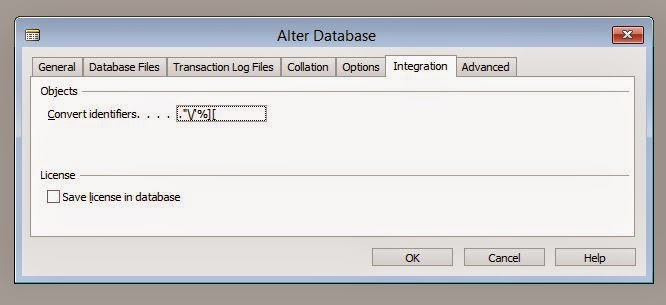
6. In that window go to "Integration" tab.
In there you will see the special characters that will get replaced in the SQL side (Convert Identifiers).
SQL Query
Follow the following steps to get this character list from SQL side,
1. Open SQL Server Management Studio
2. Log to Server
3. Open a new query window and write this following query
USE DBNAME
GO
SELECT * FROM [DBNAME].dbo.[$ndo$dbproperty]
4. Execute the query and result will look like follow.

** Do not change this values unless you really wants to and make sure you know exactly what you are messing up with.
Thank you and Regards,
Tharanga Chandrasekara.
Tharanga Chandrasekara.
This was originally posted here.
*This post is locked for comments