web
You’re offline. This is a read only version of the page.
close
Skip to main content

Announcements

News and Announcements icon
Community site session details

Community site session details

Session Id :
Finance | Project Operations, Human Resources, ...
Unanswered

Filtering Excel Add-in Export for Cross-Company Data Entities Using OfficeFormRunHelper

(0) ShareShare
ReportReport
Posted on by 2

I recently had a requirement to export data from the TAM Rebate Workbench form to Excel. The challenge was that all tables used by the data entity were configured as cross-company tables: TAMRebateTrans ,ТAMRebateDateTrans and TAMRebateTable. Additionally, the source form (TAMRebateWorkbench) is a standard system form. Because the underlying tables are cross-company, the standard Excel Add-in export returned records from multiple legal entities. My requirement was to export only the records belonging to the currently selected legal entity. I first looked for a solution directly within the data entity lifecycle methods. However, due to the way the Excel Add-in generates and retrieves data for cross-company entities, the standard entity methods were not sufficient for this scenario. Instead, I used OfficeFormRunHelper and replaced the standard Office export menu with a custom export option.

The approach consists of three steps:

1. Subscribe to the Office menu initialization eventDuring form initialization, subscribe to the OfficeMenuInitializing event using OfficeFormRunHelper.
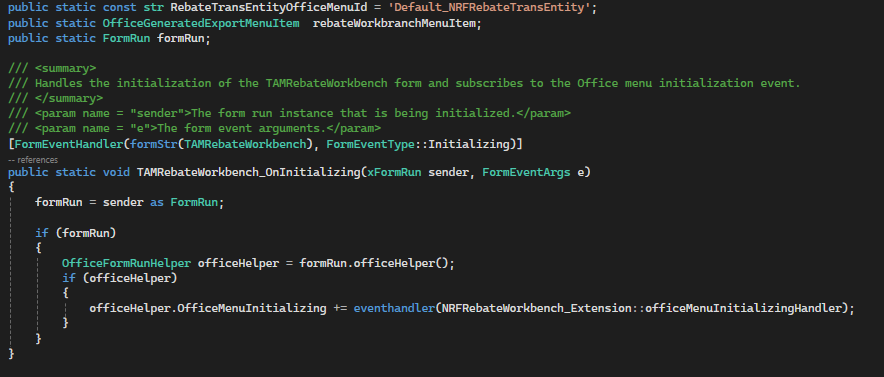
2. Replace the standard export option - Inside the Office menu initialization handler, remove the standard data entity export options and add a custom export menu item.


3. Apply a legal entity filter - When the Excel Add-in requests the data entity context, dynamically apply a filter on the RefCompanyId field using the current legal entity.
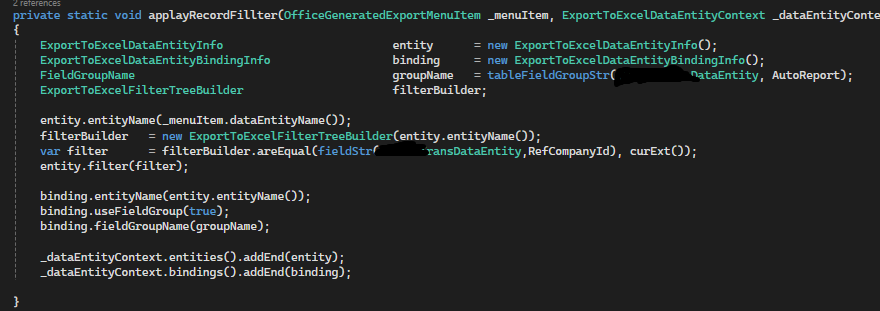
The custom Excel export now returns only records for the currently selected legal entity, even though the underlying tables and entity are configured as cross-company.

This approach can be useful whenever:

  • The entity is based on cross-company tables.
  • Standard entity filtering is not sufficient.
  • The export is initiated from a form.
  • You need complete control over the Excel Add-in export context.

I hope this helps anyone facing similar Excel Add-in filtering challenges in D365FO.


"If anyone knows an alternative approach directly through the data entity framework, I would be interested to hear it."

Categories:
I have the same question (0)
  • Martin Dráb Profile Picture
    239,838 Most Valuable Professional on at
    Moved from Integration, Dataverse, and general topics forum to Finance | Project Operations, Human Resources, AX, GP, SL forum.
     
    Thank you for sharing the information, but note that this is a discussion forum. You should look for another place for such things, such as creating a blog.
  • Subra Profile Picture
    1,362 on at
    Hi @Sara Nikolova

    As suggested by Martin, please post this in Blog and for Blog you can send a request to community team by using the below link.

    https://customervoice.microsoft.com/Pages/ResponsePage.aspx?id=v4j5cvGGr0GRqy180BHbR09YsMxpLitItRhZj37jtbNUODk4VkNYN1VMRjVXSlhNU0hISDExVFVYRyQlQCN0PWcu
     
    Thanks,
    Subra
     

Under review

Thank you for your reply! To ensure a great experience for everyone, your content is awaiting approval by our Community Managers. Please check back later.

Helpful resources

Quick Links

Season of Sharing Community Challenge Launch!

Jump in, show your community spirit, and win prizes!

Women in Power Builds Momentum

Expanding mentorship, skilling, and AI innovation

Congratulations to the May Top 10 Community Leaders

These are the community rock stars!

Leaderboard > Finance | Project Operations, Human Resources, AX, GP, SL

#1
Abhilash Warrier Profile Picture

Abhilash Warrier 481 Super User 2026 Season 1

#2
André Arnaud de Calavon Profile Picture

André Arnaud de Cal... 429 Super User 2026 Season 1

#3
Subra Profile Picture

Subra 391

Last 30 days Overall leaderboard

Product updates

Dynamics 365 release plans



