web
You’re offline. This is a read only version of the page.
close
Skip to main content

Announcements

News and Announcements icon
Community site session details

Community site session details

Session Id :
Finance | Project Operations, Human Resources, ...
Answered

Set cost/price for a specific bookable resource

(0) ShareShare
ReportReport
Posted on by 135

Hi all,

I have a question about price lists.

It's clear to me that it is possible to set a price/cost for a combination of Role and Resourcing Unit.

Is there a way to insert the price/cost of a specific Bookable Resource? For example, is it possible to specify a Price List where John X. costs 50$/hour, Jane Y. costs 60$/hour and so on?

I tried to fill the Resource field of a Role Price record, but it empties after saving.
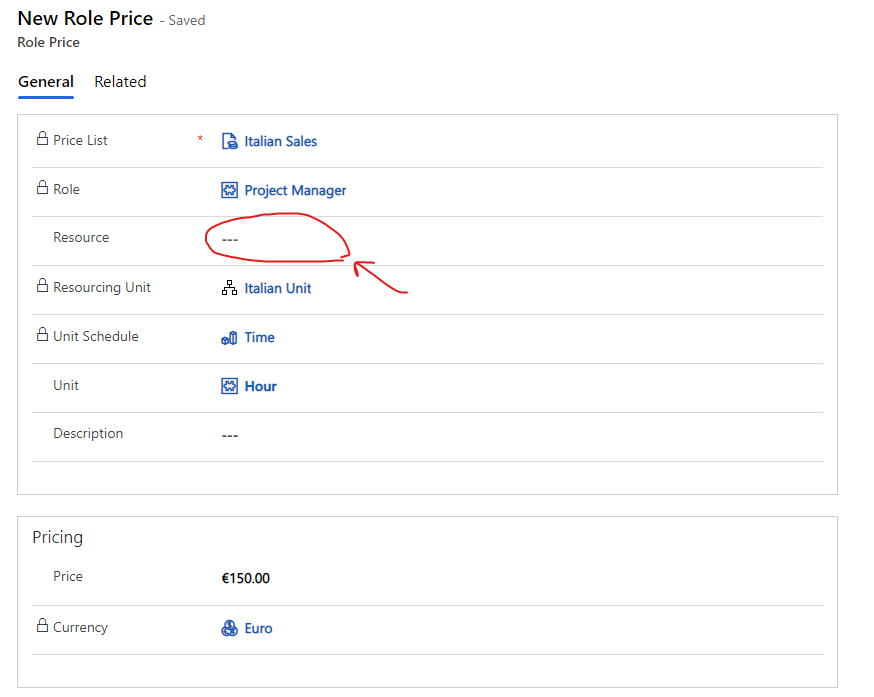
pastedimage1642092424656v1.png

Thanks in advance.

Gabriele

I have the same question (0)
  • Verified answer
    Juan Simon Profile Picture
    1,026 on at

    Hi Gabriele,

    I don’t think we can set for individual bookable resources as of today.

    One way (the easiest) I can see with today’s OOTB setup is to have an alternative ‘Role’ say:

    PM:

    Cost: 100

    Sales: 150


    PM Prime or whatever name you want:

    Cost: 100 or whatever

    Sales: 185

    ....which you assign a higher cost/sales price.

    Then make sure you assign this special role to the Resource in question. If you plan to create this across different Organizational Units, you will need to create this role for every unit!!

    I hope this helps. In effect, it does exactly what you want!

    Please, confirm that this answers your question so we can close it. (nobody does it and we should).

    Thanks!

  • Gabriele Profile Picture
    135 on at

    I was aware of this trick, but I hoped there could be a more straightforward solution ...

    Anyway, thank you for confirming me that this is the best way to assign the cost.

  • Suggested answer
    Juan Simon Profile Picture
    1,026 on at

    Actually, you could use Price Dimensions: docs.microsoft.com/.../pricing-dimensions-overview

    It is meant to be used when setting up extra hours charges and it could work in your situation. It is not a point and click solution as of now.

    Thanks,

    Juan

  • Suggested answer
    Matthew Lazowski Profile Picture
    3,163 on at

    I believe that exactly your scenario is covered in the white paper here: go.microsoft.com/.../. Works the same in Proj Ops Lite as in PSA 1.x, 2.x, and 3.x

  • Suggested answer
    CliveOld Profile Picture
    52 on at

    I just had this issue, out of the box it doesn't have the pricing dimension for bookable resource turned on for cost/sales. Just go to settings -> parameters -> Pricing dimensions and turn it on like so:
    pastedimage1665618566364v1.png

Under review

Thank you for your reply! To ensure a great experience for everyone, your content is awaiting approval by our Community Managers. Please check back later.

Helpful resources

Quick Links

Season of Sharing Community Challenge Launch!

Jump in, show your community spirit, and win prizes!

Women in Power Builds Momentum

Expanding mentorship, skilling, and AI innovation

Congratulations to the April Top 10 Community Leaders

These are the community rock stars!

Leaderboard > Finance | Project Operations, Human Resources, AX, GP, SL

#1
Giorgio Bonacorsi Profile Picture

Giorgio Bonacorsi 676

#2
Abhilash Warrier Profile Picture

Abhilash Warrier 635 Super User 2026 Season 1

#3
André Arnaud de Calavon Profile Picture

André Arnaud de Cal... 605 Super User 2026 Season 1

Last 30 days Overall leaderboard

Product updates

Dynamics 365 release plans



