web
You’re offline. This is a read only version of the page.
close
Skip to main content

Notifications

Announcements

No record found.

Community site session details

Community site session details

Session Id :
Customer experience | Sales, Customer Insights,...
Answered

Two EntityList view for same entity and different filter condition

(0) ShareShare
ReportReport
Posted on by 105

Hi All,

I am working in Dynamics Portal. I have a requirement to add a new view in Portal for case entity with filter condition for that view only.

If i add the view in existing entitylist and add the filter criteria then it applies to all views. So, i have created a second entity list and added filter criteria in it. After doing this It does not display in portal. If I create the webpage and added the same entitylist, it can't be applied because only one webpage can be applied to one entitylist. 

Currently , "Customer Service case list" entity list is already mapped with webpage "Customer Service Home Page".
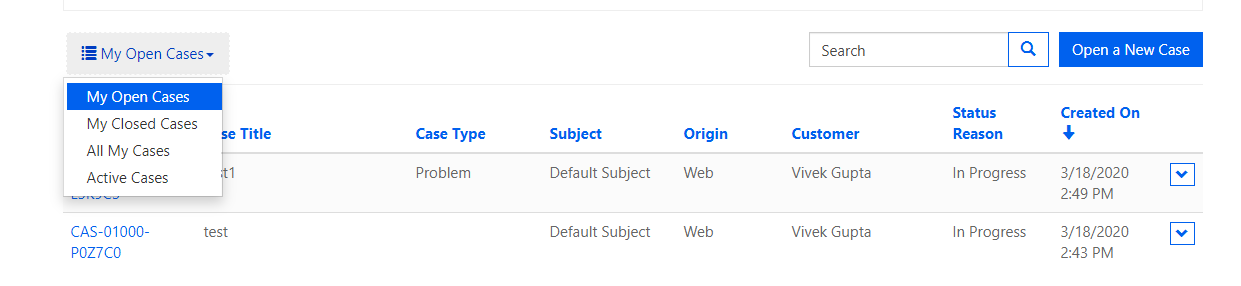
pastedimage1584531886300v2.png

As above screen shot, I have added "Active case" in existing entity list. but my requirement is to add this view by creating a different entity list for same entity. When I do this , it does not display in the view.

Please suggest !!!!

Thanks & Regards,

Vivek Gupta

I have the same question (0)
  • Suggested answer
    oliver.rodrigues Profile Picture
    4,052 on at

    hi Vivek

    you can achieve that by doing the following:

    1 - Having 2 entity lists being displayed in your page. You already created the entity lists, so in order to display you need to change the Page Template/Web Template associated with your web page, create a new record (for page template and web template), and in your Web Template you can display both lists:

          <h2>My List #1</h2>

          {% include 'entity_list' key: "your entity list #1" %}

          <h2>My List #2</h2>

          {% include 'entity_list' key: "your entity list #2" %}

    your web page don't need to have any entity list associated in that scenario

    2 - You can inject a JS code in the view switch dropdown, and hide the filter html element, I don't have any ready code for this, but should be simple enough to make your own

  • Vivek Singla Profile Picture
    105 on at

    Thanks Oliver,

    should I create new page template and web template ? if yes, then how can I map because existing page template and web template is already created and mapped with a webpage.

    I have directly added existing webtemplate that is already mappTwo-entity-list-view.pnged with a entity list. I have added above your code and it works. When I see in portal, I am able to see two entity list as below screen shot. but issue is second entity list does not have hyperlink. I can not open the record from second view. Could you please suggest me how can I open the record from second view.

  • Verified answer
    oliver.rodrigues Profile Picture
    4,052 on at

    Yes Vivek, please create a new Page Template/Web Template

    You can change the association in your Web Page to the new Page Template (remember to make sure both root and content web pages are updated)

    in relation to the 2nd list not showing the link, did you create a details link in your other entity list? both lists should have the details web page/form related

  • Vivek Singla Profile Picture
    105 on at

    hey Thanks Oliver !!!

    That's worked.

    what I have done. I didn't create any other page template/web Template. I just added above liquid code and added the details of webpage in second entity list. After that hyperlink works for second view as well.

    It is working for me. Is the correct approach that I have followed and it worked ?

  • oliver.rodrigues Profile Picture
    4,052 on at

    I am glad it worked out now

    My only concern is that now you have probably in your "Full Page" web template a hard-coded line to show the additional entity list, every other page you create with the same web template will end up showing the entity list I believe

    you can fix that at any time I guess, so nothing to worry for now 

Under review

Thank you for your reply! To ensure a great experience for everyone, your content is awaiting approval by our Community Managers. Please check back later.

Helpful resources

Quick Links

Responsible AI policies

As AI tools become more common, we’re introducing a Responsible AI Use…

Neeraj Kumar – Community Spotlight

We are honored to recognize Neeraj Kumar as our Community Spotlight honoree for…

Leaderboard > Customer experience | Sales, Customer Insights, CRM

#1
Tom_Gioielli Profile Picture

Tom_Gioielli 170 Super User 2025 Season 2

#2
#ManoVerse Profile Picture

#ManoVerse 61

#3
Gerardo Rentería García Profile Picture

Gerardo Rentería Ga... 52 Most Valuable Professional

Last 30 days Overall leaderboard

Product updates

Dynamics 365 release plans



