web
You’re offline. This is a read only version of the page.
close
Skip to main content

Announcements

News and Announcements icon
Community site session details

Community site session details

Session Id :
Customer experience | Sales, Customer Insights,...
Answered

Custom Field in Lead Summary

(1) ShareShare
ReportReport
Posted on by 12

I am a new comer in Dynamics so pardon me if you find me a noob.

I created a custom fiend in Sales -> Lead called Role in Practice. This field has dropdown choices. The filed works OK. However, when I Qualify the Lead, the particular field does not flow on the Accounts
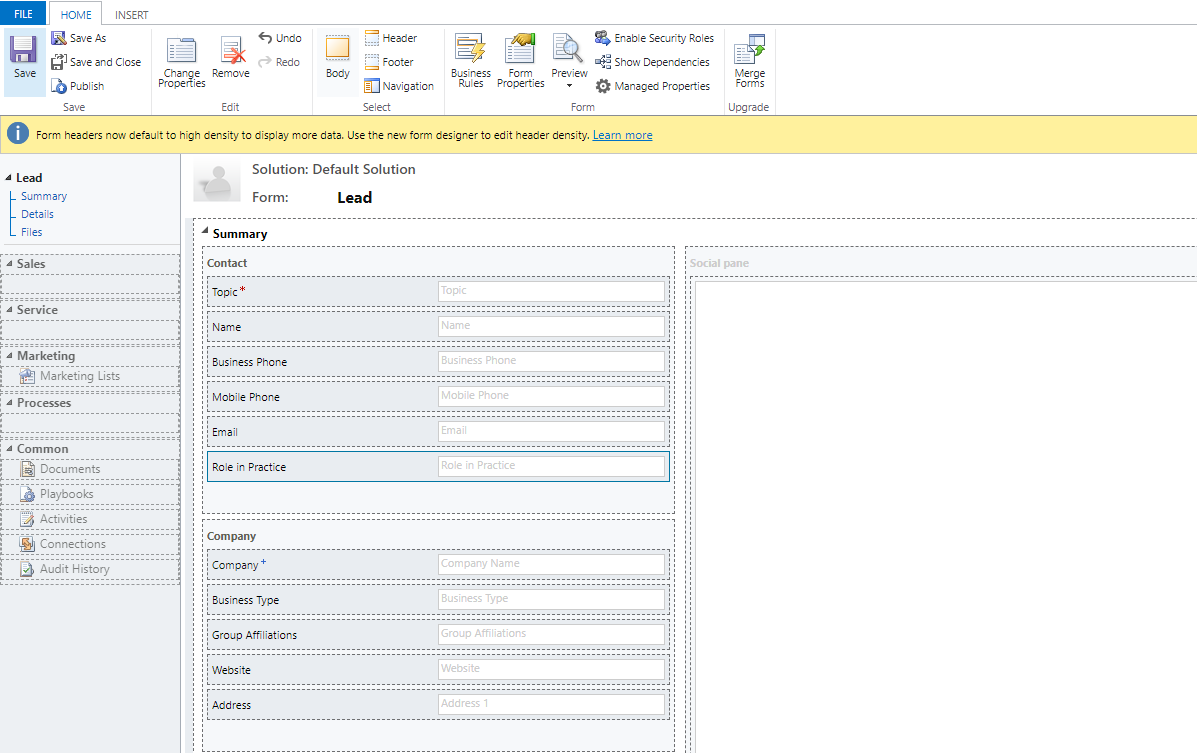
pastedimage1588876655523v1.png

What I would like to do is if I fill-up the "Role in Practice" while I am still under Lead. It should carry the value in Accounts, when I Qualify the Lead. I hope I am making sense.

Thanks for the help.

I have the same question (0)
  • Verified answer
    meelamri Profile Picture
    13,218 User Group Leader on at
  • Verified answer
    LuHao Profile Picture
    40,892 on at

    Hi protas,

    Is the Account field also an option set field? Are its options the same as the Lead field "Role in Practice"?

    If so, as Mehdi said, we need to use the mapping in the relationship.

    Go to Customize the System, click AccountN:1 Relationships, edit account_originating_lead.

    pastedimage1588917169888v1.png

    Click Mappings.

    pastedimage1588917206264v3.png

    New.

    pastedimage1588917228831v4.png

    Select "Role in Practice" in Account and Lead. Save it.

    pastedimage1588917304085v5.png

    In this way, when you qualify a lead, the value of Lead field "Role in Practice" will be copy into the Account field.

  • Suggested answer
    protas Profile Picture
    12 on at

    Hi Lu,

    You are AWESOME!!!! Now I move with my project. THANK YOU!!!!

    Eunar

  • protas Profile Picture
    12 on at

    Thank you Mehdi for the response. I appreciate all the help you guys provided!

  • meelamri Profile Picture
    13,218 User Group Leader on at

    Don't hesitate to post your questions Have a nice day.

  • ellybfox30 Profile Picture
    5 on at

    Please make sure to check your mappings from Lead to Account. there is referential relationship between Lead to Account where you can add the fields that you wanted to Map, once its mapped properly it will automatically flow.

  • ali.rizvi Profile Picture
    10 on at

    Hi Mehdi,

    I followed the steps in your solution but for me the relationship pane is showing blank. Please see following screen cap for reference.

    2022_2D00_06_2D00_23_5F00_9_2D00_30_2D00_16.png

Under review

Thank you for your reply! To ensure a great experience for everyone, your content is awaiting approval by our Community Managers. Please check back later.

Helpful resources

Quick Links

Season of Sharing Community Challenge Launch!

Jump in, show your community spirit, and win prizes!

Women in Power Builds Momentum

Expanding mentorship, skilling, and AI innovation

Congratulations to the May Top 10 Community Leaders

These are the community rock stars!

Leaderboard > Customer experience | Sales, Customer Insights, CRM

#1
Hamza H Profile Picture

Hamza H 140 Super User 2026 Season 1

#2
Nagaraju_Matta Profile Picture

Nagaraju_Matta 128

#3
Abhilash Warrier Profile Picture

Abhilash Warrier 70 Super User 2026 Season 1

Last 30 days Overall leaderboard

Product updates

Dynamics 365 release plans



