web
You’re offline. This is a read only version of the page.
close
Skip to main content

Notifications

Announcements

No record found.

Community site session details

Community site session details

Session Id :
Dynamics 365 general forum

Goals Chart Edits

(0) ShareShare
ReportReport
Posted on by 288

8037.Goals-Chart.PNGI am currently using the system views but Id like to remove the in-progress money from the chart, leaving me with just the actual money and the target that my sales team need to meet. Is this possible? ive tried creating my own chart but cant replicate the goals chart when doing so. Any help on this would be greatly appreciated. 

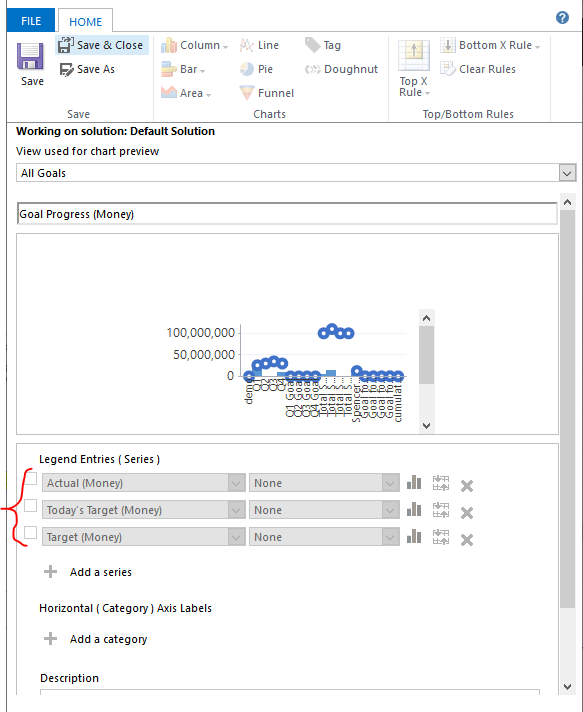
I just want to remove the blue part of the chart but when i edit a system chart its all greyed out.

Jason

Categories:
I have the same question (0)
  • Suggested answer
    LuHao Profile Picture
    40,892 on at

    Hi Jason,

    If you want to modify the system chart, you need to go to the custom panel to modify it.

    Go to SettingsCustomizationsCustomize the System, expand Entities and the entity which hosts the chart you want to customize. Click on Charts, then select the chart you would want to customize.

    3301.2.PNG    3301.2.PNG

    Then you can modify this chart to delete unwanted data.

    1643.3.PNG

    Please refer to this article on the chart:

    [View:https://crmbook.powerobjects.com/system-administration/customization/charts-dashboards/:320:50]

  • Jason Fleming Profile Picture
    288 on at

    Hi Lu,

    Thanks very much for coming back to me on this, however, when i go through these steps the goals chart is greyed out, not allowing me to edit the details in there. I want to remove the in-progress money but cant click on it to delete. The only other way I can think of doing it is to export the chart and remove the code, when i tried to do this it wont load back in as the file doesnt contain the required data.

    Ive also tried to replicate the chart as a personal chart but unable to do this also. Any other suggestions will be a massive help.

    See here a screenshot of what I see when clicking on the system chart.Goals-Chart-2.PNG

  • Verified answer
    LuHao Profile Picture
    40,892 on at

    Hi Jason,

    Indeed, this chart cannot customize Series. It's the same in my environment.

    So we can import a new chart while retaining the original chart.

    Here are the steps:

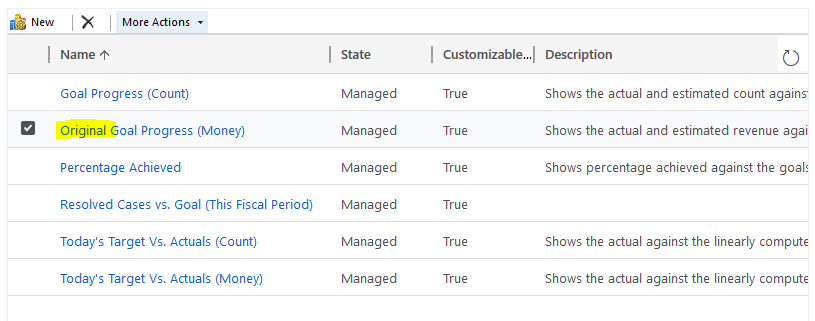
    1. Export the original chart. Then change the name of the original chart.

    4846.8.PNG    8765.2.PNG    1588.4.PNG

    2. Open the exported original chart file. Then delete the three pieces of code. (Delete the area selected by the red box in the picture.)
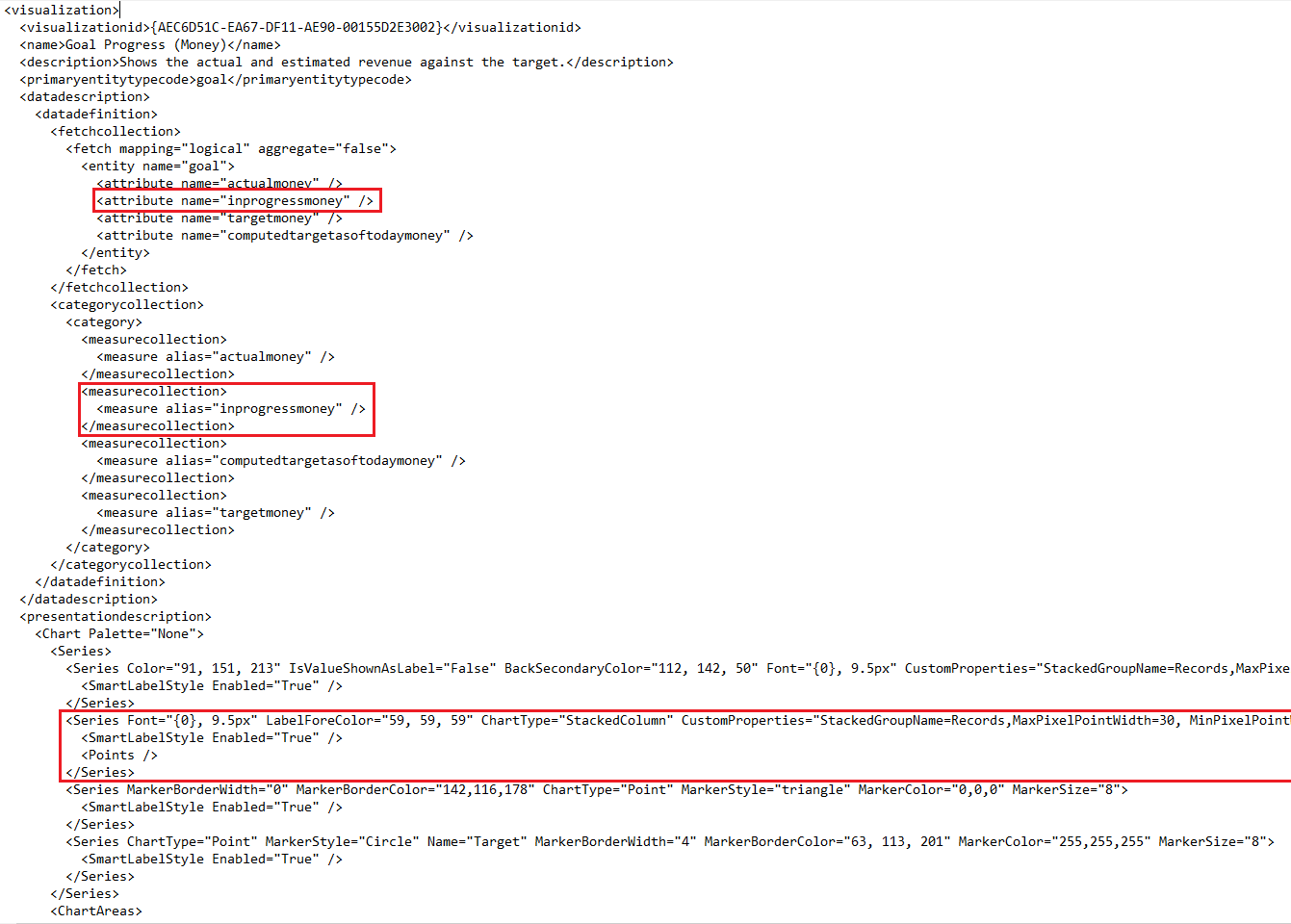
    6038.3.PNG

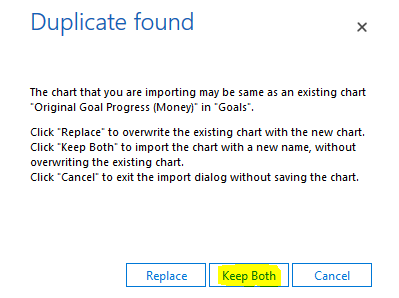
    3. Import this file. Keep Both. 

    5.PNG    4212.6.PNG

    In this case, the original chart still exists, and the new chart replaces the original chart.

    4846.7.PNG    4846.8.PNG

  • Jason Fleming Profile Picture
    288 on at

    Hi Lu,

    Thank you so so much, this was something I just was not able to do myself and you have provided the exact answer I was looking for. I have been trying google, trying to look at the code myself (im not a coder) and nothing worked for me. You have just made my day with this (sad I know but this is brilliant)

    Thanks again for your responses on this,

    signing off as one happy administrator.

    Jason

  • Jason Fleming Profile Picture
    288 on at

    Hi Lu,

    I wonder if you could help with another item I have on goal charts. Do you know is it possible to change the target circle on my charts to a line? I wonder if this is possible?

    Thanks again for your help with this.

  • LuHao Profile Picture
    40,892 on at

    Hi Jason,

    Please post a new theme.

    We do not recommend posting multiple problems in one theme post.

    I am following all new posts. If I have a good solution, I will definitely help you, don't worry.

  • Jason Fleming Profile Picture
    288 on at

    Cool will do, Thanks Lu.

Under review

Thank you for your reply! To ensure a great experience for everyone, your content is awaiting approval by our Community Managers. Please check back later.

Helpful resources

Quick Links

November Spotlight Star - Khushbu Rajvi

Congratulations to a top community star!

Forum Structure Changes Coming on 11/8!

In our never-ending quest to help the Dynamics 365 Community members get answers faster …

Dynamics 365 Community Platform update – Oct 28

Welcome to the next edition of the Community Platform Update. This is a status …

Leaderboard > Dynamics 365 general

Last 30 days Overall leaderboard

Featured topics

Product updates

Dynamics 365 release plans