web
You’re offline. This is a read only version of the page.
close
Skip to main content

Announcements

No record found.

News and Announcements icon
Community site session details

Community site session details

Session Id :
Customer Service forum

Hide 'Related' tab from the Case for interactive Experience form.

(0) ShareShare
ReportReport
Posted on by Microsoft Employee

Hi Team,

Is there any way to remove the 'Related' tab from the Case for interactive Experience form. There are no related entities to the form still the related tab is coming up in the form. Any help would be appreciated.

0624.Untitled.png

I have the same question (0)
  • Verified answer
    LuHao Profile Picture
    40,892 on at

    Hi Apurva,

    You could hide it using Javascript.

    This is the code for Javascript:

    var hide = true;
    var interval = null;
    function hideRelatedTab(){
        interval = setInterval(function () {
            var element = parent.document.getElementById("rel4");
            if (element !== null && hide === true) {
                hide = false;
                element.style.display = "none";
                clearInterval(interval);
            }
        }, 1000);
    }

    You need to set it to the onLoad event of the Case for interactive Experience form.
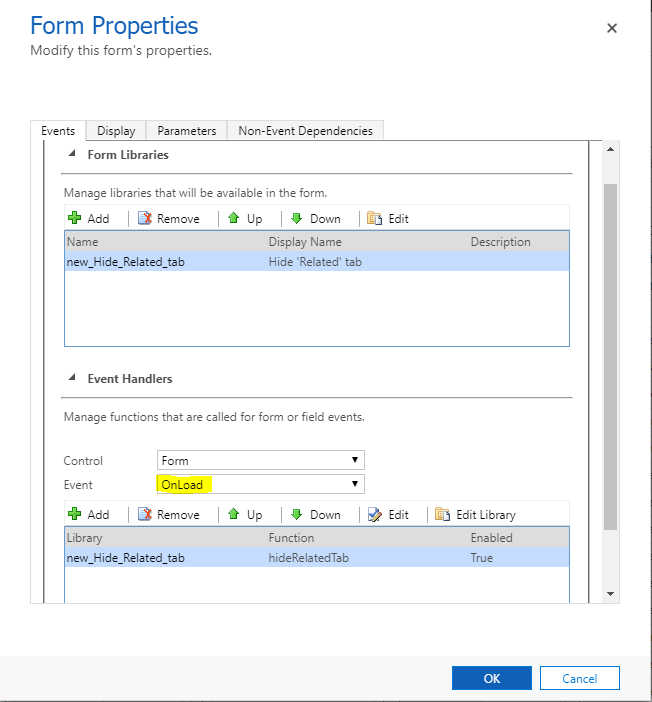
    5125.PNG

    In this case, the 'Related' tab will be hidden each time the user opens the form.

    5076.PNG

    This blog is about how to set up Javascript for a form: 

    [View:https://www.tutorialspoint.com/microsoft_crm/microsoft_crm_jscript_web_resources.htm:320:50

  • Apurva Yadav Profile Picture
    Microsoft Employee on at

    Hi Lu,

    Thanks a lot for your help. This can be used but here the problem is that the id of the Related tab may be dynamic and may change according to the form customization.

  • Verified answer
    LuHao Profile Picture
    40,892 on at

    Hi Apurva,

    Indeed, its ID will change with the number of tabs in the front.

    So we can use title to grab the 'Related' tab.

    var hide = true;
    var interval = null;
    function hideRelatedTab(){
        interval = setInterval(function () {
            var node = parent.document.querySelector('[title="Related"]');
            if (node !== null && hide === true) {
                hide = false;
                node .style.display = "none";
                clearInterval(interval);
            }
        }, 1000);
    }

    There won't be a second tab called Related, so this method is better.

  • Apurva Yadav Profile Picture
    Microsoft Employee on at

    Hi Lu,

    Thanks a lot. This works perfectly fine for me.

Under review

Thank you for your reply! To ensure a great experience for everyone, your content is awaiting approval by our Community Managers. Please check back later.

Helpful resources

Quick Links

November Spotlight Star - Khushbu Rajvi

Congratulations to a top community star!

Forum Structure Changes Coming on 11/8!

In our never-ending quest to help the Dynamics 365 Community members get answers faster …

Dynamics 365 Community Platform update – Oct 28

Welcome to the next edition of the Community Platform Update. This is a status …

Leaderboard > Customer Service

Last 30 days Overall leaderboard

Featured topics

Product updates

Dynamics 365 release plans
