web
You’re offline. This is a read only version of the page.
close
Skip to main content

Announcements

News and Announcements icon
Community site session details

Community site session details

Session Id :
Service | Customer Service, Contact Center, Fie...
Suggested Answer

Connect Omnichannel with PVA Voice Channel

(1) ShareShare
ReportReport
Posted on by 18 User Group Leader
I need to use omnichannel with PVA integration for voice channel and right now I have number and Azure Communication Services integrated by AudioCodes.
The PVA voice is working until I ask for transfer to agent, the call insta end because can't find an agent. On AudioCode LiveHub side the error is /Bot Err: Transfer failed. No transfer target/.
 
Unified routing, users, capacity, workstream, queue is all configured (Ig).
I see I can't add PVA as bot on my workstream, the list is empty.
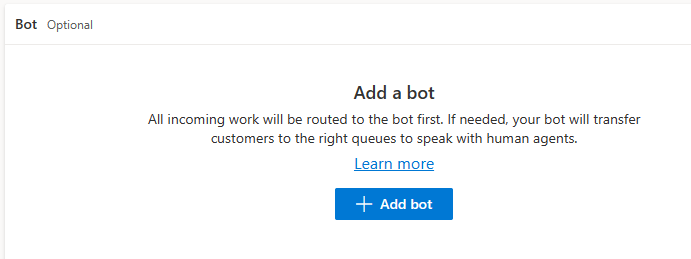
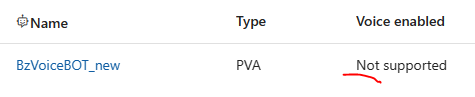
On bot's list, I see my bot as /not supported/ for voice enabled (even working on PVA side).

Any help? 
I have the same question (0)
  • Suggested answer
    PerezAguiar Profile Picture
    Microsoft Employee on at
    Hey.
     
    When you create a bot on PVA, you get an option stating that if you want Voice capacities (and enabling it with Omnichannel), you'll need to use the classic version:
     
    Bots on the new canvas app can't be integrated with OC.  ONly the ones tagged (in PowerVirtualAgent site) as "Classic" can use voice and allow transfer to Omnichannel:
     
    This would be the first thing to check.  The second thing, is that when configuring the bot, you'll need to allow the configuration on PVA:
  • Wesley NL Profile Picture
    18 User Group Leader on at
    Hello @PerezAguiar

    Ah, yes, I was trying with old classic bots. Now I created a new classic bot and I was able to add as bot on OC Workstream.


    On bot's list:
     
    Do I need to do something else? II see this warning message, but the PVA is with capacity and was added in default voice queue. It's connected.

    Thx
  • Suggested answer
    PerezAguiar Profile Picture
    Microsoft Employee on at
    Hey.

    That should be far enough.  You should be able to dial the number that you have associated to your workstream and the bot will start their processes:
     
    ******
    I hope this answer has helped you solve your problem. If you are satisfied with it, please consider marking it as the excellent answer by clicking on the green check mark below. This will help other users who have similar questions find the best solution.
     Thank you for your feedback!
  • bmarcurella Profile Picture
    45 on at
    Did you get this figured out? 

Under review

Thank you for your reply! To ensure a great experience for everyone, your content is awaiting approval by our Community Managers. Please check back later.

Helpful resources

Quick Links

Season of Sharing Community Challenge Launch!

Jump in, show your community spirit, and win prizes!

Women in Power Builds Momentum

Expanding mentorship, skilling, and AI innovation

Congratulations to the May Top 10 Community Leaders

These are the community rock stars!

Leaderboard > Service | Customer Service, Contact Center, Field Service, Guides

#1
Abhilash Warrier Profile Picture

Abhilash Warrier 51 Super User 2026 Season 1

#1
Muhammad Shahzad Shafique Profile Picture

Muhammad Shahzad Sh... 51 Most Valuable Professional

#3
Nagaraju_Matta Profile Picture

Nagaraju_Matta 50

Last 30 days Overall leaderboard

Featured topics

Product updates

Dynamics 365 release plans



