web
You’re offline. This is a read only version of the page.
close
Skip to main content

Notifications

Announcements

Community site session details

Community site session details

Session Id :
Finance | Project Operations, Human Resources, ...
Suggested Answer

Checks Links hung

(0) ShareShare
ReportReport
Posted on by 10

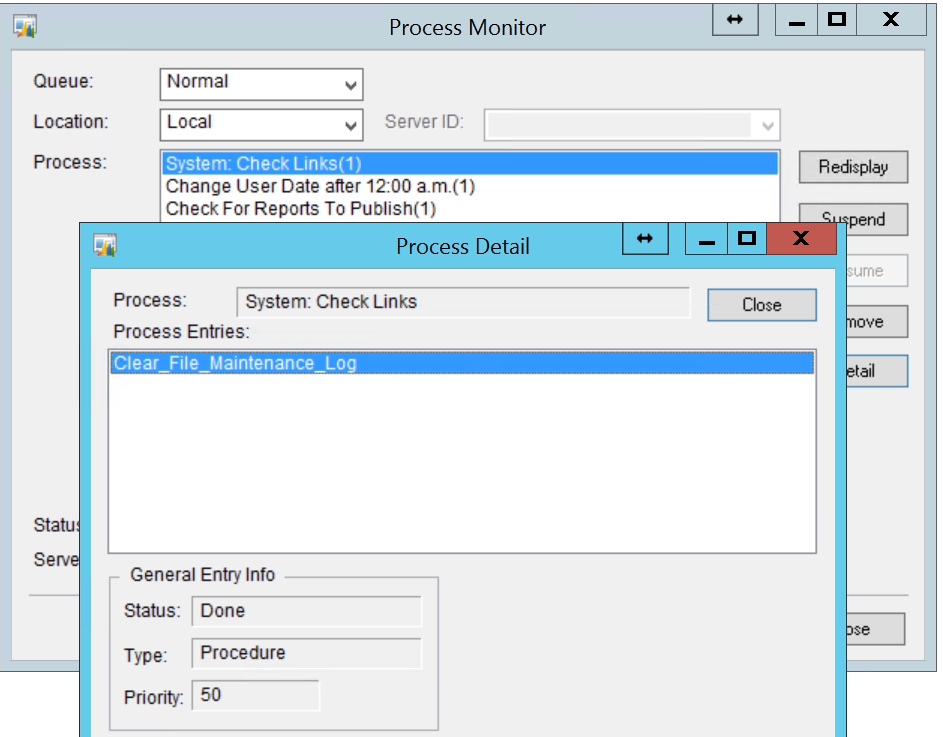
Check-Links-Error.png

Good day,

I put through a Purchasing check links, the printout was generated. I usually print to screen and then file. It was at night so the message would have come up to acknowledge the change in date and time. All this is fine but it has not moved from there since last night, 9.37 pm.

From the process monitor when I look at the details for check links it says 'done'.

The question is can I end this?

I did the sales check links just prior and there were no issues. From the Purchasing printout there was something that seemed off.

Regards

Rosemary

I have the same question (0)
  • Jozy Profile Picture
    393 on at

    Yes, You can end this as sometimes check links process stuck when other processes runs automatically.

  • Richard Wheeler Profile Picture
    75,852 Moderator on at

    Did you perform a backup to just prior to running checks? If so, it would be a good idea to restore from that backup. Check links has the ability to delete records so killing the task will give you no idea what check links did.If you did not perform a backup you can kill it just just check what is there. It sounds like you run check links fairly often. When you run it does it normally report any issues?

  • Rosemary Profile Picture
    10 on at

    Thanks for your response.

    Yes a back up was done prior and yes check links and reconcile are done often. The report is done to print to screen first then file, yes it highlights a receipt which has an issue but there was something else that was not there before.

    I did end the job, Purchasing/Receiving seems to be okay.  I will restore in test and check what might have caused it to hang.

    Regards

  • Rosemary Profile Picture
    10 on at

    What other processes?

  • Richard Wheeler Profile Picture
    75,852 Moderator on at

    Did anyone sneak into GP while you were running check links. I am thinking a table or record lock caused check links to get locked.

  • Suggested answer
    Beat Bucher  GP Geek  GPUG All Star Profile Picture
    28,058 Moderator on at

    Rosemary,

    I usually send the output of checklinks straight to a file, as the process can be a pretty lengthy one.. so no matter what, you usually have something to look at.. Except when your CL process is stuck like in your case, at which point no report might get produced at all.

    You might be able to run CL unattended by using a macro and close GP once the process is completed. GP can be started by calling the .mac file in the command line as a parameter...  Schedule the whole process from a batch file in Windows Scheduler.

  • Lisa at AonC.com Profile Picture
    967 Super User 2025 Season 2 on at

    I too tend to print Check Link logs to files.

    When running Check Links for larger databases, I make certain to go to Process Monitor and remove the processes in the Timed Queue.

    Other things that may help:

    -Dex.ini switch:  SuppressChangeDateDialog=True

    -Scheduling check links (2020 enhancement).  I have not yet had a compelling reason to set this up for a client (as we have other routines in place) but the idea is interesting.

    community.dynamics.com/.../microsoft-dynamics-gp-fall-2020---schedule-check-links

  • Beat Bucher  GP Geek  GPUG All Star Profile Picture
    28,058 Moderator on at

    Lisa,

    I've tried at some point to use the scheduled Check-links and wasn't able to get anything useful working out of this. The concept sounded interesting, but I think the practical application is sub-par..

    Maybe someone should explain how this is supposed to work ? the documentation about this new feature is less than stellar ;-)

    docs.microsoft.com/.../schedule-check-links

Under review

Thank you for your reply! To ensure a great experience for everyone, your content is awaiting approval by our Community Managers. Please check back later.

Helpful resources

News and Announcements

Season of Giving Solutions is Here!

Quick Links

Responsible AI policies

As AI tools become more common, we’re introducing a Responsible AI Use…

Neeraj Kumar – Community Spotlight

We are honored to recognize Neeraj Kumar as our Community Spotlight honoree for…

Leaderboard > Finance | Project Operations, Human Resources, AX, GP, SL

#1
Abhilash Warrier Profile Picture

Abhilash Warrier 679 Super User 2025 Season 2

#2
André Arnaud de Calavon Profile Picture

André Arnaud de Cal... 429 Super User 2025 Season 2

#3
Martin Dráb Profile Picture

Martin Dráb 264 Most Valuable Professional

Last 30 days Overall leaderboard

Product updates

Dynamics 365 release plans



