web
You’re offline. This is a read only version of the page.
close
Skip to main content

Notifications

Announcements

No record found.

Community site session details

Community site session details

Session Id :
Customer experience | Sales, Customer Insights,...
Suggested Answer

Access to Account's related Contacts that is not owned by same user

(0) ShareShare
ReportReport
Posted on by 5

Hi all experts,

I encounter the below situation:
User A owns an Account [ABC Company], there are 2 Contacts under ABC Company, Peter Chan owned by User A, and Mary Wong owned by User B

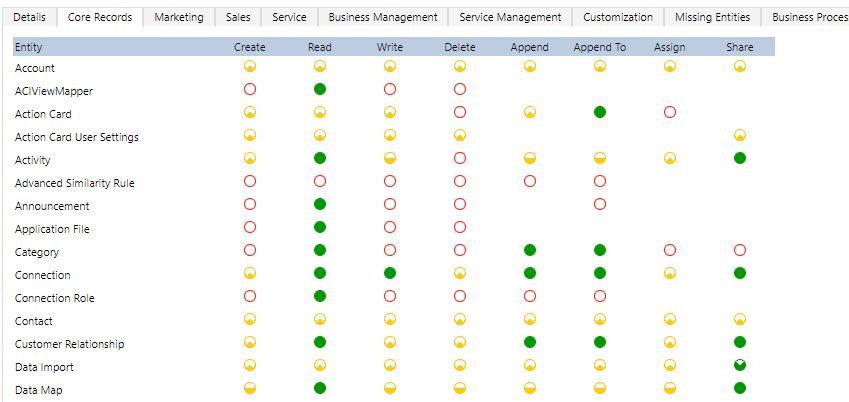
Both User A and B is assigned with Sales Executive role, in which they should only be able to access the records owned by themselves.
(the Security Role assignment is attached for reference)
pastedimage1586419156688v1.png

But now User A is able to see both Contacts Peter Chan and Mary Wong.

Is this a standard behaviour in which Account owner can see all the linked Contact in regardless of the ownership?
Is there any way to block User A's access to the record Mary Wong?

Many Thanks!

Best Regards,

Chloe

I have the same question (0)
  • Suggested answer
    Malini Johari Profile Picture
    160 on at

    Hi,

    In CRM, Security role privileges are cumulative: having more than one security role gives a user every privilege available in every role.

    So, check User A might have any other security role or part of any team.

  • LuHao Profile Picture
    40,892 on at

    Hi Chloe,

    Yes, it is a standard behaviour.

    Unfortunately, there is currently no solution to this.

    I would recommend you suggest an idea: https://experience.dynamics.com/ideas

  • Suggested answer
    yader.morales Profile Picture
    291 on at

    Hello Chloe,

    This behavior looks as by design. Cascade relationship between the Account and Contact entity generates that if there are shared contacts with users, their dependent records can also be viewed by others. For more information, you can check this link: https://docs.microsoft.com/es-es/dynamics365/customerengagement/on-premises/developer/entity-relationship-behavior

    For your reference when we work with relationships:

    Parental: In a parental relationship between two entities, any action taken on a record of the parent entity is also taken on any child entity records that are related to the parent entity record. if you delete a record in the parent entity, the related child entity records are also deleted; or if you share a parent entity record, the related records from the child entity are also shared. All options are disabled for Parental relationship

    Referential: In a referential relationship between two entities, you can navigate to any related records, but actions taken on one will not affect the other.

    Take note that after change the behavior through relationship configuration, the affected records will remain available.

    Hope this helps.

    Regards,

    Yader.

  • Suggested answer
    Bruno Andrade Profile Picture
    95 on at

    Hello Chloe.

    If I understood your need, you can enable of the read and or write privilege in the Contact entity in the security roles and configure the access team in the Contact entity, restricting and or enabling the privileges of the users associated with the specific record according your necessity.

    Follow the link talking more about the access team.

    https://docs.microsoft.com/pt-br/dynamics365/customerengagement/on-premises/admin/manage-teams#about-access-teams-and-team-templates

Under review

Thank you for your reply! To ensure a great experience for everyone, your content is awaiting approval by our Community Managers. Please check back later.

Helpful resources

Quick Links

Responsible AI policies

As AI tools become more common, we’re introducing a Responsible AI Use…

Neeraj Kumar – Community Spotlight

We are honored to recognize Neeraj Kumar as our Community Spotlight honoree for…

Leaderboard > Customer experience | Sales, Customer Insights, CRM

#1
Tom_Gioielli Profile Picture

Tom_Gioielli 171 Super User 2025 Season 2

#2
#ManoVerse Profile Picture

#ManoVerse 83

#3
Jimmy Passeti Profile Picture

Jimmy Passeti 50 Most Valuable Professional

Last 30 days Overall leaderboard

Product updates

Dynamics 365 release plans



