web
You’re offline. This is a read only version of the page.
close
Skip to main content

Announcements

News and Announcements icon
Community site session details

Community site session details

Session Id :
Finance | Project Operations, Human Resources, ...
Suggested Answer

Number sequence group doesn't work when creating free text invoices

(0) ShareShare
ReportReport
Posted on by 375

I set up the number sequence group KI with format KI######## for legal entity USMF. Then I create a new free text invoice and select KI as number sequence group, it works well for the first time. However, the invoice number showed the wrong format since the second time.

Here is the reproduce steps:

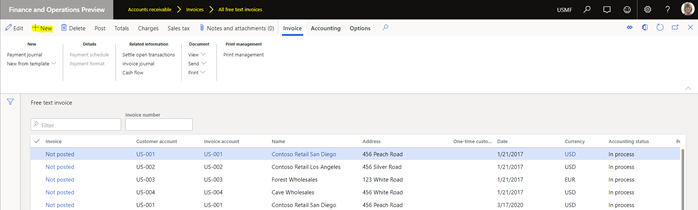
  1. Create a new free text invoice

>> Go to Account receivable >> Invoices >> All free text invoices > New
 

 pastedimage1585211851928v1.png

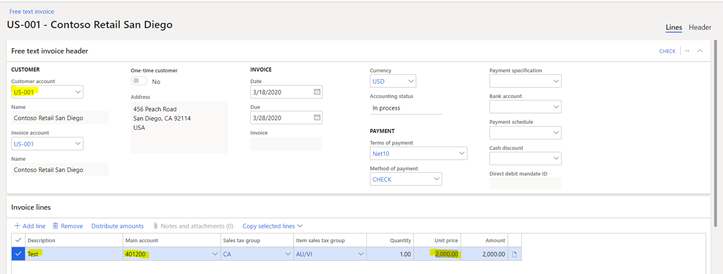
>> Select customer account: US-001

      Invoice lines: Description: Test, Main account: 401200, Unit price: 2000
pastedimage1585212715839v2.png

  1. Create a new number sequence group and a new number sequence code

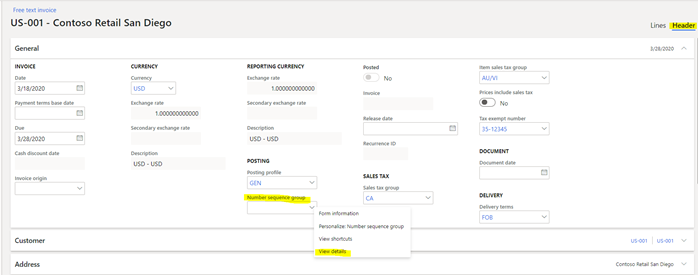
>> Click Header

>> Right click to number sequence group >> View details
 pastedimage1585212735249v3.png


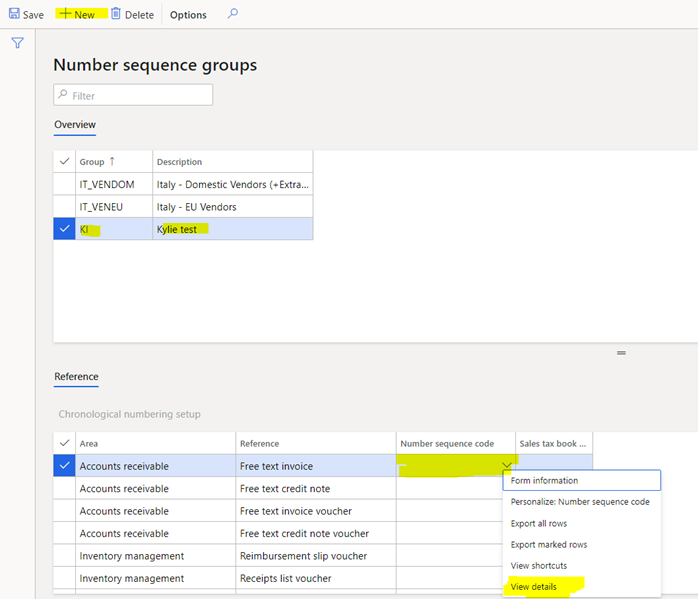
>> Click New, enter Group: KI, Description: Kylie test.

      Click Save

      In reference, in Account receivable line, right click Number sequence code > View details.
 pastedimage1585212754809v4.png

>> Enter: Number sequence code: KI, Name: Kylie test

      Select Scope as Company, Company = USMF

      In segments: Enter Constant = KI

      Click Save

The format is KI#########
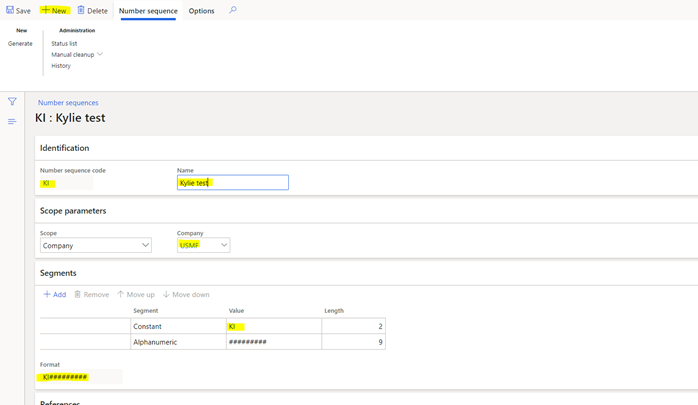
 pastedimage1585212797787v5.png

Come back free text invoice and select KI as number sequence group, then post.


Then I found that, the expected result just came in first time I’ve tested. From the second times, the invoice number does not follow the number sequence group setup.

 pastedimage1585212827284v6.png

I have the same question (0)
  • qianwang Profile Picture
    7,168 on at

    Hi L Dinh,

    Do you select this number sequence group the second time? If you want to replace the initial sequence code, you can do changes in related number sequence or replace it in AR parameter--> number sequences--> reference(Free text invoice).

    Regards,

    QianQW

  • Suggested answer
    Ludwig Reinhard Profile Picture
    Microsoft Employee on at

    Hi,

    Why don't you create a completely new number sequence for your invoices and set it up / link it in the AR Parameters?

  • nopainnogain Profile Picture
    375 on at

    I could not find any thing related to free text invoice in reference

  • nopainnogain Profile Picture
    375 on at

    Because my user just want to have some free text invoice has number sequence group so I think we could not create a new one

  • qianwang Profile Picture
    7,168 on at

    Hi L,

    If I understand correctly, don't you want to completely replace the initial sequence numbers? So, did you select the sequence group KI again when you created the free text invoice for the second time, otherwise it will apply the default sequence code set in the AR parameters.

    Regards,

    QianQW

  • Suggested answer
    Ludwig Reinhard Profile Picture
    Microsoft Employee on at

    Hi, 

    Here is a screenprint of the AR parameters that show you the number sequences for the free text invoice and the respective vouchers. 

    arp.png

    Can't you simply create new number sequences, save them, go to the AR parameters form and replace the standard ones by the ones you created?

    Best regards, 

    Ludwig

  • André Arnaud de Calavon Profile Picture
    305,465 Super User 2026 Season 1 on at

    Hi L Dinh,

    If you want to have a number sequence for all free text invoices, then the replies above should help you.

    If you need a number sequence per customer or group of customers you should be aware that each new free text invoice will inherit the number group from the customer.

    So, first setup the number group on the customer(s); then create new free text invoices.

  • nopainnogain Profile Picture
    375 on at

    Thank all your suggestion!

Under review

Thank you for your reply! To ensure a great experience for everyone, your content is awaiting approval by our Community Managers. Please check back later.

Helpful resources

Quick Links

Season of Sharing Community Challenge Launch!

Jump in, show your community spirit, and win prizes!

Women in Power Builds Momentum

Expanding mentorship, skilling, and AI innovation

Congratulations to the April Top 10 Community Leaders

These are the community rock stars!

Leaderboard > Finance | Project Operations, Human Resources, AX, GP, SL

#1
Giorgio Bonacorsi Profile Picture

Giorgio Bonacorsi 671

#2
André Arnaud de Calavon Profile Picture

André Arnaud de Cal... 621 Super User 2026 Season 1

#3
Abhilash Warrier Profile Picture

Abhilash Warrier 589 Super User 2026 Season 1

Last 30 days Overall leaderboard

Product updates

Dynamics 365 release plans



