web
You’re offline. This is a read only version of the page.
close
Skip to main content

Announcements

News and Announcements icon
Community site session details

Community site session details

Session Id :
Customer experience | Sales, Customer Insights,...
Answered

Account form > Related > difference between DEV & Test and Acc & Prod

(2) ShareShare
ReportReport
Posted on by 8
Hi all,

I wanted to clean up the Account form regarding everything that was to be found under 'related' (which was a lot!). 
I have done this and on Dev and Test environments, this is great. 
Unfortunately, on Acc and Prod there are other, extra related items visible. I am assuming this has to do with the fact that in ACC and Prod, we have the Marketing add-on installed. (Customer insights journey).

I guess the only solution is to add this add-on also to our DEV enviroment, to be able to hide / remove these related items of the Account form?
Hoping there is also another way to achieve this.. 
 
DEV:


ACC:
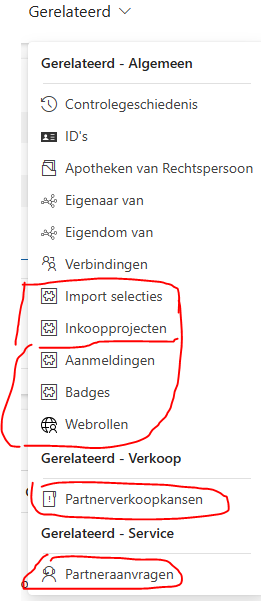
I have the same question (0)
  • Suggested answer
    Daivat Vartak (v-9davar) Profile Picture
    7,847 Moderator on at
    Hello FC-28111508-0,
     

    It sounds like you've done a great job streamlining your Account form in Dev and Test! It's frustrating when those pesky extra related items pop up in other environments. You're right, the Marketing add-on (Customer Insights Journey) is almost certainly the culprit.

    While adding the add-on to Dev would likely solve the problem, it's not the only way, and might be a bit heavy-handed if you're not actively using it in Dev. Here's a breakdown of options, weighing the pros and cons:

    1. The "Match Dev" Approach (Adding the Add-on):

    • Pros:

      • Mirrors Production: Makes Dev a true reflection of Prod, which is ideal for testing.
      • Directly Addresses the Issue: You can customize the form in Dev to match your desired layout, then deploy the changes.

      •  
    • Cons:

      • Resource Intensive: Adds complexity to Dev, potentially slowing it down.
      • Might Be Unnecessary: If you're not actively developing Marketing-related features, it's extra baggage. 

      •  

    2. The "Targeted Customization" Approach:

    • Pros:

      • More Precise: You directly hide the unwanted items in Acc and Prod, no need to change Dev.
      • Less Invasive: Keeps Dev lean. 

      •  
    • Cons:

      • Requires More Effort: You'll need to identify the specific components added by the Marketing add-on.
      • Potential for Errors: If you're not familiar with Dynamics 365 customization, you might accidentally hide something important. 

      •  

    Here's how to go the "Targeted Customization" route:

    1. Identify the Culprits: In Acc or Prod, go to the Account form and carefully examine the extra related items. Note their exact names or types (e.g., "Marketing Lists," "Customer Journeys").

    2. Customize the Form:

      • Go to Settings > Customizations > Customize the System.
      • Navigate to the Account entity > Forms.
      • Open the Account form you want to modify

    3. Hide the Unwanted Items: There are a few ways to do this:

      • Remove from Navigation: If they're navigation items, you can remove them from the form's navigation.
      • Hide Related Entity Grids: If they're related entity grids, you can hide them or remove them from the form.
      • Use Form Properties: In some cases, you might be able to use form properties to control the visibility of certain sections 

    4. Publish Your Changes: Once you're happy with the changes, publish them to Acc and Prod.

    5.  

    Important Notes:

    • Test Thoroughly: Always test your changes in a non-production environment first to avoid any unintended consequences.
    • Security Roles: Make sure the users who need to see these related items still have the necessary permissions.
    • Documentation: Keep track of the customizations you make so you can easily revert them if needed.
     
    If my answer was helpful, please click Like, and if it solved your problem, please mark it as verified to help other community members find more. If you have further questions, please feel free to contact me.
     
    My response was crafted with AI assistance and tailored to provide detailed and actionable guidance for your Microsoft Dynamics 365 query.
     
    Best Regards,
    Daivat Vartak
  • EC-28111508-0 Profile Picture
    8 on at
    @Daivat Vartak (v-9davar) Thank you so much for your reply.
     
    I want to do this in a proper way as we use CI/CD pipeline to release our changes from DEV > Test > ACC > PRD.
    So i guess the only way to properly do it in that case is to install Marketing also on DEV? (and Test?)
  • Verified answer
    Daivat Vartak (v-9davar) Profile Picture
    7,847 Moderator on at
    Hello FC-28111508-0,
     
    Yes, you are right, you have to instal the Customer Insight - Journey (Marketing) solution to other environments to ensure that all the environments must have all the OOTB/MSFT components before moving changes/customization from the dev to another environment. 
     
    Regards,
    Daivat Vartak

Under review

Thank you for your reply! To ensure a great experience for everyone, your content is awaiting approval by our Community Managers. Please check back later.

Helpful resources

Quick Links

Season of Sharing Community Challenge Launch!

Jump in, show your community spirit, and win prizes!

Women in Power Builds Momentum

Expanding mentorship, skilling, and AI innovation

Congratulations to the May Top 10 Community Leaders

These are the community rock stars!

Leaderboard > Customer experience | Sales, Customer Insights, CRM

#1
Hamza H Profile Picture

Hamza H 142 Super User 2026 Season 1

#2
Nagaraju_Matta Profile Picture

Nagaraju_Matta 128

#3
11manish Profile Picture

11manish 121

Last 30 days Overall leaderboard

Product updates

Dynamics 365 release plans



