web
You’re offline. This is a read only version of the page.
close
Skip to main content

Announcements

News and Announcements icon
Community site session details

Community site session details

Session Id :
Finance | Project Operations, Human Resources, ...
Answered

Importing active business events events via data entity

(0) ShareShare
ReportReport
Posted on by 5

Hi all,

I need to be able to import and export data from table BusinessEventsConfiguration via the Data management framework so I created all objects needed for this via this table right click option "Addins"  ->"Create data entity".

When I tried to build this in project I get the following compile error:

Cannot generate chain of command subscription inialization code for 'BusinessEventsConfiguration'.'insert'. Exception: 'Object reference not set to an instance of an object.' at: at IKVM.Reflection.Emit.ModuleBuilder.GetTypeToken(Type type)
at IKVM.Reflection.Emit.ILGenerator.Emit(OpCode opc, Type type)
at Microsoft.Dynamics.AX.Framework.Xlnt.ILGenerator.ILGeneratorPass3Worker.EmitChainOfCommandSubscriptionsCode(Parameters parameters, IXppcMetadataProvider metadataProvider, NetModuleNameByTypeName netModules, FileRollbackHandler fileRollbackHandler, IDiagnosticSink diagnosticsHandler).

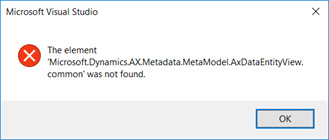
And also this
5127.pastedimage1589542427207v1.png

Then I renamed the data entity and staging table (by adding the prefix Mcs) and the compile error was gone. The error from the picture above remained. The export worked as expected but on import the data is filled in the staging table and after this error appear:

Results. Error executing code: McsBusinessEventsConfigurationEntity table does not have method '__doInsert'. for insert of new records and

Results. Error executing code: McsBusinessEventsConfigurationEntity table does not have method '__doUpdate'. for updating.

The code goes in run time error in class DMFEntityBase, method insertUpdate, lines  _target.insert(); or  _target.doInsert(); or _target.update(); or  _target.doUpdate(); depending whether the parameter for validation on Entity structure is set and whether it should insert or update the base table.I have not added nor overrided any methods on entity or staging table.

I checked the windows Event viewer and there is only the same error as above.

I have seen similar standard ax entities that work as expected, for example CustBillingClassificationCodeEntity. The only difference is that table BusinessEventsConfiguration has property Save Data per Company set to No.

Any idea why this happens?

I have the same question (0)
  • Suggested answer
    nmaenpaa Profile Picture
    101,172 Moderator on at

    Just delete the whole entity, build your model, sync database and generate the entity again with correct name.

    Then see if you still have some issues.

  • Cvetanka Acevska Profile Picture
    5 on at

    I tried this, it doesn't work. After generating the entity again I get this error on database synchronization:

    Microsoft.Dynamics.AX.Framework.Database.Synchronize.DataEntitySyncException: Failed to parse data entity view queries for following data entities: McsBusinessEventsConfigurationEntity.

    What is strange is that even this error appears the entity still can be created in Data management workspace and used for exporting. On import the same error from my previous post appears. 

  • Sergei Minozhenko Profile Picture
    23,097 on at

    Hi Cvetanka,

    I had a similar issue with another BE table and entity. Finally, I found that the issue was related to one of child data sources for the table with disabled Partition field. Check all data sources and derived data sources nodes in the entity and check if you have any of these with tables without Partition field.

  • Cvetanka Acevska Profile Picture
    5 on at

    Hi Sergei,

    I have checked all child and derived data sources and their Partition filed is not disabled.

    DS-field-Partition.png 

    Also the field Partition is enabled on the tables behind this data sources. Table-field-Partition.png

  • Verified answer
    Sergei Minozhenko Profile Picture
    23,097 on at

    Hi Cvetanka,

    I only suspect something wrong with BusinessEventsEndpoint data source. If you remove it and related fields and sync entity - it will work. BusinessEventsEndpoint has incomplete relation to Configuration table and also it's a base table for all kinds of endpoints.

    You can try to create MS support ticket, but I would use the unmapped field for EndpointName and added code to find endpoint by name and put RecId of the endpoint to Configuration table during import.

  • Suggested answer
    Sukrut Parab Profile Picture
    71,741 Moderator on at

    Do you have business event endpoints created in the system or you are importing those  in the same file ? If you are importing those in the same file make sure  entity creates business event endpoint first and then use that endpoint to create record in configuration table.  

    Another approach is just keep BusinessEventEndpoint table in the entity , if you are importing those  through a file and create configuration table through code.  You can take a look at code present on the businessEventCOnfiguration form button to see how its created.

  • Cvetanka Acevska Profile Picture
    5 on at

    Yes,

    the workaround with unmapped field for EndpointName works ok.

    I have removed the BusinessEventsEndpoint data source and used code to find endpoint by name and put RecId of the endpoint to Configuration table during import and vice versa (to find the endpoint Name by RecId) for export.

    In order this to work in the staging table, the relation to data entity, the name field normal should be removed.

    In meantime I have also created MS support ticket so we'll see what they respond.

Under review

Thank you for your reply! To ensure a great experience for everyone, your content is awaiting approval by our Community Managers. Please check back later.

Helpful resources

Quick Links

Season of Sharing Community Challenge Launch!

Jump in, show your community spirit, and win prizes!

Women in Power Builds Momentum

Expanding mentorship, skilling, and AI innovation

Congratulations to the May Top 10 Community Leaders

These are the community rock stars!

Leaderboard > Finance | Project Operations, Human Resources, AX, GP, SL

#1
Abhilash Warrier Profile Picture

Abhilash Warrier 463 Super User 2026 Season 1

#2
André Arnaud de Calavon Profile Picture

André Arnaud de Cal... 423 Super User 2026 Season 1

#3
Subra Profile Picture

Subra 392

Last 30 days Overall leaderboard

Product updates

Dynamics 365 release plans



