Hi,
Due to incoming All-in-one deployable package enforcement, I'm trying to setup version control and build pipeline.
I have successfully created a build pipeline using Microsoft-hosted agent.
My next challenge is to setup the whole development & deployment workflow, when I don't even know how to use TFVC.
We have 1 DEV, 1 UAT, 1 Production environments.
Our typical situation is we will have multiple requirements in DEV with some of them deployed to UAT. Among the multiple requirements deployed to UAT, we will need to deploy only partial of them to Production, depending on which has given the permission by customer to be deployed. Customer will test the deployed customization in UAT according to their best interest, not necessarily will follow the order or deployment. We even have customization in UAT pending for testing since last year, but a recently deployed ones can go into Production first.
I simply follow the recommended folder structure:
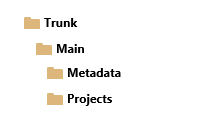
Metadata is mapped to K:/AosService/PackagesLocalDirectory
Projects is mapped to UserId/Documents/Visual Studio 2015/Projects
After I check-in everything to Azure Repos, I convert Main to branch, and create DEV branch from Main.
At this point, how do I make changes on DEV branch without affecting Main?
I created K:/AosService/PackagesLocalDirectory-DEV folder and map it to DEV/metadata.
I created UserId/Documents/Visual Studio 2015/Projects-DEV folder and map it to DEV/Projects.
When I try to open any solution from DEV/Projects, Cloak menu appeared:
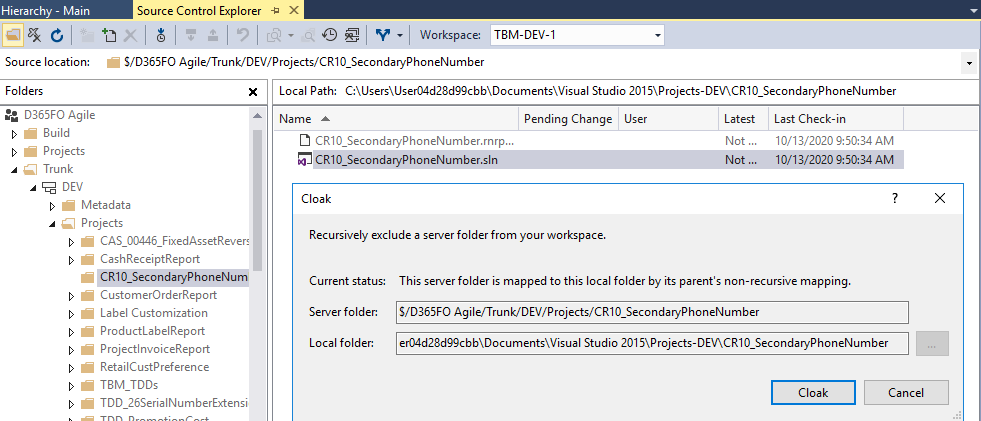
I don't understand what's going here. I don't want to cloak the folder. I'm just trying to open any element in DEV branch, make changes, and merge to Main. What did I do wrong?
Thank you.





