web
You’re offline. This is a read only version of the page.
close
Skip to main content

Notifications

Announcements

No record found.

Community site session details

Community site session details

Session Id :
Microsoft Dynamics AX (Archived)

"Azure AD Tenant" in Power BI Configuration on VM for D365FO

(0) ShareShare
ReportReport
Posted on by 30

Hi All,

I am using VM for D365FO.

I almost done Power BI configuration with D365FO. I am only facing issue with "Azure AD Tenant" in Power BI Configuration.

*** Mostly in real scenario we put Organization Tenant in Azure AD Tenant means domain name of the company. example : <companyname.com>

Can you please let me know what i need to mention in Azure AD Tenant.
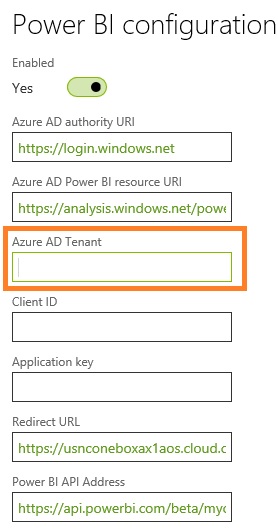
PowerBIConfig.jpg

Please give me more shed on this.

Thanks!

*This post is locked for comments

I have the same question (0)
  • Verified answer
    Sohaib Cheema Profile Picture
    49,438 User Group Leader on at

    keeping this very short, this would be your tenant after you alias

    abc@yahoo.com

    here yahoo.com is tenant and abc is alias.

    similarity for MSOL its usually like UserName@OrganzationName.OnMicrosoft.com

    Thus, this should be OrganzationName.OnMicrosoft.com (azure tenant ID)

  • @rp@n Profile Picture
    30 on at

    Thanks Sohaib,

    I did the same thing now and before also. but getting below error:

    errorPBI.jpg

    How to resolve this issue?

    Please give me more shed on this.

    Thanks!

  • Verified answer
    Sohaib Cheema Profile Picture
    49,438 User Group Leader on at

    good to see screenshot.

    i wounder why you made question in false way if you were knowing answer already :)

    anyways do what message is suggesting. provide a tenant from same domain. you might be using ax with domain named yahoo.com and providing tenant in Power BI as Gamil.com

    watch the tenant from your admin id and provide a correct value which is supported by Power BI

  • @rp@n Profile Picture
    30 on at

    Thanks Sohaib,

    Sorry, I don't know the answer.

    Sorry not understand.

    "you might be using ax with domain named yahoo.com and providing tenant in Power BI as Gamil.com

    watch the tenant from your admin id and provide a correct value which is supported by Power BI"

    Kindly elaborate me.

    Thanks!

  • Verified answer
    Sohaib Cheema Profile Picture
    49,438 User Group Leader on at

    what is your admin user id with alias and domain name that you use to login on ax..?

  • @rp@n Profile Picture
    30 on at

    Thanks Sohaib

    6087.user.jpg

    Please give me more shed on this.

    Thanks!

  • Verified answer
    Sohaib Cheema Profile Picture
    49,438 User Group Leader on at

    take all the part after @... and paste that in Power BI configuration

    also note that some of power BI content packs do not work in old versions of MSDyn365FO. some work with latest version. some don't work with old version.

  • @rp@n Profile Picture
    30 on at

    yes, i mentioned in Azure Ad Tenant = arpan@... (all) in Power BI Configuration.

    But still getting an error.

    Thanks!

  • Verified answer
    Sohaib Cheema Profile Picture
    49,438 User Group Leader on at

    That's what i am saying after @

    Please don't put arpan@

    Put the part , only after @

  • @rp@n Profile Picture
    30 on at

    Okay, i will check.

Under review

Thank you for your reply! To ensure a great experience for everyone, your content is awaiting approval by our Community Managers. Please check back later.

Helpful resources

Quick Links

Responsible AI policies

As AI tools become more common, we’re introducing a Responsible AI Use…

Neeraj Kumar – Community Spotlight

We are honored to recognize Neeraj Kumar as our Community Spotlight honoree for…

Leaderboard > 🔒一 Microsoft Dynamics AX (Archived)

#1
Martin Dráb Profile Picture

Martin Dráb 4 Most Valuable Professional

#1
Priya_K Profile Picture

Priya_K 4

#3
MyDynamicsNAV Profile Picture

MyDynamicsNAV 2

Last 30 days Overall leaderboard

Featured topics

Product updates

Dynamics 365 release plans



