web
You’re offline. This is a read only version of the page.
close
Skip to main content

Announcements

News and Announcements icon
Community site session details

Community site session details

Session Id :
Customer Service forum

Microsoft Forms Pro

(0) ShareShare
ReportReport
Posted on by Microsoft Employee

Hi Mates,

I'm trying to explore on Microsoft Forms Pro and facing issue while connecting Forms Pro with Dynamics 365 environment. 

Problem: On Click of cog icon, it should let user choose the environment where they would like to connect with, which is not made visible to me while survey creation and need to find a way to connect forms pro with D 365.
pastedimage1562742170628v1.png

Can you help me connect Forms pro with D 365 instance. 

Thanks,

Leo

I have the same question (0)
  • Suggested answer
    Wouter Madou Profile Picture
    3,392 on at

    Hi,

    To connect Forms Pro with D365 you'll need to do so through MS flow.

    You will find templates there from which you can start or create your own.

    So first, create your survey and secondly, create your trigger flow to send it.

  • LeoFernandas Profile Picture
    Microsoft Employee on at

    Hi Wouter,

    Thank you for letting me know this. I followed the steps you have mentioned and these are the steps I used to get Survey created from Forms pro in D 365.

    1) Created a new Survey in Forms Pro
    2) Logged into https://us.flow.microsoft.com
    3) Searched for Forms Pro in Connectors and opened it
    4) Used Predefined template named Send Survey when a lead is qualified in D 365
    5) Selected the environment where this flow should be triggered from

    pastedimage1562751177574v2.png

    When I click on Create Flow, this throws an error that definition contains invalid parameter. Hence, I clicked on Edit in advance mode where I was unable to select the survey I created from Forms pro.

    Would you please help me find the survey created in Forms pro?

    Thanks,
    Leo

  • Suggested answer
    Wouter Madou Profile Picture
    3,392 on at

    I'd recommend to create a second question in the forum to have a better response.

    Is your forms pro survey in the same tenant as your ms flow?

    ie: If you click on the top left 'show me all my apps' icon, and you click on the forms pro and on the flow icon, do you see them there or do you need to switch between accounts?

  • LeoFernandas Profile Picture
    Microsoft Employee on at

    Hi Wouter,

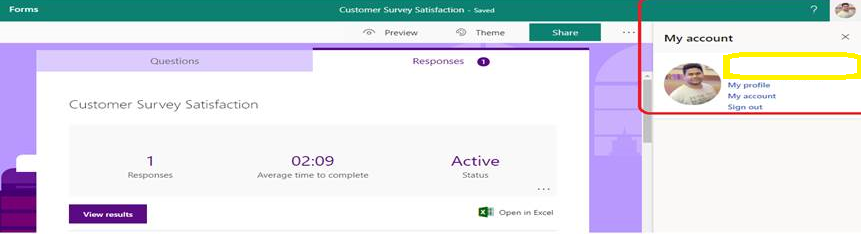
    The issue I'm facing is I don't see any organization which is connected to forms pro while I can see it from MS Flow. I would like to know that I need to do any settings I need to update to check connected organization name from cgo icon in forms pro.

    pastedimage1562753726374v1.png

    I guess, since forms pro is not connected any organization, I ain't able to select survey from ms flow where this is connected some to some organization.

    Could you help me resolve this please.

    Thanks,

    Leo

  • Justin Wilkinson Profile Picture
    1,338 on at

    Hey I have had issues also - firstly you need to build a model driven app like you would get added in by default if you had VoC. The best articles on Forms pro by a mile is the blog posts by Megan walker: meganvwalker.com/.../

    Also - you can change environments but you have to click back on forms pro at the top left a few times to be taken to the survey summary screen. I have had issues also if it has been done in a demo tenant.

  • Suggested answer
    LeoFernandas Profile Picture
    Microsoft Employee on at

    Hi All,

    Thanks a lot for your answers. I'm able to sort this issue out and the reason why this cog icon was not visible to me is forms pro license didn't enable for me. The cog icon would be available to those who are licensed to access to forms pro, where you can select the organization you want to work with and start developing your surveys.

    Thanks,

    Leo Fernandas

  • LeoFernandas Profile Picture
    Microsoft Employee on at

    Hi All,

    Thanks for your responses! I'm able to sort this issue out. The reason why cog icon was not visible to is form pro license was not enabled to me and this icon would only be visible to those who have access to forms pro. After enabling this license, you would be able to see this icon where you can switch to the organization you would like to work with and start creating your desired surveys.

    Thanks,

    Leo

Under review

Thank you for your reply! To ensure a great experience for everyone, your content is awaiting approval by our Community Managers. Please check back later.

Helpful resources

Quick Links

November Spotlight Star - Khushbu Rajvi

Congratulations to a top community star!

Forum Structure Changes Coming on 11/8!

In our never-ending quest to help the Dynamics 365 Community members get answers faster …

Dynamics 365 Community Platform update – Oct 28

Welcome to the next edition of the Community Platform Update. This is a status …

Leaderboard > Customer Service

Last 30 days Overall leaderboard

Featured topics

Product updates

Dynamics 365 release plans



