web
You’re offline. This is a read only version of the page.
close
Skip to main content

Notifications

Announcements

No record found.

Community site session details

Community site session details

Session Id :
Customer experience | Sales, Customer Insights,...
Answered

How to add my Business Process Flows to Account Entity Opportunity Form Switch Process Dialog?

(0) ShareShare
ReportReport
Posted on by 80

Hi,

I find myself posting the same Q's as a I see elsewhere because somehow my issue has a unique spin on it.

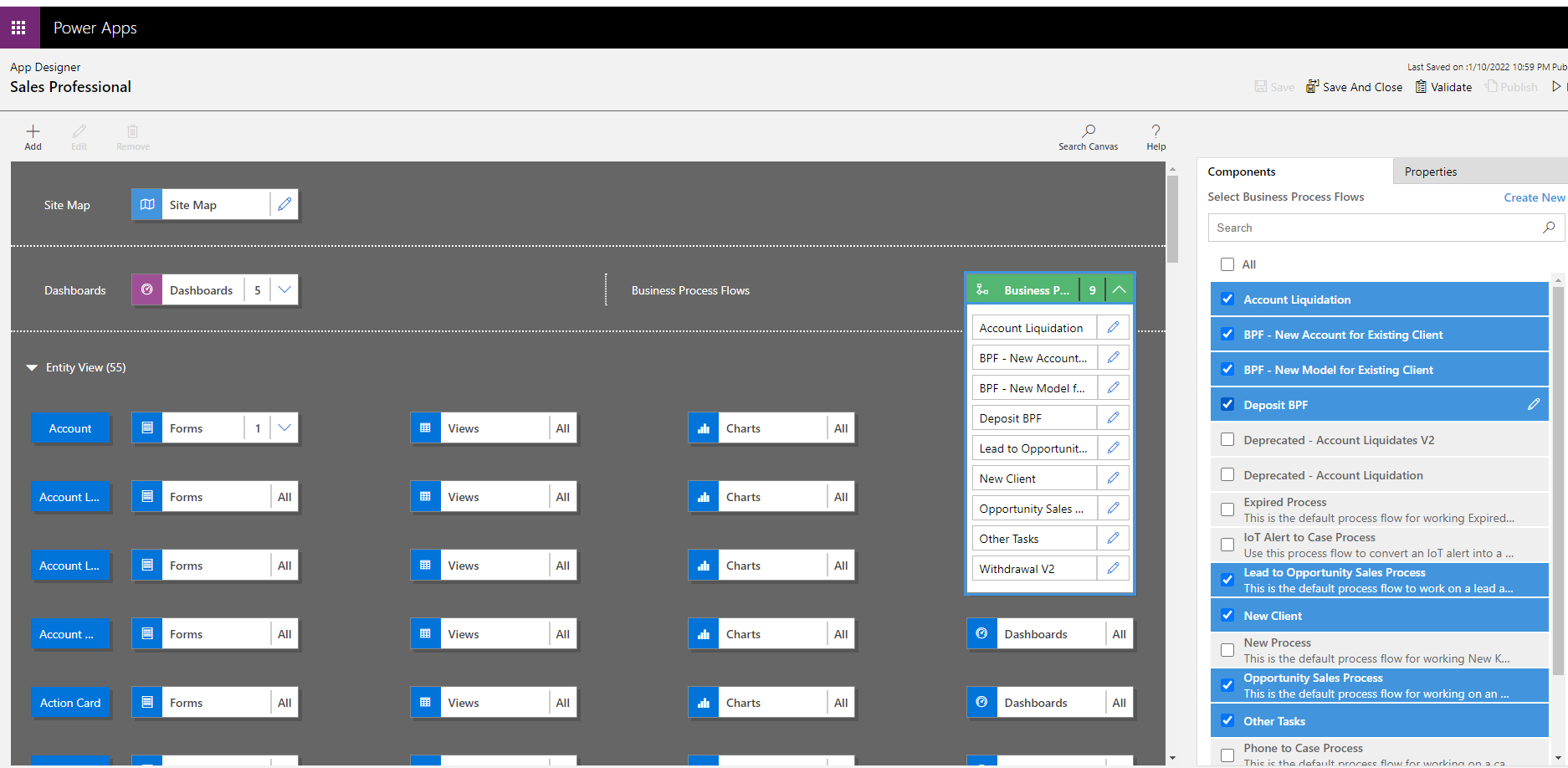
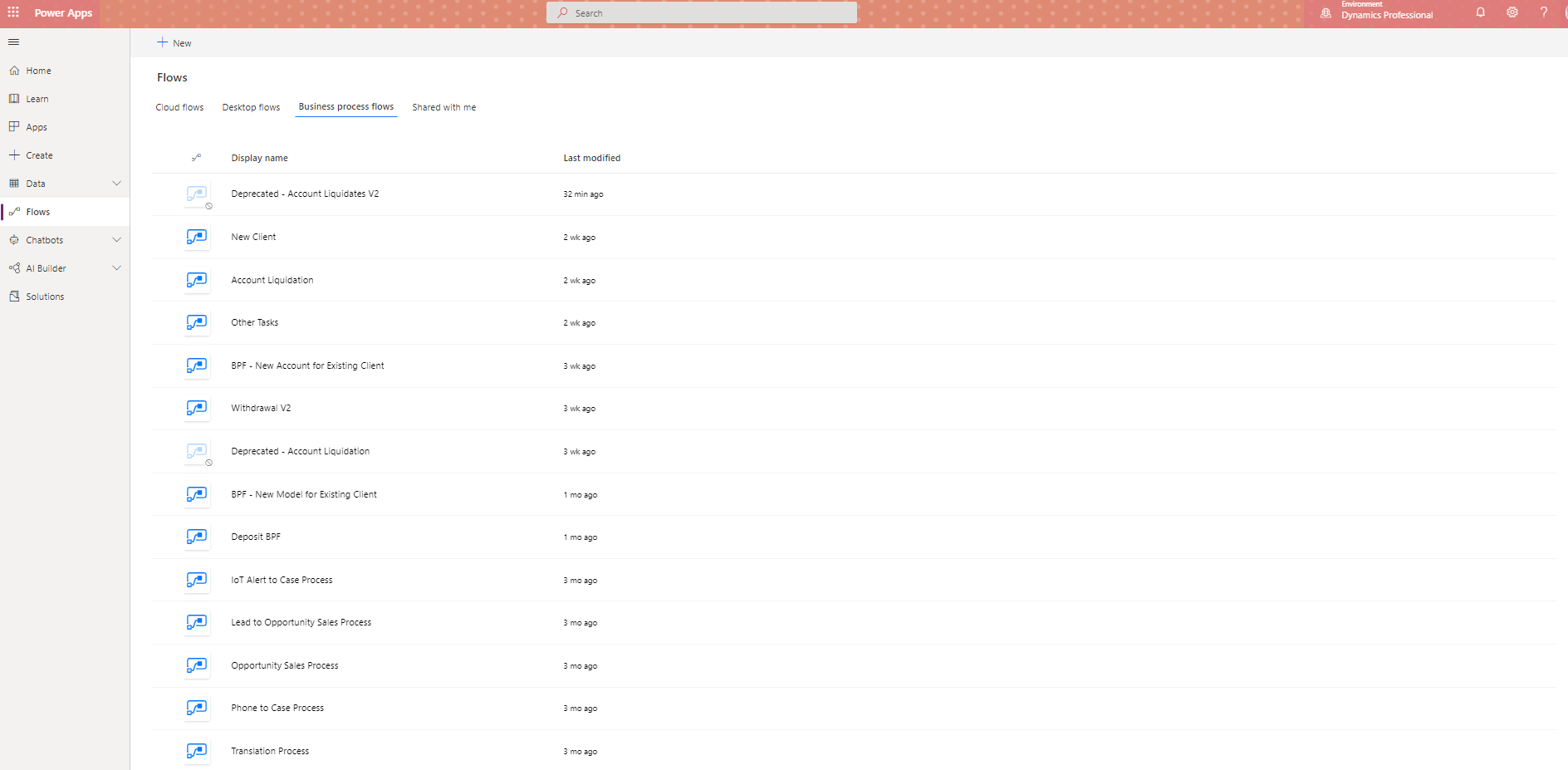
We are beginning to test out the Opportunity and Lead OOTB BPFs, though we began by building our firm's existing processes, so I started in the middle and need to clean up the beginning. As such, I have the main BPFs built. I simply want to enable my coworkers to SWITCH PROCESS from Opportunity to [New Client] or whatever BPF they need.

BPFs:pastedimage1641856943940v1.png
Enabled in MDA:pastedimage1641857019429v2.png

pastedimage1641857063622v3.pngSwitch Process dialog box.

Thanks for the help. I find most Community responses say 'activate your bpf in your app!' and to the best of my knowledge I have done so. I have tried closing the browser. I have tried using Edge.

What should I try next?

Thanks so much,

-Ryan N

I have the same question (0)
  • Suggested answer
    Community Member Profile Picture
    on at

    Hi invintern,

    Please check the following point:

    1. When you create BPF, you related table should be Opportunity.

    pastedimage1641866277344v1.png

    2. Please turn on your new created BPF.

    pastedimage1641866350250v2.png

    3. Add it to your app, save and publish it.

    pastedimage1641866470437v4.png

    Result:

    pastedimage1641866528329v5.png

  • Suggested answer
    Bipin D365 Profile Picture
    28,983 Moderator on at

    Hello,

    I hope you enabled correct security roles for your BPF -

    CR60.PNG

    Please mark my answer verified if this is helpful!

    Regards,

    Bipin Kumar

    Follow my Blog: xrmdynamicscrm.wordpress.com/

  • invintern Profile Picture
    80 on at

    Hello Steve,

    My discrepancy vs. yours is that my BPFs do not use the Opportunity Table. Interesting.

    Until now I had assumed that I could run any BPF from any Account through Switch Process and I see now that is not the case. I currently have setup relationships between the BPF tables and Account, which mostly satisfied my needs until now...

    I suppose what I am looking for is a way to run my existing BPFs from that Switch Process dialog box within an Opportunity.

    To make it so that this Opportunity can be Closed as Won and move onto our next step, which is one of about 7 BPFs. A seamless way for my team to begin any BPF (their work processes) from that Opportunity page.

    I see resources about using Java to switch BPFs, though I am not sure it will work considering none of the BPFs use Opportunity Table.

    Thank you for the help. Am I going to need to rework my bpfs to work off the Opportunity Table, even though I have designed the BPFs without? Do you know of any other way I could try and allow the start of my BPFs through Opportunity Table? 

  • invintern Profile Picture
    80 on at

    Hi Bipin,

    Sorry for not showing earlier. I am pretty sure I have my BPFs' security roles enabled. My Team will use Sales Team Member.pastedimage1641922164111v1.png

    I am always open to tips on my naming conventions too. 

    Thanks for the reply Bipin.

  • Verified answer
    Community Member Profile Picture
    on at

    Hi invintern,

    Yes, you need to design a new BPF for Opportunity table. As far as I know, there is no way to start the BPFs related to other tables in the Opportunity record.

  • Verified answer
    Bipin D365 Profile Picture
    28,983 Moderator on at

    Hi,

    Unfortunately, only Opportunity Entity BPF can be shown on Opportunity switch to process opetion.

    You can't show other Entity BPF in Opportunity so you will have design your BPF for Opportunity entity to be shown in Switch to Process option.

    Please mark my answer verified if this is helpful!

    Regards,

    Bipin Kumar

    Follow my Blog: xrmdynamicscrm.wordpress.com/

Under review

Thank you for your reply! To ensure a great experience for everyone, your content is awaiting approval by our Community Managers. Please check back later.

Helpful resources

Quick Links

Responsible AI policies

As AI tools become more common, we’re introducing a Responsible AI Use…

Neeraj Kumar – Community Spotlight

We are honored to recognize Neeraj Kumar as our Community Spotlight honoree for…

Leaderboard > Customer experience | Sales, Customer Insights, CRM

#1
Tom_Gioielli Profile Picture

Tom_Gioielli 170 Super User 2025 Season 2

#2
#ManoVerse Profile Picture

#ManoVerse 70

#3
Jimmy Passeti Profile Picture

Jimmy Passeti 50 Most Valuable Professional

Last 30 days Overall leaderboard

Product updates

Dynamics 365 release plans