web
You’re offline. This is a read only version of the page.
close
Skip to main content

Notifications

Announcements

No record found.

Community site session details

Community site session details

Session Id :
Service | Customer Service, Contact Center, Fie...
Answered

Power BI Connection

(0) ShareShare
ReportReport
Posted on by 45

Dear Community,

i have the Problem, that i can load my Data from Guides-Instance to Power BI Desktop, but i cannot see or filter the data. I have completed the instructions for several times:
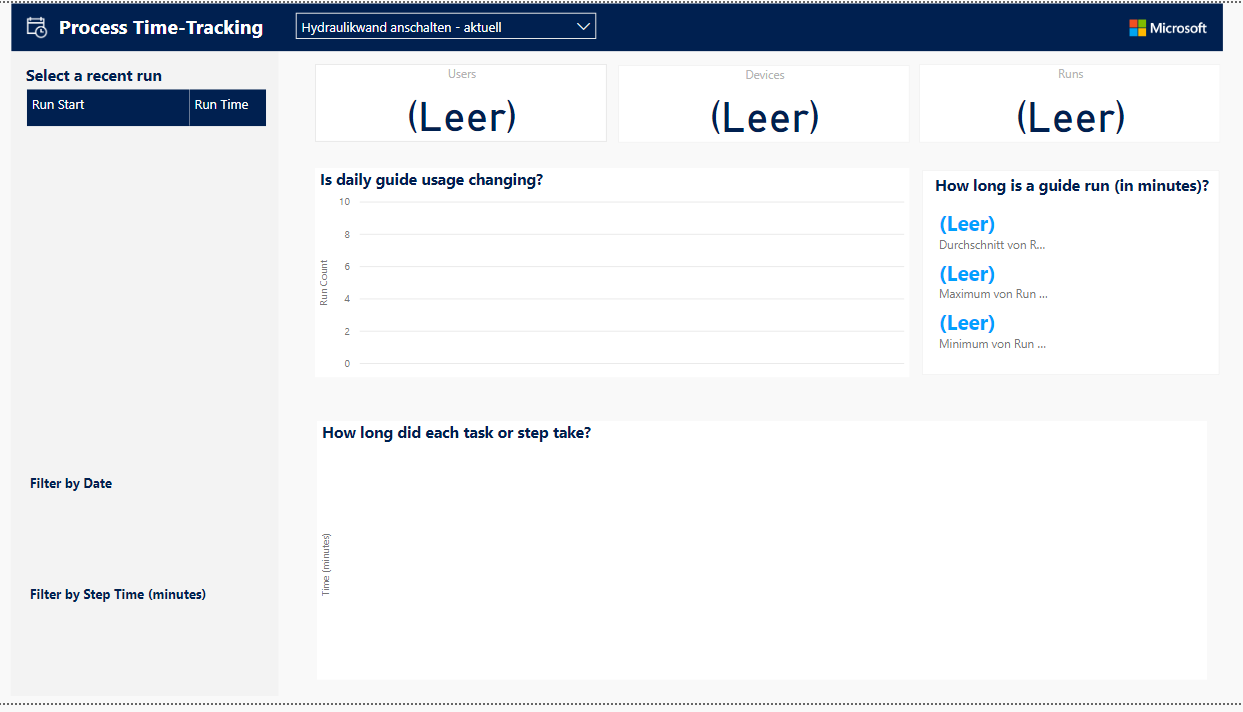
Hydraulikwand.PNG

Is it necessary to do some configuration in powerapp admin center, in power bi or guides?

I have done the steps that are written in guides analytics @ guides app.

Thanks a lot for answering

GRich

I have the same question (0)
  • DavePinch Profile Picture
    on at

    Hi GRich,

    You should not have to do any special configuration beyond the instructions. First, can you confirm that you have operated a guide in operator mode? You may see the behavior shown in your screenshot if you haven't yet run a guide and generated telemetry. Once you have generated some telemetry, open the PowerBI desktop app and select the data tab as highlighted below. Confirm you see some data.

    pastedimage1599239358812v2.jpeg

    However, if you don't see data and you know you have generated some telemetry, then there may be an upstream issue. To help diagnose, log into the Guides portal and go to the telemetry tab.  Note: if you haven't bookmarkeded your portal, go to your instance URL (found on the Analyze tab of the Guides desktop app) and look for the portal link. Then look for the telemetry link on the left-side menu as shown in the second screen below.

    pastedimage1599240965153v4.png 

    pastedimage1599240185332v3.jpeg

    Do you see data here that is not showing up in PowerBI?

  • GRich Profile Picture
    45 on at

    Hi Dave,

    thanks for your answer.

    Now I can see the Data from Guides in Power BI as you have described.

    In my Charts I cannot see the Data. The connections seen in the picture are done:

    Verbindungen_5F00_BI_5F00_Guides.JPG

    Thanks a lot for your help.

    Best Regards

    GRich

  • Verified answer
    DavePinch Profile Picture
    on at

    Thanks GRich. I will reach out to the data engineering team. In the meantime (just so I am very clear), can you explicitly confirm the following:

    1. You see data in the Events table and Guides tables, but:

    2. No data appears in the Process Tracking report.

    3. No data appears in the Guides Usage report.

    What happens when you select the filter option on top of the reports (the drop-down on the blue band on the top of the report)? Are your guides listed?

  • GRich Profile Picture
    45 on at

    Hallo DavePinch,

    thanks for your answer. I can answer your questions as following:

    1. I see data in Guides and SourceEvents. I have no data in Events and Runs.

    pastedimage1599636068057v1.png

    2. No data appears in Process Time-Tracking and 

    3. no data appears in Guides Usage

    I can choose all guides step by step advises and the number "Guides" changes, but the rest of the data-boxes are empty.

    pastedimage1599636280034v2.png

    I do not know my status "guides listed or not". I work in a big company and we have a valid guides license and a valid license for power bi desktop.

    Thanks a lot and have a nice day

    GRich

  • DavePinch Profile Picture
    on at

    Thanks GRich. No worries on "guides listed or not" - I wanted to know if you could see your guides in the drop-down menu (and it appears you can.) Last thing - my apologies but I am not clear from the thread. Can you confirm that you have used your guides as an operator - by this I mean opening the guide on the HoloLens and using the guide as an operator (not an author). The  report is filtered to show events from operator mode.

  • GRich Profile Picture
    45 on at

    Hallo DavePinch, no problem.

    Yes I did the most of the guides for several times in operator mode.

    Perhaps you have further ideas. Maybe we also can have a teams call that i can show it to you.

    Thanks a lot and have a nice day.

    GRich

  • Suggested answer
    DavePinch Profile Picture
    on at

    Thank you GRich and no worries, we will get this solved. Let's try one more thing. There is a known issue in older versions of the report in which authors acting as operators do not appear. This was fixed in July in version 1.0.0.3 of the report. To confirm you are on this version, go to the Getting Started tab and look for the small version number in the lower-left corner. If you are on an older version, download the latest template from https://www.microsoft.com/en-us/download/details.aspx?id=57767 and try again.

    pastedimage1599764179485v1.png

  • GRich Profile Picture
    45 on at

    Hallo Dave,

    thank you for the answer. I have downloaded the new Version 1.0.0.3 and when i want to start it with my power bi desktop i geht the following mistake:

    "Fehler beim Speichern von Änderungen auf dem Server. Zurückgegebener Fehler: "Der Ausdruck in der Partition "n/a" in Tabelle "n/a" verweist auf eine unbekannte Entität"

  • DavePinch Profile Picture
    on at

    Thank you for trying - and thank you for your patience! Let's go with your suggestion and do a Teams call with engineering. I sent you a private message on this forum to start coordination. Once fixed, we can return back to this thread and post any useful information to others in the community.

  • Community Member Profile Picture
    on at

    This thread is really helpful since I have the same problem as GRich where my data cannot load from my guides to the power Bi desktop. Therefore, I would be really grateful if you can share and finish this thread with the solutions that both of you have discussed.

    Have a nice day and thank you so much :)

Under review

Thank you for your reply! To ensure a great experience for everyone, your content is awaiting approval by our Community Managers. Please check back later.

Helpful resources

Quick Links

Responsible AI policies

As AI tools become more common, we’re introducing a Responsible AI Use…

Neeraj Kumar – Community Spotlight

We are honored to recognize Neeraj Kumar as our Community Spotlight honoree for…

Leaderboard > Service | Customer Service, Contact Center, Field Service, Guides

#1
Tom_Gioielli Profile Picture

Tom_Gioielli 61 Super User 2025 Season 2

#2
Siv Sagar Profile Picture

Siv Sagar 52 Super User 2025 Season 2

#3
Daniyal Khaleel Profile Picture

Daniyal Khaleel 42 Most Valuable Professional

Last 30 days Overall leaderboard

Featured topics

Product updates

Dynamics 365 release plans



