web
You’re offline. This is a read only version of the page.
close
Skip to main content

Announcements

No record found.

News and Announcements icon
Community site session details

Community site session details

Session Id :
Customer Service forum

Combine Phone Call Data with Email Addresses

(0) ShareShare
ReportReport
Posted on by 250

Hello,

We want to pull a report that shows who called in on a specific day along with their email address.  The call data was easy enough to get but we have not been able to include the email address.

We tried using Phone Calls with Activity Parties but did not get any data returned in our regarding(contact) fields.  The phone calls always have the call from field populated. We also tried using just the Activities entity but could not get names and email addresses together there either.

Any suggestions?

Thanks,

Beth

Categories:
I have the same question (0)
  • Alex Fun Wei Jie Profile Picture
    33,628 on at

    Hi

    are you using oob report or ssrs?

  • LuHao Profile Picture
    40,892 on at

    Hi JonesEA_2018,

    Do you want to list their contacts name and email addresses by phone number?

    If so, please set Report like this:

    6787.2.JPG

    For the Email Addresses of Contact you need to select Regarding (Contact) in Record type, Email in Column.

    6787.2.JPG

    For details on how to create a report, please refer to this article: https://crmbook.powerobjects.com/basics/analytics/microsoft-dynamics-crm-report-wizard/

    If I misunderstand your needs, please correct me.

    Hope this helps.

    Best Regards,

    Lu Hao

  • JonesEA_2018 Profile Picture
    250 on at

    Hi Wei,

    We're using an OOB report.

  • JonesEA_2018 Profile Picture
    250 on at

    Hi Lu Hao,

    This is what we tried to do.  None of the fields we selected from regarding(contant) had data in them for the people who called phone call.  For the people who emailed this pulled their data.

  • Alex Fun Wei Jie Profile Picture
    33,628 on at

    Hi Jones,

    Please check the phonecall data " regarding" field, are they link to contact?

  • Suggested answer
    LuHao Profile Picture
    40,892 on at

    Hi JonesEA_2018,

    I recommend using advanced find to see if you could search for relevant contact data.

    1) First, we set the search criteria as follows:
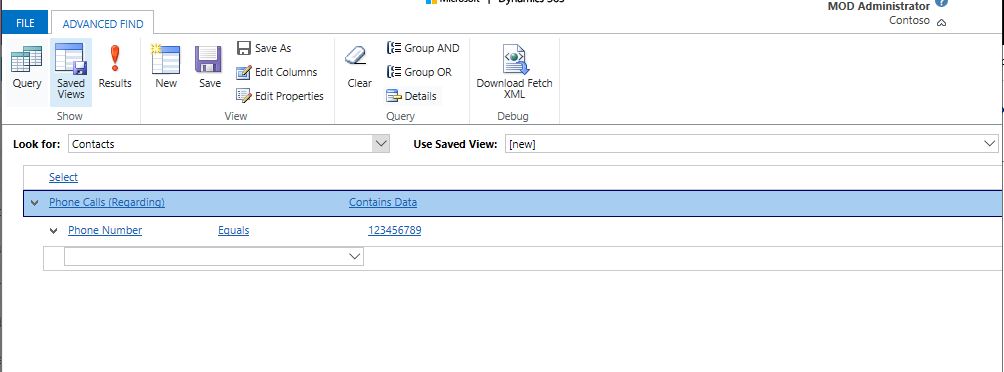
    0825.2.JPG

    Manually enter a contact's phone number to see if it can be found.

    2) Then, we set the search criteria as follows:
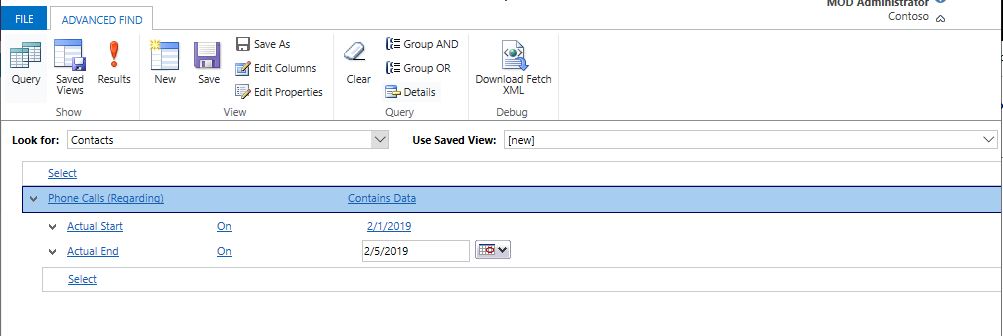
    0825.2.JPG

    Manually enter the start date and end date of the phone activity to see if you can search for contacts who have a call during this time period.

    Please check if the above two points are successful.

    Hope this helps.

    Best Regards,

    Lu Hao

  • JonesEA_2018 Profile Picture
    250 on at

    Hi Wei,

    The Regarding fields are a mix of accounts, contacts, and cases.  Mostly accounts.

  • JonesEA_2018 Profile Picture
    250 on at

    This does work, Lu Hao.  

    The regarding fields are a mix of mostly accounts with just some being contacts or cases so we're not getting the data we want. For now we've decided to use two reports, export the data, then use vlookup to find the email addresses for people who called in the day before.

  • Suggested answer
    LuHao Profile Picture
    40,892 on at

    Hi JonesEA_2018,

    The type of record directly associated with Case is Customer. Customer is a type of record, relationship between a customer and a partner in which either can be an account or contact.

    However, Customer cannot be directly used as a record type in the report.

    So we could set Regarding (Account), Regarding (Contact), and Regarding (Case) in the report. This allows you to search through all three types of records. Just add these three record types to the column.

    3107.1.JPG    0804.4.JPG    1464.5.JPG

    3107.1.JPG    7181.2.JPG

    Hope this helps.

    Best Regards,

    Lu Hao

  • JonesEA_2018 Profile Picture
    250 on at

    Thanks, Lu Hao.

    Even with adding all the different regarding fields I don't get exactly what I want.

Under review

Thank you for your reply! To ensure a great experience for everyone, your content is awaiting approval by our Community Managers. Please check back later.

Helpful resources

Quick Links

November Spotlight Star - Khushbu Rajvi

Congratulations to a top community star!

Forum Structure Changes Coming on 11/8!

In our never-ending quest to help the Dynamics 365 Community members get answers faster …

Dynamics 365 Community Platform update – Oct 28

Welcome to the next edition of the Community Platform Update. This is a status …

Leaderboard > Customer Service

Last 30 days Overall leaderboard

Featured topics

Product updates

Dynamics 365 release plans
