web
You’re offline. This is a read only version of the page.
close
Skip to main content

Announcements

No record found.

News and Announcements icon
Community site session details

Community site session details

Session Id :
Finance | Project Operations, Human Resources, ...
Suggested Answer

Unable to add Purchase Order (PO) number to Pending Vendor Invoice (using Power Automate)

(0) ShareShare
ReportReport
Posted on by 5

hello, We are using Power Automate and AIBuilder and pushing vendor invoices into D365. We are successful in reading the vendor invoices using AI Builder and pushing it into D365 - the extracted invoice fields and the invoice preview is visible in "Pending Vendor Invoice" in D365. One thing we are missing is the ability to insert the Purchase order value into Pending Vendor invoice in D365


The approach we used to create the invoice in D365 --> using the PA connector "Fin & Ops Apps (D365)" and Action "Create record" and Entity "VendorInvoiceHeader". This entity does not have a PO number field so we are not able to pass the PO we have extracted from the invoice while creating the invoice in D365.


Is this by design? or should i being using a different entity while creating the invoice? or do i have to add another step in PA to add the PO to the vendor invoice created? Please let me know if anyone has been able to do this.


Note: we are using a trial instance of D365.

After the invoice is created in D365, i am able to manually select the PO number to the invoice.

thank you

I have the same question (0)
  • Sukrut Parab Profile Picture
    71,735 Moderator on at

    VendInvoiceHeaderEntity does have purchase order number field which is mapped to vendInvoiceInfotable.

    Are you not able to see it on designer ? Can you check  entity visual studio and see if purahchaseOrderNumber field is available there.

  • rosirosss Profile Picture
    5 on at

    thank you Sukrut for your response.

    I don't know much about the D365. So I am not setup to check D365 entity and figure out if the field is present. But here is some additional information that i have checked out

    This is the power automate action where i am creating a record using the entity. here the PO number field does not appear for us to pass the value.

    pastedimage1628836522916v1.png

    Below is an action where we are retrieving the vendor invoice using the same entity. if you notice the output, you can see that Purchase order number field exists.

    pastedimage1628836788877v2.png

    pastedimage1628837318962v1.png

    Looking at this i would think that the entity as such has the PO number field available - but while trying to create the invoice from the power automate perspective, the field is not available.

  • rosirosss Profile Picture
    5 on at

    when Power automate runs, this is the output that it posts from the create record action. here i can see the PurchaseOrderNumber field. so the field exists in the entity and its being passed as blank.

    But on the Power automate UI, we can see that the field is missing. Is this a power automate bug or by design?

    {
      "@odata.context": "">dynamicsax-si.azconn-si.p.azurewebsites.net/$metadata
      "@odata.etag": "W/\"JzEsNjg3MTk0OTc4NTk7MSw2ODcxOTQ3NzY4NTswLDAn\"",
      "ItemInternalId": "(dataAreaId='usmf',HeaderReference='TINV-19004819')",
      "dataAreaId": "usmf",
      "HeaderReference": "TINV-19004819",
      "InvoiceRoundOff": 0,
      "CashDiscountDate": "2019-12-20T12:00:00Z",
      "FixedRate": "No",
      "ServiceCodeOnDeliveryAddress": "No",
      "ApproverPersonnelNumber": "",
      "DimensionDisplayValue": "",
      "TermsOfPayment": "Net30",
      "BusinessDocumentSubmissionId_W": "00000000-0000-0000-0000-000000000000",
      "InvoicePaymentReleaseDate": "1900-01-01T00:00:00Z",
      "CTeType": "Normal",
      "VariancePersonnelNumber": "",
      "DeliveryFreightChargeTerms": "Prepaid",
      "BankAccount": "",
      "GSTImportDeclarationNumber": "",
      "DeliveryTransportBrand": "",
      "DocumentNumber": "",
      "VendorAccount": "US-104",
      "MethodOfPayment": "CHECK",
      "FiscalDocumentSeries": "",
      "SettleVoucher": "None",
      "EndDateTime": "1900-01-01T00:00:00Z",
      "FiscalOperationPresenceType": "DoesNotApply",
      "BankConstantSymbol": "",
      "FiscalEstablishmentId": "",
      "ImportedAmount": 0,
      "InvoiceGroup": "",
      "EnterpriseNumber": "",
      "Warehouse": "13",
      "Comment": "",
      "IsBatch": "No",
      "PurchaseOrderNumber": "",
      "PurchReceiptDate_W": "1900-01-01T12:00:00Z",
      "UUID": "",
      "VendorPaymentFineCode": "",
      "InvoiceReceivedDate": "2019-12-13T12:00:00Z",
      "VarianceApprovedDateTime": "1900-01-01T00:00:00Z",
      "CashDiscountCode": "1%D07",
      "InvoiceDate": "2019-12-13T12:00:00Z",
      "TotalDiscount": 9,

    Purchase order number field seems to be missing here..(between Batch and Receive Document Date)
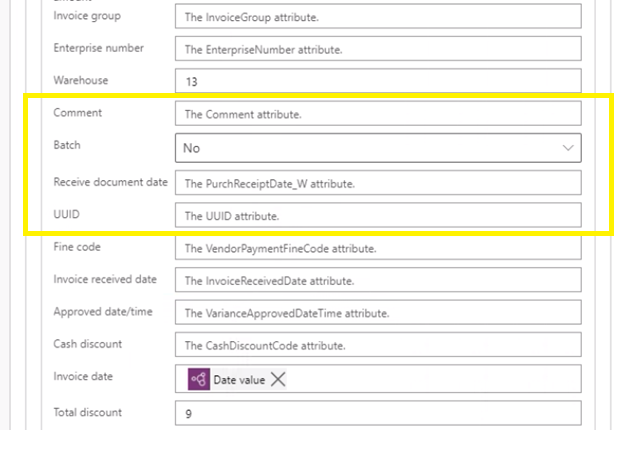
    pastedimage1628840537775v2.png

  • Henrik Mozart Profile Picture
    Microsoft Employee on at

    The Field Purchase order number is indeed part of the VendorInvoiceHeader Entity, However, it is set to" Do not allow edit" on create, therefore it not show in power automate.

    The structure is a bit more complex than just enabling the field. As 1 Invoice can be matched to many Purchase orders. So you will see that within the GUI, you see a + and it then lists available PO's .  The ones you select are populated into vendInvoiceInfotable as mentioned in a post above.

  • Faisal alracheed Profile Picture
    15 on at

    Hi Sukrat , the PO exists in vendor invoice header, however from power automate i cant find it as well  in the entity.

  • Suggested answer
    saurabh bharti Profile Picture
    15,045 Moderator on at

    Check this entity this allows you to import product receipt and PO both

    exploredynamics365.home.blog/.../

  • apdemots Profile Picture
    5 on at

    Hi did you manage to find a way around this? Currently stuck on the same problem

Under review

Thank you for your reply! To ensure a great experience for everyone, your content is awaiting approval by our Community Managers. Please check back later.

Helpful resources

Quick Links

Introducing the 2026 Season 1 community Super Users

Congratulations to our 2026 Super Stars!

Meet the Microsoft Dynamics 365 Contact Center Champions

We are thrilled to have these Champions in our Community!

Congratulations to the March Top 10 Community Leaders

These are the community rock stars!

Leaderboard > Finance | Project Operations, Human Resources, AX, GP, SL

#1
Giorgio Bonacorsi Profile Picture

Giorgio Bonacorsi 616

#2
André Arnaud de Calavon Profile Picture

André Arnaud de Cal... 460 Super User 2026 Season 1

#3
Syed Haris Shah Profile Picture

Syed Haris Shah 331 Super User 2026 Season 1

Last 30 days Overall leaderboard

Product updates

Dynamics 365 release plans



