web
You’re offline. This is a read only version of the page.
close
Skip to main content

Announcements

No record found.

News and Announcements icon
Community site session details

Community site session details

Session Id :
Finance | Project Operations, Human Resources, ...
Suggested Answer

Total accounts related information display when not using Total Accounts

(0) ShareShare
ReportReport
Posted on by

The clients are not using Total accounts at all.

However, I find when I click on the "Total accounts" on the top menu

pastedimage1598268196543v1.png

the page displays data with some values
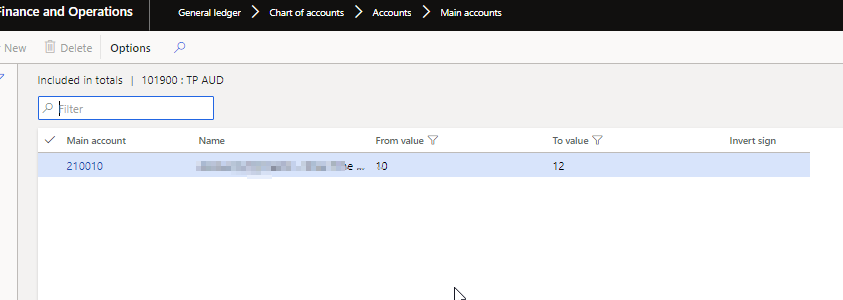
pastedimage1598268274344v3.png

I am not too sure where these values are picked up from

We are not using any totalling accounts at all. All accounts belong to either Revenue, Expense, Asset, Liability or Equity only

Any idea where these are coming from.

Thanks

I have the same question (0)
  • André Arnaud de Calavon Profile Picture
    303,730 Super User 2026 Season 1 on at

    Hi JacksNZ,

    Someone should have entered these details. They are not populated automatically. What is the account type of this main account where you see this totals entry?

  • JacksNZ Profile Picture
    on at

    Thanks Andre for responding.

    As I said, accounts it appears are all Assets, Liabilities or Expenses.

    Strangely, I find this page above is same as the page that appears when you have Total Dimensions values in financial dimensions

    We have some financial dimensions that have been set up as totalling dimensions

    but it is quite bizarre that these values appear against some GL main accounts -

    any ideas? thanks

  • Sukrut Parab Profile Picture
    71,735 Moderator on at

    I have  environment with contoso demo data and I see when you create new account on main account form and click total account  the data automatically shows up.

    Here is my observation - when you create new account  say 16234567 (just a random value )  and if any main account with account type total exist  (169999- PROJECT NET WIP in demo contoso data)  starting with 16* then its shows that account  on the form. I haven't checked the details why system does that.

    Similarly if you create account starting with 12* main account of type total starting with 129* is selected.

  • JacksNZ Profile Picture
    on at

    Thanks Sukrut,

    In our case, there are no Total accounts. All accounts are either Asset/Liability/Equity/Revenue/Expense.

    What I noticed is that we have created a few  Totalling dimensions-that is within a custom dimension called, say  Division, we have added a few totalling dimensions, which make up of a few values from within the same division.

    I suspect this may have triggered this display but still feel it is a bug.

  • Sukrut Parab Profile Picture
    71,735 Moderator on at

    That's sounds right . If you want to take a look at logic written In the init method of the form which gets open when you click total account button.

  • Suggested answer
    Ludwig Reinhard Profile Picture
    Microsoft Employee on at

    Hi JackNZ,

    You can make use of the total accounts when you design your financial reports with the financial/management reporter.

    Over the last years I have not seen many companies making use of total accounts because you can easily calculate the totals of various accounts by making use of the CAL function in the financial report designer.

    The 'value' of using total accounts looks thus rather small if I take the time and effort into account it takes to set them up and maintain them but they are an option to use if you like to design your financial reports this way.

    Best regards,

    Ludwig

  • JacksNZ Profile Picture
    on at

    Thanks Dr Ludwig for the response.

    Our issue is very similar to the one Sukrut above has identified.

    I do not need and do not use Totalling accounts. but I find some strange values against some GL accounts (Liability/Expenses/Assets) accounts when I hit the "Total accounts" button on the top menu.

    I notice that these values are similar to the ranges that we have used in Totalling dimensons within Financial dimension values. For now, I believe it is a bug and am escalating to Microsoft.

Under review

Thank you for your reply! To ensure a great experience for everyone, your content is awaiting approval by our Community Managers. Please check back later.

Helpful resources

Quick Links

Introducing the 2026 Season 1 community Super Users

Congratulations to our 2026 Super Stars!

Meet the Microsoft Dynamics 365 Contact Center Champions

We are thrilled to have these Champions in our Community!

Congratulations to the March Top 10 Community Leaders

These are the community rock stars!

Leaderboard > Finance | Project Operations, Human Resources, AX, GP, SL

#1
Giorgio Bonacorsi Profile Picture

Giorgio Bonacorsi 616

#2
André Arnaud de Calavon Profile Picture

André Arnaud de Cal... 460 Super User 2026 Season 1

#3
Syed Haris Shah Profile Picture

Syed Haris Shah 331 Super User 2026 Season 1

Last 30 days Overall leaderboard

Product updates

Dynamics 365 release plans



