web
You’re offline. This is a read only version of the page.
close
Skip to main content

Announcements

News and Announcements icon
Community site session details

Community site session details

Session Id :
Dynamics 365 Community / Forums / Finance forum / Minimum infrastructure...
Finance forum

Minimum infrastructure requirements for Dynamics 365 on-premises

(1) ShareShare
ReportReport
Posted on by 275
I have the same question (0)
  • hoang.nguyen83 Profile Picture
    275 on at

    Hi guys,

    I really appreciate if i can have your opinions on this. That is big help for me

  • Suggested answer
    Community Member Profile Picture
    on at

    Hi,

    if you want the minimum of the minimum you couls install all on one server (CRM app server + sql database), but that's really not recommended. The basic for each environment is one sql server and 1 crm application server.

    technet.microsoft.com/.../hh699831.aspx

  • hoang.nguyen83 Profile Picture
    275 on at

    Thank you for your comments but i actually am talking about Dynamics 365 Operation on-premises

  • Microsoft Dynamics 365 Community 2020 Profile Picture
    5 on at

    Hi Mark,

    Can you share with us your experience about the minimumm Hardware for F&O.

    thx

  • Suggested answer
    Rahul Mohta Profile Picture
    21,046 on at

    Hope you have reviwed

    docs.microsoft.com/.../system-requirements-on-prem

    in my summary

    Min. 9 VM 4to8 cores each

    Cost Cloud LBD Local business data

    1..2m 4.2m

    To sell cloud, calculate 10 yr cost & then compare onprem

    For unreliable internet, get express route

  • Suggested answer
    cfernandez Profile Picture
    40 on at

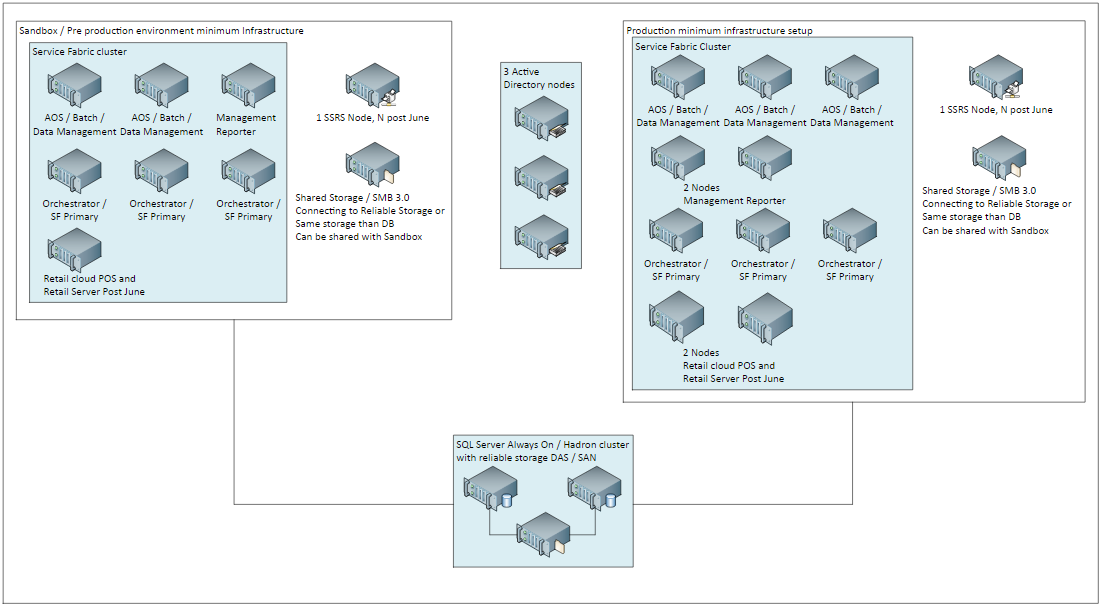
    We have a sandbox environment with the below spec (runs on 2 physical servers in a fail-safe mode with VM migration)

    The performance is just barely bearable!.

    Role Node Count Total
    Cores
    Total
    Memory
    AOS, Data management, Batch 2 4 12
    Management Reporter 1 2 8
    SQL Server Reporting Services 1 2 8
    Orchestrator 3 3 8
    SQL Server
    (or use the production SQL Servers)
    1 4 16

    Do NOT use it for production though!; your users would be after your scalp.

    - and yes, 3 ORCs are mandatory even on a sandbox.see this post for a setup on the cheap -> D365 on the cheap

    regards

  • Suggested answer
    nmaenpaa Profile Picture
    101,172 Moderator on at

    In addition to at least one Sandbox and one Prod system, you still need development systems and a build system, just like with the cloud version. Each concurrent developer needs their own VM, and on top of that you need one build VM.

    For dev/build you use exactly the same systems as in cloud version = onebox environments which you can host locally or in Azure.

    You might also need more than one test system but that you need to discuss with your customer. Additional test systems can be sandboxes hosted on Service Fabric, or oneboxes, depending of your scenario.

Under review

Thank you for your reply! To ensure a great experience for everyone, your content is awaiting approval by our Community Managers. Please check back later.

Helpful resources

Quick Links

November Spotlight Star - Khushbu Rajvi

Congratulations to a top community star!

Forum Structure Changes Coming on 11/8!

In our never-ending quest to help the Dynamics 365 Community members get answers faster …

Dynamics 365 Community Platform update – Oct 28

Welcome to the next edition of the Community Platform Update. This is a status …

Leaderboard > Finance

Last 30 days Overall leaderboard

Featured topics

Product updates

Dynamics 365 release plans