web
You’re offline. This is a read only version of the page.
close
Skip to main content

Announcements

News and Announcements icon
Community site session details

Community site session details

Session Id :
Dynamics 365 Community / Forums / Finance forum / Enter transactions in ...
Finance forum

Enter transactions in a closed fiscal year?

(0) ShareShare
ReportReport
Posted on by 626

D365 - Is it possible to reverse a transaction in a prior year once I have executed the GL > Fiscal Year Close process (assuming the ledger calendar periods are still Open)?

I have the same question (0)
  • Suggested answer
    Ludwig Reinhard Profile Picture
    Microsoft Employee on at

    Hi Oceanfish26,

    Of course.

    As long as the periods are still open you can make adjustments in the previous year.

    The only thing to look out for is that you run the fiscal year closing process once again after you recorded your adjustment to ensure that opening balances are ok.

    Best regards,

    Ludwig

  • Oceanfish26 Profile Picture
    626 on at

    Hmm.  Thanks.  But with the FYC completed (See screenshot), I receive the following error, "The ledger transaction type Ledger journal for account 11-43020-1-00000- cannot be reversed".  When I undo the FYC, I can reverse again.  What do you think is causing this?

    pastedimage1566395697584v1.png

  • Ties Philippi Profile Picture
    962 on at

    When you run a FYC two things are done:

    * all balance transactions get summarized depending on dimension setup in the FYC and transfered to the opening balance

    * all P&L transactions get summarized to the retained earnings.

    If you try to run a transaction reversal this would mean creating inconsistency in the earlier transfered FYC transactions.

    You can do two things:

    1. Enter the correction as a seperate G/L entry without reversing the original transaction and run the FYC process again in which the end result would be that you have an original voucher for the first FYC process and a seperate one for the second correction FYC.

    2. Undo the ealier FYC process, reverse the transaction and redo the FYC process. This would result into having just one new FYC voucher.

    Best regards,

    Ties

  • Oceanfish26 Profile Picture
    626 on at

    Thanks.  That's what I understood as well, but of course limited documentation to get that kind of summary.

  • Suggested answer
    Ludwig Reinhard Profile Picture
    Microsoft Employee on at

    Hi,

    I think the second option "2. Undo the earlier FYC process, reverse the transaction and redo the FYC process" is not supported out of the box.

    One can always re-run the year end closing and D365FO either (a) deletes the prior FYC voucher and creates a new one or (b) it creates an adjustment closing voucher.

    Whether D365FO uses (a) or (b) depends on the GL parameter setting 'delete close-of-year-transaction during transfer'.

    I would recommend not to activate this parameter because many companies use 3rd party datawarehouse systems for analyzing their data. Deleting a transaction might thus result in reconciliation and data analysis issues with those systems. In addition, the deletion of a voucher is not allowed according to most accounting standards.

    Best regards,

    Ludwig

  • Suggested answer
    Ties Philippi Profile Picture
    962 on at

    Hi Ludwig,

    I completely agree with you in regard to the GL parameter 'delete close-of-year-transaction during transfer'.

    However I was talking about the undo parameter when you run a year end close. In older versions this was called Reset I believe.
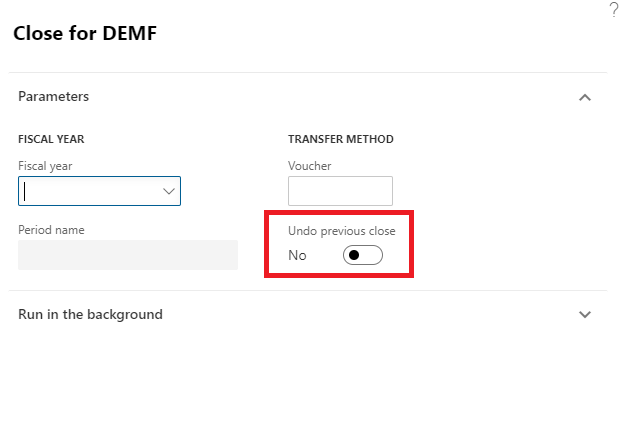
     Parameter-Yes-Undo-Param.png

    The GL parameter does not affect this, just to be sure I tested it in a Contoso company (10.0.4 / PU28). 

    Tests with parameter set to Yes:

    Transactions Before:

    Parameter-Yes-Trans-Before.png

    Transactions after running the job with Undo set to yes:
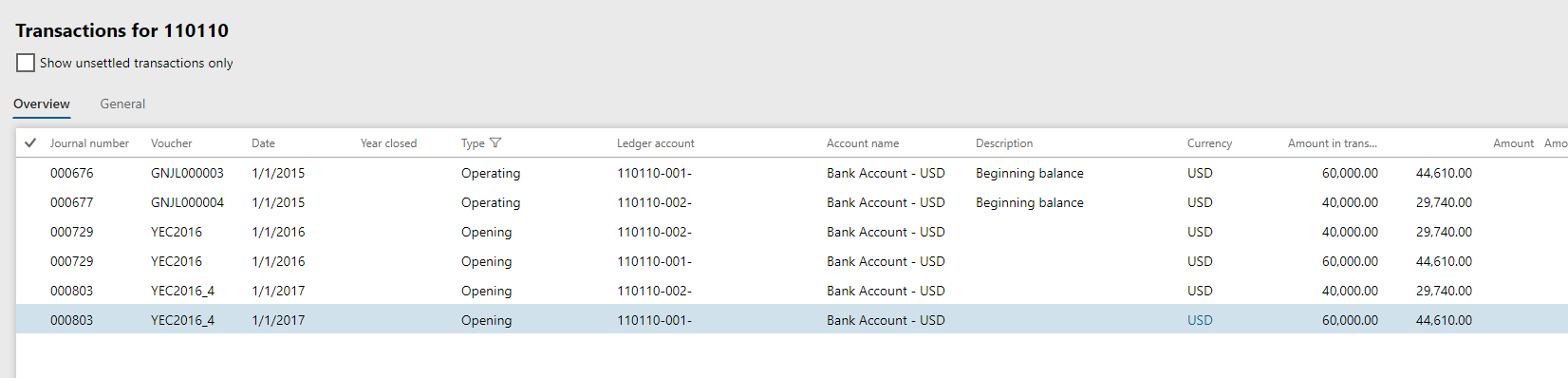
    Parameter-Yes-Trans-After.png

    Transactions after running the job with the Undo set to no:
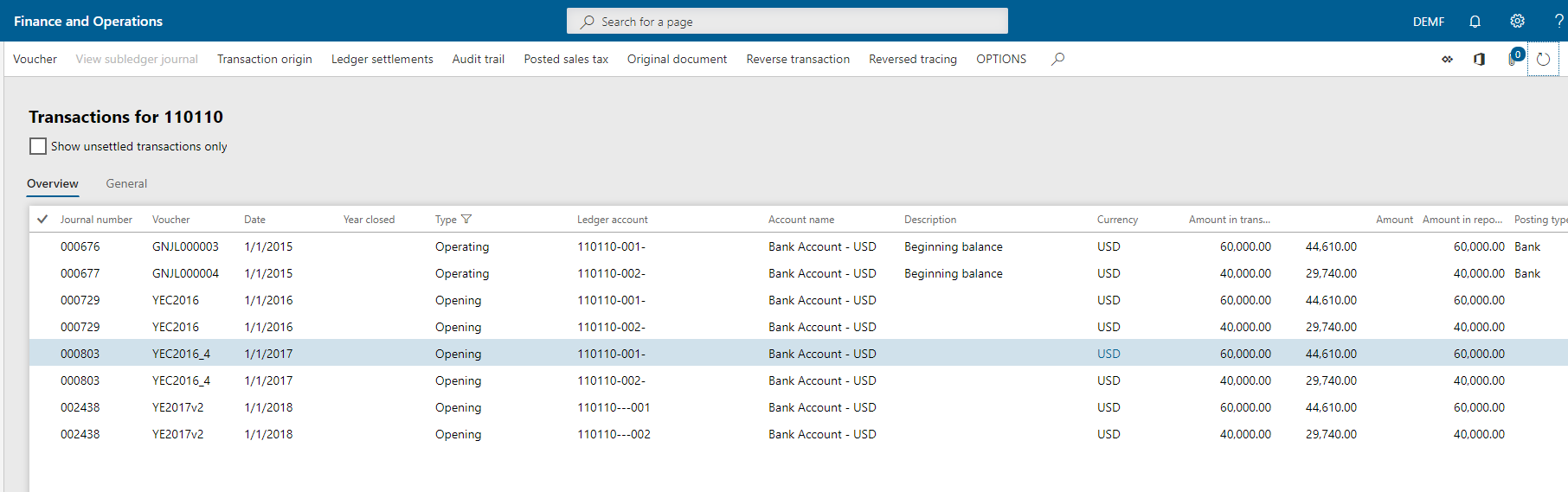
    Parameter-Yes-Trans-Redo.png

    After this I changed the GL parameter back to No, and performing the Undo gave the same result:
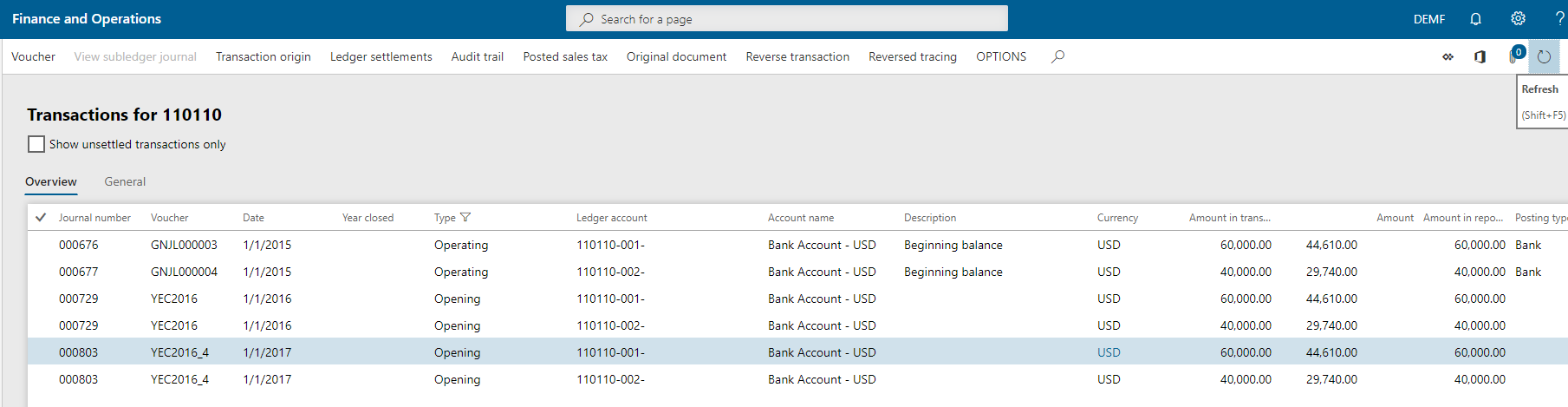
    Parameter-No-trans-Undo.png

    Best regards,

    Ties Philippi

Under review

Thank you for your reply! To ensure a great experience for everyone, your content is awaiting approval by our Community Managers. Please check back later.

Helpful resources

Quick Links

November Spotlight Star - Khushbu Rajvi

Congratulations to a top community star!

Forum Structure Changes Coming on 11/8!

In our never-ending quest to help the Dynamics 365 Community members get answers faster …

Dynamics 365 Community Platform update – Oct 28

Welcome to the next edition of the Community Platform Update. This is a status …

Leaderboard > Finance

Last 30 days Overall leaderboard

Featured topics

Product updates

Dynamics 365 release plans



