web
You’re offline. This is a read only version of the page.
close
Skip to main content

Announcements

No record found.

News and Announcements icon
Community site session details

Community site session details

Session Id :
Microsoft Dynamics AX (Archived)

Financial inventory value remains after inventory closing

(0) ShareShare
ReportReport
Posted on by 75

Hi,

I have a setup that temporarily requires negative physical and financial inventory. I use, Site, Warehouse, Location and Batch. The quantity of the goods can vary while it transports between the locations. 

My Storage dimension is setup to follow physical inventory on SWL and Financial value on SW (location not possible to check).

The item model group allows negative financial and physical inventory. I have one with FIFO and one with Weighted average.

Now to my problem. While the goods flow between the locations, I always adjust the former location, should there be anything left, negative or positive. A fincancial value is first added during the process, not from start.

I use inventory adjustment journals and transfer journals. It all ends with a sales order invoice. When all transactions are done, the inventory has 0 quantity, but some negative financial amount left.

After the inventory close, I receive several rows of negative financial value. Since all transaction for that specific batch are closed, I don't know how to get rid of the negative amount. I appreciate any help here.

Inventory on hand
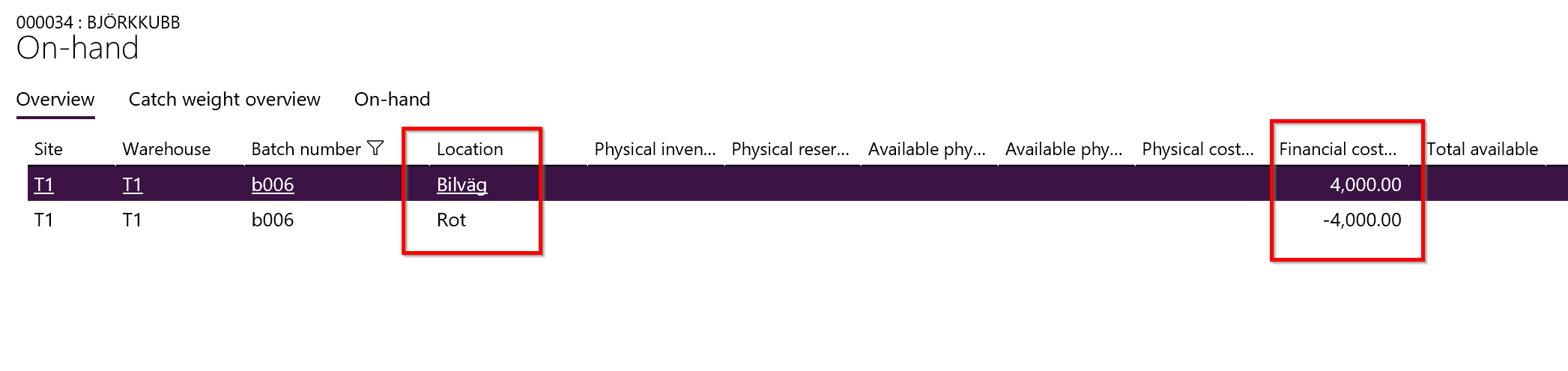
Inventory-on-hand.png


Inventory transactions

Inventory-transactions.png

*This post is locked for comments

I have the same question (0)
  • Anna Isaksson Profile Picture
    75 on at

    Hi, No I have only created manual transactions. My transactions have had the purpose to empty each Storage location.

  • Suggested answer
    André Arnaud de Calavon Profile Picture
    303,483 Super User 2026 Season 1 on at

    Hi Anna,

    Can you check the storage dimension setup? Is the financial field enabled on the Location setting? If so, you have to clear the inventory per location.

  • Anna Isaksson Profile Picture
    75 on at

    Hi, you are right, the storage dimension setup is not marked on Financial inventory on Location. I have tried the above with transfers only on Warehouse level and I got the wanted result.

    The remaining problems though is that the Location was physically cleared. Nothing was left and all transactions closed. The remaining value appeared after inventory close.

    I do want to track financial inventory by location, but it doesn't seem possible to mark that checkbox.

  • André Arnaud de Calavon Profile Picture
    303,483 Super User 2026 Season 1 on at

    Hi Anna,

    When transactions had been created, it is not possible anymore to change the settings of the storage dimension groups. It is possible to create a new one and change it on the released product. Possibly you first have to post the on-hand to zero and run an inventory closing before you are able to do this.

    You could also test in a separate environment if changing the setting in the database directly would solve it as well. Note that you have to test it carefully before applying it on a live environment.

  • Suggested answer
    Brandon Wiese Profile Picture
    17,788 on at

    What you have noticed (residual financial value in locations with 0 physical quantity) is normal and expected with your system configuration.  If you are not tracking financial value at location, then you cannot expect to evaluate financial value by location, and you cannot expect financial value to "make sense" at location.  The system is ignoring location when it evaluates financial value, and so must you.

    To explain this, consider this simple case where you receive a quantity 1 into warehouse A location 1 at cost $2.00, and then you receive quantity 1 into warehouse A location 2 at cost $0.00.  Then you issue quantity 1 from location 1 and another quantity 1 from location 2, both of which will have cost $1.00, the average cost within the warehouse across all locations therein.  Of course then location 1 will have quantity 0 and residual cost $1.00, and location 2 will have quantity 0 and residual cost -$1.00, as expected.

Under review

Thank you for your reply! To ensure a great experience for everyone, your content is awaiting approval by our Community Managers. Please check back later.

Helpful resources

Quick Links

Introducing the 2026 Season 1 community Super Users

Congratulations to our 2026 Super Stars!

Congratulations to our 2025 Community Spotlights

Thanks to all of our 2025 Community Spotlight stars!

Leaderboard > 🔒一 Microsoft Dynamics AX (Archived)

#1
Joris dG Profile Picture

Joris dG 5

#2
Sagar Suman Profile Picture

Sagar Suman 2 Super User 2026 Season 1

#2
Alexey Lekanov Profile Picture

Alexey Lekanov 2

Last 30 days Overall leaderboard

Featured topics

Product updates

Dynamics 365 release plans



