web
You’re offline. This is a read only version of the page.
close
Skip to main content

Notifications

Announcements

No record found.

Community site session details

Community site session details

Session Id :
Microsoft Dynamics AX (Archived)

An unexpected error occurred while querying the Metadata services

(0) ShareShare
ReportReport
Posted on by 1,883

Dear all,

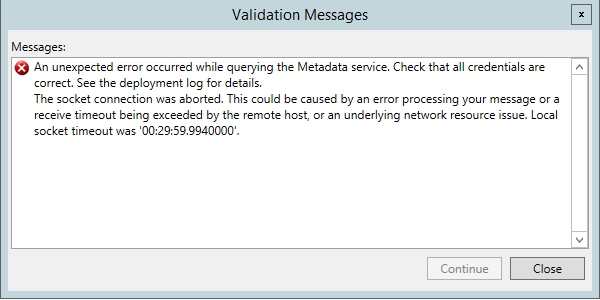
After lot of research on internet I'm posting this issue here. I have Management Reporter CU16,  all the server side components installed successfully. But when I try to Add Microsoft Dynamics AX 2012 Data Mart I received following error. Please help me with relevant solutions.
sdgsdg.jpg

Thanks,

Faqru

*This post is locked for comments

I have the same question (0)
  • Suggested answer
    Vilmos Kintera Profile Picture
    46,149 on at

    Check logon credentials for the service / Windows Firewall settings / AIF inbound ports in AX (if something is red, error-free CIL compilation is required).

  • Faqruddin Profile Picture
    1,883 on at

    Yes I already double check everything. I entered correct logon credentials, Windows Firewall settings all off and there is no error in AIF inbound ports.

  • Suggested answer
    Vilmos Kintera Profile Picture
    46,149 on at

    There could be multiple issues with this error message.

    It typically involves a user credentials problem, see this topic, there are multiple solutions suggested:

    community.dynamics.com/.../120523

    In one case it was an incorrectly provided SQL Server database name, where they have added the default instance name and worked without it - try it the other way around too.

    In one case they had strange customizations for table relations that broke the metadata service communication:

    https://community.dynamics.com/ax/f/33/t/123925

  • Faqruddin Profile Picture
    1,883 on at

    I already check above two links. I try all the possibilities with first link as suggested but the  issue is same. And I'm sure there is no customization on table relations.

  • Tommy Skaue Profile Picture
    Moderator on at

    If you are certain credentials and permissions are ok, and network is not blocked by protection software (like firewalls), then you can also verify the time on the servers involved are in sync with the logon server (Active Directory Server). Default they should be in sync with no more than 5 minutes offset.

    Strange with that 30 minutes timeout though.

  • Faqruddin Profile Picture
    1,883 on at

    Thanks for your reply Tommy. This is what system log recorded. I restart everything related to network and including servers. But the issue is same.

    Received the following exception when contacting the AX Metadata Service possibly due to expired token. Attempted to retry the operation 10 times with no success. The socket connection was aborted. This could be caused by an error processing your message or a receive timeout being exceeded by the remote host, or an underlying network resource issue. Local socket timeout was '00:29:59.9930000'.

    Machine: AXTEST

    System service communication error The communication object, System.ServiceModel.Channels.ServiceChannel, cannot be used for communication because it is in the Faulted state.

    Machine: AXTEST

    18/4/2017 4:45:16 PM - An unexpected error occurred while querying the Metadata service. Check that all credentials are correct. See the deployment log for details. An unexpected error occurred while querying the Metadata service. Check that all credentials are correct. See the deployment log for details.

    Machine: AXTEST

  • Tommy Skaue Profile Picture
    Moderator on at

    Can you access the metadata service manually? Open a Internet browser and navigate directly:

    servername:8101/.../MetadataService

    Exchange servername with the correct servername, or use localhost if you're testing from the same machine hosting the AOS.

    More details on testing the metadata service can be found here:

    dev.goshoom.net/.../ax2012-metadata-service-2

  • Faqruddin Profile Picture
    1,883 on at

    Thanks. This is what I received from above service.

    meta.jpg

  • Tommy Skaue Profile Picture
    Moderator on at

    Is that the entire result you get? It looks incomplete, doesn't it?

    You've got the license in, the application is fully built and CIL is fully generated and the AOS has been restarted? 

    I guess next step is Microsoft support.

  • Faqruddin Profile Picture
    1,883 on at

    Thanks. Here is entire result. Yes the application is fully built-in. Full CIL is generated without any errors and I try AOS restart manually. 

Under review

Thank you for your reply! To ensure a great experience for everyone, your content is awaiting approval by our Community Managers. Please check back later.

Helpful resources

Quick Links

Responsible AI policies

As AI tools become more common, we’re introducing a Responsible AI Use…

Neeraj Kumar – Community Spotlight

We are honored to recognize Neeraj Kumar as our Community Spotlight honoree for…

Leaderboard > 🔒一 Microsoft Dynamics AX (Archived)

#1
Martin Dráb Profile Picture

Martin Dráb 4 Most Valuable Professional

#1
Priya_K Profile Picture

Priya_K 4

#3
MyDynamicsNAV Profile Picture

MyDynamicsNAV 2

Last 30 days Overall leaderboard

Featured topics

Product updates

Dynamics 365 release plans



