web
You’re offline. This is a read only version of the page.
close
Skip to main content

Announcements

News and Announcements icon
Community site session details

Community site session details

Session Id :
Customer experience | Sales, Customer Insights,...
Suggested Answer

Missing custom entities in Sales Professional App Unified Interface

(0) ShareShare
ReportReport
Posted on by 285

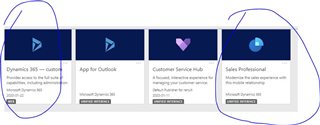
pastedimage1579725523478v1.jpeg

Hi, I recently created two environments, 1) Production and 2) Test

Then in Test, I imported a custom solution from on-prem to the online version which worked well.

I had no issues and I was able to see custom entities on the web interface (Dynamics 365 - Custom) as well as the app (Sales professional) for the Test environment. 

But when I did the same thing for production I can only see custom entities for Web (Dynamics 365 - Custom)  and missing the custom entities in Sales professional app Production environment.  

Any fixes???  

I have the same question (0)
  • Suggested answer
    LeoAlt Profile Picture
    16,331 Moderator on at

    Hi partner,

    1.Please go to Settings->My apps->Sales Hub and open it in app designer.

    pastedimage1579743515233v1.png

    2.Check if your custom entity in the entity list.

    pastedimage1579743562994v2.png

    pastedimage1579743595278v3.png

    3.Check if your added your custom entity into the sitemap.

    pastedimage1579743626099v4.png

    pastedimage1579743650146v5.png

    If not, please add your custom entity into the Sales Hub sitemap and publish and try again.

    Best Regards,

    Leo

  • nidnani Profile Picture
    285 on at

    Hi Leo,

    I did not had to do this for the app in Test environment.  

    Is there any other way that it would show custom entities without touching the app designer?

  • nidnani Profile Picture
    285 on at

    Also, i do not want my custom entity in sitemap. It is used within the leads entity.

    I have customized my leads entity in which i get other custom entities like a lookup field.  

  • LeoAlt Profile Picture
    16,331 Moderator on at

    Hi nidnani,

    If you don't want your custom entity in sitemap, you will not be able to find them in the navigation bar.

    But if you have the custom entity lookup field on your lead form, you should be able to enter the custom entity by click on the lookup record.

    Could you share more information about your issue?

    Best Regards,

    Leo

  • nidnani Profile Picture
    285 on at

    Hi Leo,

    I have created a customized lead form with custom fields and custom entity lookup record. But none of the customizations are available on the app. I can see them in legacy web app but not on Sales professional app. And everything works for the test environment.

    Basically missing all the customization in the app but able to see them in the legacy app.

  • LeoAlt Profile Picture
    16,331 Moderator on at

    Hi partner,

    Did you turn to your custom form in Sales Hub?

    I created a custom form with some custom fields and lookup fields  in Lead and I could find this in Sales Hub.

    pastedimage1580283341988v1.png

    Best Regards,

    Leo

  • nidnani Profile Picture
    285 on at

    Hi Leo,

    I do not get this option.

  • LeoAlt Profile Picture
    16,331 Moderator on at

    Hi nidnani,

    Could you kindly share the difference of your custom lead form between Sales Hub and legacy app?

    Regards,

    Leo

  • nidnani Profile Picture
    285 on at

    2072.WEB.PNGSALES-PRO.PNG

    Hi Leo,

    Please see the attached images. One is the web-based (it says legacy app in the picture) and other is sales professional app.

    Let me know if any more info required.

Under review

Thank you for your reply! To ensure a great experience for everyone, your content is awaiting approval by our Community Managers. Please check back later.

Helpful resources

Quick Links

Season of Sharing Community Challenge Launch!

Jump in, show your community spirit, and win prizes!

Women in Power Builds Momentum

Expanding mentorship, skilling, and AI innovation

Congratulations to the May Top 10 Community Leaders

These are the community rock stars!

Leaderboard > Customer experience | Sales, Customer Insights, CRM

#1
Hamza H Profile Picture

Hamza H 142 Super User 2026 Season 1

#2
Nagaraju_Matta Profile Picture

Nagaraju_Matta 128

#3
11manish Profile Picture

11manish 121

Last 30 days Overall leaderboard

Product updates

Dynamics 365 release plans



