web
You’re offline. This is a read only version of the page.
close
Skip to main content

Announcements

News and Announcements icon
Community site session details

Community site session details

Session Id :
Microsoft Dynamics AX (Archived)

Data Import/Export error- Unable to Preview Source File

(0) ShareShare
ReportReport
Posted on by

Hi Everyone

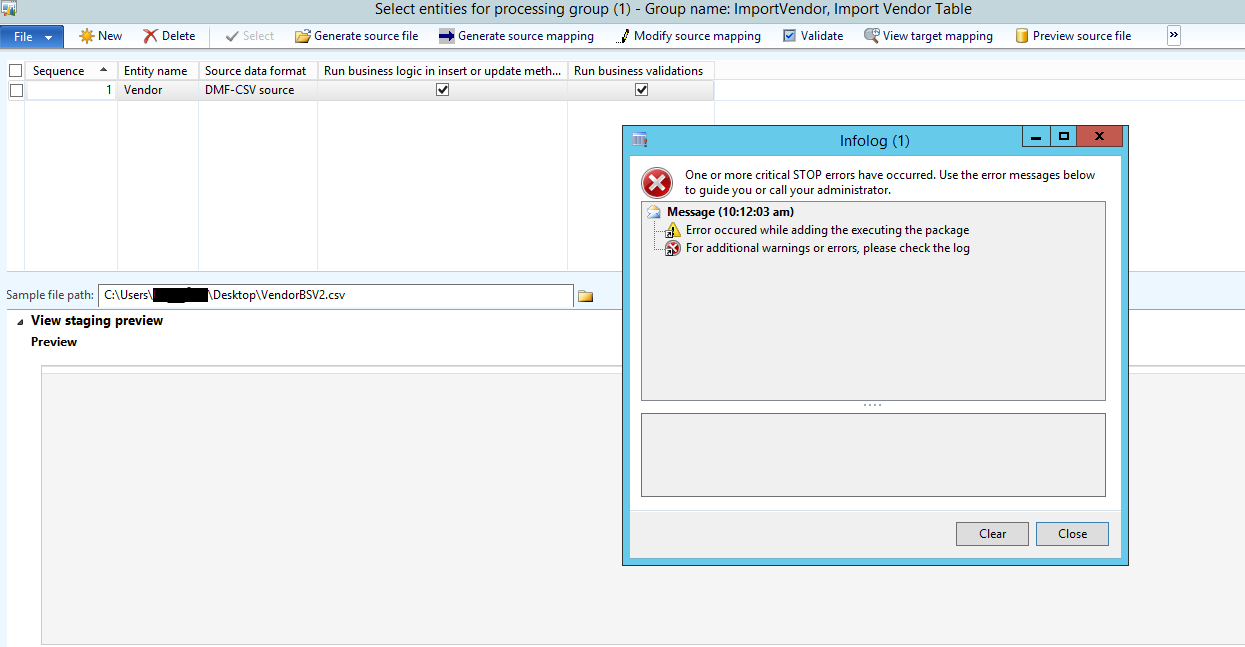
In Dixf, after generating source mapping and Validating the same, I get the following error, when I try to Preview the source File:
DIXFError.png

The error being " Error occured while adding the executing the package " and " For additional warnings or errors, please check the log"

This error has already been addressed quite a few times before, however after trying those possible solutions, the error still exists.

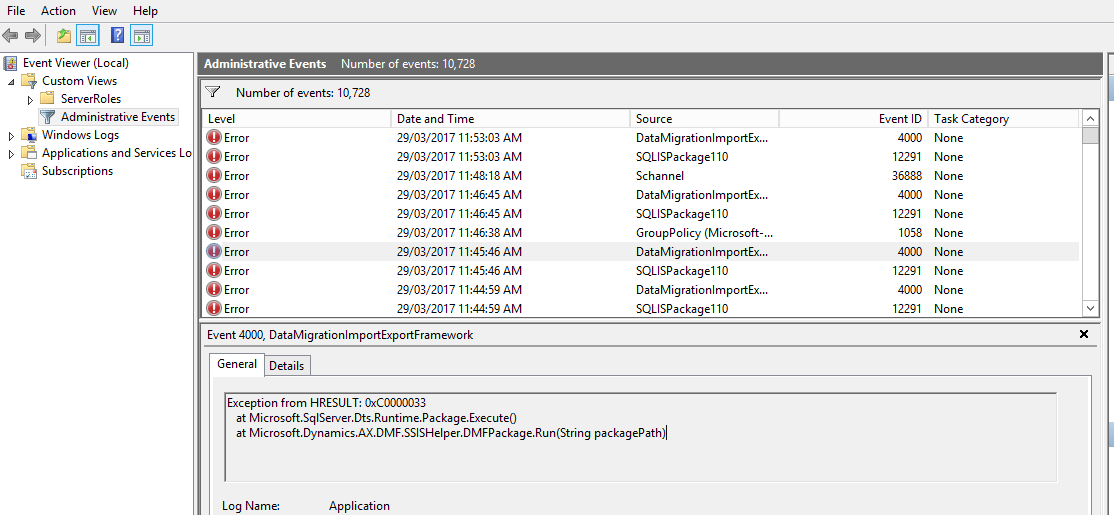
I checked the Event log of the Server, where SSIS is installed and found the following:
EventLog.png

Version: AX 2012 R2

Seperate DB and AOS/Client Server.

Please Suggest.

Thanks !

*This post is locked for comments

I have the same question (0)
  • André Arnaud de Calavon Profile Picture
    305,823 Super User 2026 Season 1 on at

    HI Madhura,

    Can you tell if the binary components are installed correctly? This is true when some other entities can be used without issues. Are you using a complete standard entity or do you have customizations? Have you also verified the code page settings? Does the code page of the source file match with the settings on the source data format? Please check this all.

  • Tommy Skaue Profile Picture
    Microsoft Employee on at

    If you're positive DMF/DIXF is installed correctly, then it might be that you also need to patch your SQL Server. 

    There was an issue with SQL Server 2012 some time ago, and your client might be on a "bad version". 

    Look here for more info: blogs.msdn.microsoft.com/.../dixf-cannot-preview-source-file-communicationexception-an-error-occurred-while-receiving-the-http-response-from-dmfservicehelper-svc

  • Yasir Shahzad Profile Picture
    1,635 on at

    its all about the 2 AOS...same problem i have faced...you have to connect with primary AOS..then it will resolve your issue as per my thinking...also let me know if its happened

    Regards

  • Community Member Profile Picture
    on at

    Hi all

    Thanks for the replies.

    @Andre, as per your suggestion, I am pretty sure I have installed the DIXF components correctly. All are standard entities, with no customizations.

    @Tommy and Yasir, I found the exact description of the error code as specified in the error log-

    HRESULT:0xC0000033',-1073741773,'DTS_E_EXPIRED','Integration Services evaluation

    period has expired.'

    For further references check the following link:

    billfellows.blogspot.in/.../ssis-error-list-in-tabular-format.html

    My doubt here is, If I uninstall and reinstall SSIS with necessary update on my DB server, will that affect any functionality? Should I re-install DIXF as well after this?

  • Verified answer
    Tommy Skaue Profile Picture
    Microsoft Employee on at

    Just get your SQL Server properly licensed and the problem should go away.

    You will have to run the SQL Server Installation Center and run Edition Upgrade to apply a valid license, as far as I remember.

  • Suggested answer
    Danny Bilodeau Profile Picture
    4,941 Super User 2026 Season 1 on at

    Hi Madhura,

    Whenever I faced this problem and the Generate Source mapping and validate had all run without issues, I reduced my source file to its most basic (header line plus one or two records that were squeaky clean). If Preview Source file works, then the source file has data issues (a comma in a text field, a missing record in a mandatory field somewhere deep in the file or a vagrant record in a column without a header that was incorrectly deleted).

    90 times out of 100, the "Package" error was the result of incorrect data in source file.

    Good luck!

  • Suggested answer
    Pravasti AK Profile Picture
    2,985 on at

    Hi,

    Please find the below reply ,posted in another forum:-

    SSIS tells which edition it is by looking at the registry key at

    HKEY_LOCAL_MACHINE\SOFTWARE\Microsoft\Microsoft SQL Server\90

    Our server hardening process removed the inherited permission for the users group to have read access to this key. Instead of giving an error that it couldn't read this key, it decided it was an evaluation copy and as we'd had it 180 days since install, it had expired.

    Restoring permisisons to the specific account fixed the issue.

  • Community Member Profile Picture
    on at

    Thank you for the replies..

    When I restarted the DIXF Service in the DB Server, where SSIS are installed, I received the following error as mentioned in the link below-

    blogs.msdn.microsoft.com/.../dixf-cannot-preview-source-file-communicationexception-an-error-occurred-while-receiving-the-http-response-from-dmfservicehelper-svc

    I checked my SQL version on the DB Server, with the build number given as 11.2.5058.0. I found it to be SP2,thus, confirming that it might be the SQL 2012 "SP2" Bug

    Before trying either of the two options i.e uninstalling and degrading to SP1 or upgrading to SQL 2012 SP2 CU2, I would like any Hotfix that would help me fix this, as upgrading to CU2 isnt an easy option for us.

Under review

Thank you for your reply! To ensure a great experience for everyone, your content is awaiting approval by our Community Managers. Please check back later.

Helpful resources

Quick Links

Season of Sharing Community Challenge Launch!

Jump in, show your community spirit, and win prizes!

Women in Power Builds Momentum

Expanding mentorship, skilling, and AI innovation

Congratulations to the May Top 10 Community Leaders

These are the community rock stars!

Leaderboard > 🔒一 Microsoft Dynamics AX (Archived)

#1
CP04-islander Profile Picture

CP04-islander 10

#2
Harisgillani Profile Picture

Harisgillani 4

#2
dserp Profile Picture

dserp 4

Last 30 days Overall leaderboard

Featured topics

Product updates

Dynamics 365 release plans



