web
You’re offline. This is a read only version of the page.
close
Skip to main content

Notifications

Announcements

No record found.

Community site session details

Community site session details

Session Id :
Finance | Project Operations, Human Resources, ...
Unanswered

Can we create/update project task automatically?

(0) ShareShare
ReportReport
Posted on by 10

Hi everyone,

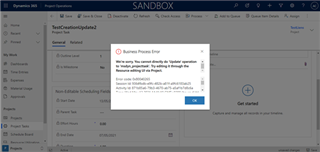
I want to create project task with informations that already exist in another entity call "Mission" (is an entity that I made), for example I want to create a new project task with a mission that already exist, the most important for me is the dates. I try to use CRM Rest Builder for create a project task but I got an error message that seems to tell me we cannot create in project task's entity.

After that I tried to create a field called "StartDateMission" (in Project Task's entity) which is updated automatically when I change the field "Mission" (in Project Task's entity). Then I made a business rule to edit field "StartDate" with the value of "StartDateMission" and try to save the modification but the same error appears.
pastedimage1620830563519v3.png

Do you have solutions to help me?
start to think it's maybe impossible to edit project task outside of Microsoft Project, but I ask to the community to be sure that is impossible or not.

PS: I also try to export in Excel project task data, edit the Excel with new columns and import in the CRM but I have the same error.

Thanks a lot,
Aurélien Coste

I have the same question (0)
  • antc Profile Picture
    2,909 on at

    Hi Aurelien

    I believe we can possibly do it from the scheduling API however there is very little information on how to connect etc and I believe also that there could be some permission issues requiring one user to have a MS Project license to authenticate.

    Would love for someone to do a how to or tutorial on using the scheduler API.

    I normally import data using Kingswaysoft however I believe the issue here is that Project for the Web is the engine so we can't just transact with our Tables (entities), Columns (Fields), Dynamics 365 (CDS -> Dataverse -> who knows next week) data in Project Operations.

    Regards

    Antony

  • MarkB45 Profile Picture
    755 on at

    Hi Aurelien,

    Can you possibly create a Project template with the correct tasks on it and then amend the dates to suit once you have copied the project into a new one.

    I have a customer who is looking at a similar configuration to speed up the project initiation phase. They have a lot of projects performing the same tasks each time so we are creating templates project and creating a view to show those projects. (Filtered by "Template" as we have included that in the project name.

    KR

    Mark

Under review

Thank you for your reply! To ensure a great experience for everyone, your content is awaiting approval by our Community Managers. Please check back later.

Helpful resources

Quick Links

Responsible AI policies

As AI tools become more common, we’re introducing a Responsible AI Use…

Neeraj Kumar – Community Spotlight

We are honored to recognize Neeraj Kumar as our Community Spotlight honoree for…

Leaderboard > Finance | Project Operations, Human Resources, AX, GP, SL

#1
Martin Dráb Profile Picture

Martin Dráb 660 Most Valuable Professional

#2
André Arnaud de Calavon Profile Picture

André Arnaud de Cal... 549 Super User 2025 Season 2

#3
Sohaib Cheema Profile Picture

Sohaib Cheema 307 User Group Leader

Last 30 days Overall leaderboard

Product updates

Dynamics 365 release plans



