web
You’re offline. This is a read only version of the page.
close
Skip to main content

Announcements

News and Announcements icon
Community site session details

Community site session details

Session Id :
Customer experience | Sales, Customer Insights,...
Suggested Answer

show "Add Existing" button of sub-grid on Territory entity

(0) ShareShare
ReportReport
Posted on by 687

Hi Community,

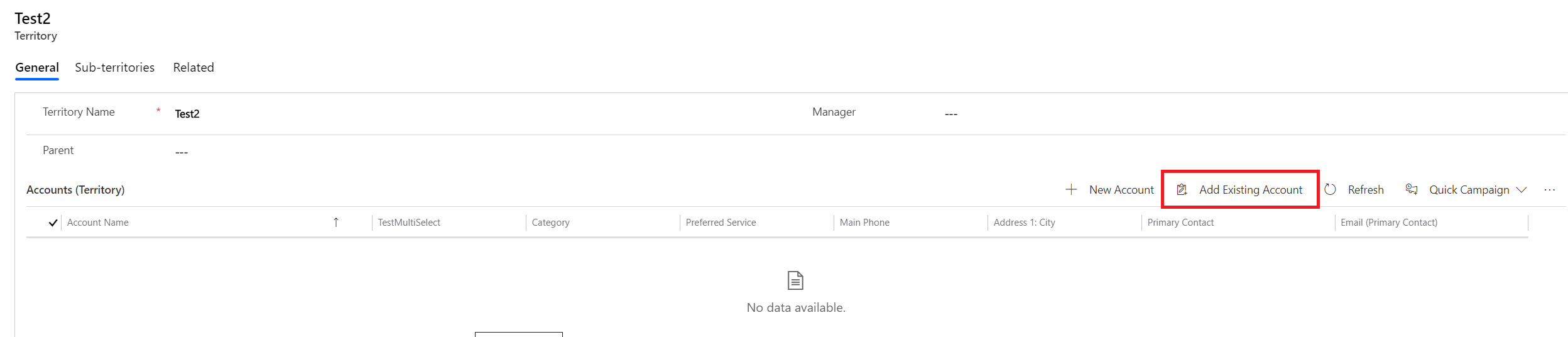
"Add Existing" button in any sub-grid on Territory form is not visible as the same is visible for other entity forms, refer below screenshot for more information:

pastedimage1577705790927v1.png

Any help is much appreciated, Thanks in advance.

Regards,

Hardik Chauhan

I have the same question (0)
  • Suggested answer
    Mustafa Sabir Profile Picture
    Microsoft Employee on at

    Hi Hardik,

    Looking at the above image, I suspect this is quite an old CRM onpremise version. However, there are a few things you need to check for the issue you have mentioned.

    1. Check if there is any 1:N relationship on Territory entity with the custom entity you want to show the "add existing" button on the subgrid.

    2. Check if the subgrid property is defined as "Only Related records".

    For eg: I have an Accounts subgrid on my Territory form and this is how I have defined the properties.
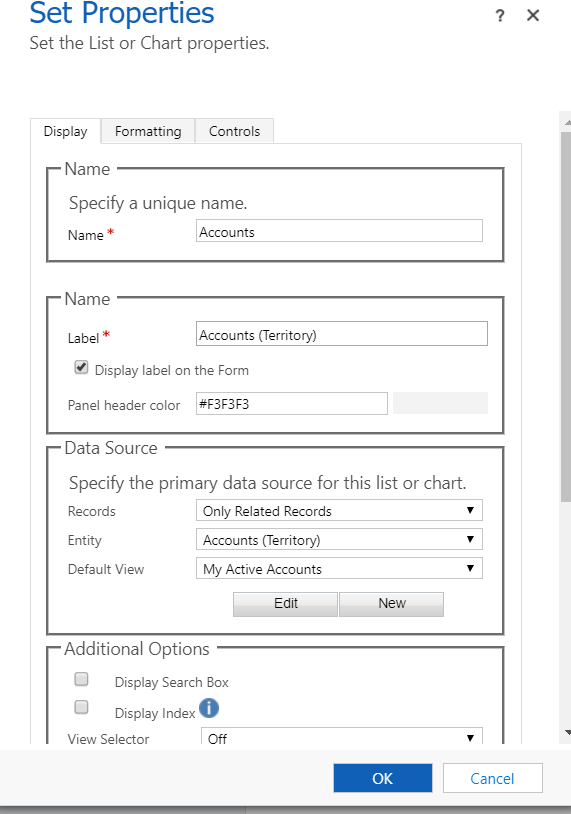
    pastedimage1577947389067v1.png

    This is how it looks on the form.

    pastedimage1577947452874v2.png

    If the above settings are in place but still not working, then check if there are any ribbon customization made on the subgrid for the effected entities.

    Thank you!

  • chauhanhardik Profile Picture
    687 on at

    Hi Mustafa,

    CRM version is (9.1.0.10743) online.

    Each sub-grids' properties are defined as "Only Related Records".

    None of the sub-grids' ribbon are customized.

    Reagrds,

    Hardik Chauhan

  • Mustafa Sabir Profile Picture
    Microsoft Employee on at

    Thanks for the info. Could you please share some screenshots from UCI? I couldn't see similar interface for Territory entity in my vanilla. Also, you may create a support ticket with Microsoft Dynamics CRM team, if you think that this could be an environment specific issue.

  • chauhanhardik Profile Picture
    687 on at

    Client still prefers classic, so haven't moved to UCI.

    Regards,

    Hardik Chauhan

  • Suggested answer
    Mustafa Sabir Profile Picture
    Microsoft Employee on at

    It is recommended to start planning to move to UCI because classic UI is deprecated and will be completely removed by October 1, 2020.
    Reference https://docs.microsoft.com/en-us/power-platform/important-changes-coming

    For now, you can open a support case to get this investigated for classic web interface.

    Thank you!

    Mustafa Sabir

    Dynamics 365 CE Support Engineer

  • Suggested answer
    John Cogovan Profile Picture
    217 on at

    Mustafa,

    In the form for the Parent entity, make sure the relationship is in the form's Navigation.  See attached screenshot with examples circled. 

    pastedimage1577988658156v1.png

Under review

Thank you for your reply! To ensure a great experience for everyone, your content is awaiting approval by our Community Managers. Please check back later.

Helpful resources

Quick Links

Season of Sharing Community Challenge Launch!

Jump in, show your community spirit, and win prizes!

Women in Power Builds Momentum

Expanding mentorship, skilling, and AI innovation

Congratulations to the April Top 10 Community Leaders

These are the community rock stars!

Leaderboard > Customer experience | Sales, Customer Insights, CRM

#1
Nagaraju_Matta Profile Picture

Nagaraju_Matta 121

#2
ManoVerse Profile Picture

ManoVerse 71 Super User 2026 Season 1

#3
Abhilash Warrier Profile Picture

Abhilash Warrier 66 Super User 2026 Season 1

Last 30 days Overall leaderboard

Product updates

Dynamics 365 release plans