web
You’re offline. This is a read only version of the page.
close
Skip to main content

Notifications

Announcements

No record found.

Community site session details

Community site session details

Session Id :
Microsoft Dynamics AX (Archived)

SSRS Subreport Error: Subreport could not be shown

(0) ShareShare
ReportReport
Posted on by 1,214

Hi,

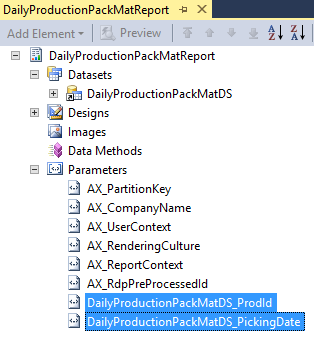
I have two reports called DailyProductionPackMatReport and DailyProductionIngRawReport, each with different sets of UIBuilder, Controller, Contract and DP. Both these reports have two same parameter fields ProdId and PickingDate but these parameters are being queried differently.

Report name Parameters Screenshot
DailyProductionPackMatReport

DailyProductionPackMatDS_ProdId

DailyProductionPackMatDS_PickingDate

DailyProductionPackMatReport.png
DailyProductionIngRawReport

DailyProductionIngRaw_ProdId

DailyProductionIngRawDS_PickingDate

DailyProductionIngRawReport.png

My requirement is to print these reports together in one click, hence the idea is to use subreport.

I tried calling DailyProductionIngRawReport from DailyProductionPackMatReport.

Here are the subreport properties:

DailyProductionIngRawReport with design named Report.

subreport-general.png

I passed DailyProductionPackMatReport parameters values as parameters for the subreport.

subreport-parameters.png

Turns out, when printing the subreport, I got Error: Subreport could not be shown.

How is this wrong? Please clarify.

Thank you very much.

*This post is locked for comments

I have the same question (0)
  • Martin Dráb Profile Picture
    237,965 Most Valuable Professional on at

    You're obviously missing some parameters, such as company. More importantly, I don't see how you're planning to deal with pre-processing. How will you prepare data for the subreport? I'm not sure if you've thought it through...

  • HAIRUL HAZRI Profile Picture
    1,214 on at

    Hi Martin,

    these two reports can be printed separately, given parameter values being specified in their UI Builder.

    There's only ReportName and Parameters as the important properties in subreport.

    So I thought when I'm passing the parameters, those values will be used by the report DP and the queries in DP will run accordingly.

    While that sounds too convenient, what's the correct way to do the pre-processing/prepare data for the subreport? Is DP is not possible after all?

  • Martin Dráb Profile Picture
    237,965 Most Valuable Professional on at

    I don't agree that the other parameters are not important and can be ignored.

    I have no idea how to use two preprocessed data sets for a single report. I guess everything is possible, but I suspect it would be very complicated. And because it seems that you decided to use a sub-report not because it's logically a sub-report but because you thought it would be an easy workaround, I think you should reconsider your overall design.

Under review

Thank you for your reply! To ensure a great experience for everyone, your content is awaiting approval by our Community Managers. Please check back later.

Helpful resources

Quick Links

Responsible AI policies

As AI tools become more common, we’re introducing a Responsible AI Use…

Neeraj Kumar – Community Spotlight

We are honored to recognize Neeraj Kumar as our Community Spotlight honoree for…

Leaderboard > 🔒一 Microsoft Dynamics AX (Archived)

#1
Martin Dráb Profile Picture

Martin Dráb 4 Most Valuable Professional

#1
Priya_K Profile Picture

Priya_K 4

#3
MyDynamicsNAV Profile Picture

MyDynamicsNAV 2

Last 30 days Overall leaderboard

Featured topics

Product updates

Dynamics 365 release plans