web
You’re offline. This is a read only version of the page.
close
Skip to main content

Notifications

Announcements

No record found.

Community site session details

Community site session details

Session Id :
Microsoft Dynamics AX (Archived)

Recurring Batch Job for Ending Production Orders

(0) ShareShare
ReportReport
Posted on by 800

Hi Everyone,

I am attempting to create a recurring batch job to End production orders.  In the query form I simply want to specify to end any production orders that have a "Reported as finished" date of the current date minus 2 days.  Based on this requirement I have set it up like the below image.
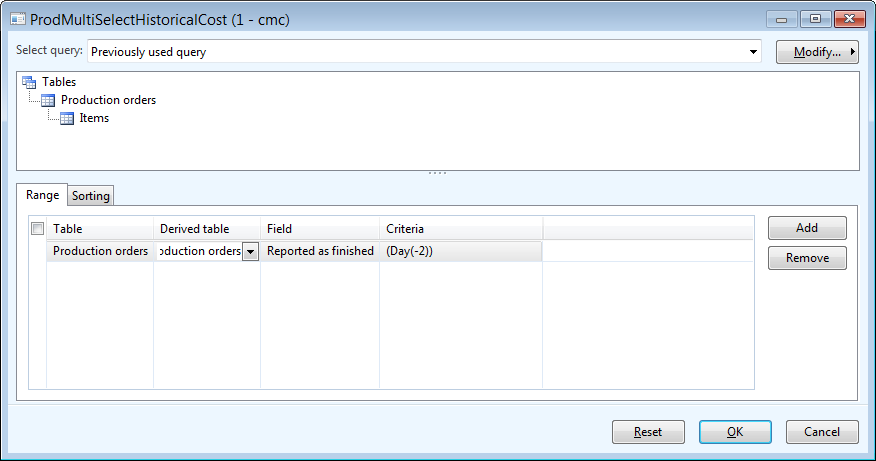
The problem here is that if today is 9/17/2014, and I have the first run of the batch job schedule for tonight, it will run successfully and end the production orders for 9/15/2014.  However, when it runs again tomorrow on 9/18/2014, it will once again try to end the production orders from 9/15/2014 when I am wanting it to end the production orders for 9/16/2014.

It feels as if the query does not keep refreshing the (Day(-2)) parameter.  Any thoughts?

Thanks,

Jim

*This post is locked for comments

I have the same question (0)
  • Community Member Profile Picture
    on at

    Hi Jim,

    Did you check the date/time of your batch server?

    Thanks,

    Caroline.

  • jczerniak1 Profile Picture
    800 on at

    Hi Caroline,

    Yes, the time is OK on the batch server.  It just doesn't seem to re-evaluate the (Day(-2)) part of the query after the first time that the batch job runs.

    Thanks,

    Jim

  • Community Member Profile Picture
    on at

    Then you can try the DayRange function. I use this one in a batch job and it works.

    (DayRange(-2, -2))

  • Community Member Profile Picture
    on at

    Hi,

    is that "dayrange" solution for this problem?

    Just thinking for example posting sales order picking lists in batch, beacuse there is separate parameter 'Late selection' for this. As I've understood, it kind of makes the selection again, with the selected criteria(s). In production order updating there isn't that kind of parameter...

  • dolee Profile Picture
    11,279 on at

    Hi Jari,

    The DayRange is actually a method that will be evaluated at batch job run time. It "Creates a query string that represents a date range that is based on days." So yes it works.

    There is a other utility functions you can use in the SysQueryRangeUtil class.

    https://msdn.microsoft.com/en-us/library/sysqueryrangeutil.aspx

  • Community Member Profile Picture
    on at

    Hi Dominic - and thanks for the quick answer!

    However, I've tried to make this work in our test environment, without any luck... And I'm using AX 2009 by the way. Does it change anything?

    What I'm doing is, that I'm setting the End run (batch run, for example for 3 times) for reported production orders (Production - Periodic - Update - End) with criteria '(DayRange(-5,0))' in field Reported as finished of Production orders- table (using Select- button).

    At the time of setting the run, there are few production orders reported and that first run goes as it should. But if I report more production orders after the first run, next runs won't end those - next runs are trying to end those already ended ones (ended in first run) again.

    So basically the selection is done only when setting the End run, and not "refreshed" anymore after the first run.

    What I'm doing wrong? Is there solution for this?

  • dolee Profile Picture
    11,279 on at

    Hi Jari,

    In this function the query was not saved in SysLastValue. Once you modified the query it will load up the Production orders to End. And the list of production order is saved for batch run. So in short, modifying the query with (DayRange(-5,0)) here won't give you what you want.

    I doubt standard have other functions that can do what you want. But in AX you can always rely on customization. sivakumar007.wordpress.com/.../ending-production-order-through-x Above contains sample code for Ending Production order using X++. You will still need to write code to collect a list of Production orders and pass into the above code one by one.

Under review

Thank you for your reply! To ensure a great experience for everyone, your content is awaiting approval by our Community Managers. Please check back later.

Helpful resources

Quick Links

Responsible AI policies

As AI tools become more common, we’re introducing a Responsible AI Use…

Neeraj Kumar – Community Spotlight

We are honored to recognize Neeraj Kumar as our Community Spotlight honoree for…

Leaderboard > 🔒一 Microsoft Dynamics AX (Archived)

#1
Martin Dráb Profile Picture

Martin Dráb 4 Most Valuable Professional

#1
Priya_K Profile Picture

Priya_K 4

#3
MyDynamicsNAV Profile Picture

MyDynamicsNAV 2

Last 30 days Overall leaderboard

Featured topics

Product updates

Dynamics 365 release plans
