web
You’re offline. This is a read only version of the page.
close
Skip to main content

Notifications

Announcements

No record found.

Community site session details

Community site session details

Session Id :
Customer experience | Sales, Customer Insights,...
Answered

What's defference between Sale and Sale Hub?

(0) ShareShare
ReportReport
Posted on by 30

I'm a beginer Dynamics 365,

I have some question about Dynamics 365 Sale (online v9):

1/What's defference between Sale and Sale Hub? How to install or enable Sale Hub on my Dynamics 365 and is it fee?

2/In screen Sale, i dont find option "PDF Generation" for Quote on Sale App (not Sale Hub).

Thanks you!

I have the same question (0)
  • Suggested answer
    ashish12 Profile Picture
    3,079 on at

    Hi,

    Open sales hub and change the app section to settings and then you can see PDF generate option.

    For more information on Sales hub check this document.

  • Hoang2610 Profile Picture
    30 on at

    Tks for ur answer!

    But i cant see App Setting because i dont use Sale Hub. :(

  • LuHao Profile Picture
    40,892 on at

    Hi partner,

    1. The main difference is that Sales is a Web client app and the Sales Hub is an Unified Interface app.

    Only the Unified Interface app supports mobile. Most latest features are only supported by the Unified Interface app, such as 'PDF Generation'.

    This is an introduction to the Unified Interface: https://docs.microsoft.com/en-us/power-platform/admin/about-unified-interface

    2. As long as you have the latest Sales module application installed, you should be able to get Sales Hub.

    This dose not require other additional installation or configuration.

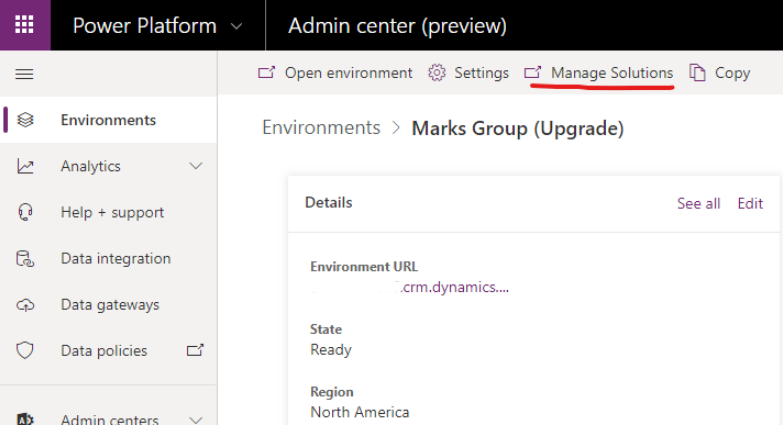
    Go to Power Platform (https://admin.powerplatform.microsoft.com/environments), then select the environment you want to work in.

    Select “manage solutions” in the top menu.
    pastedimage1575871895241v1.png

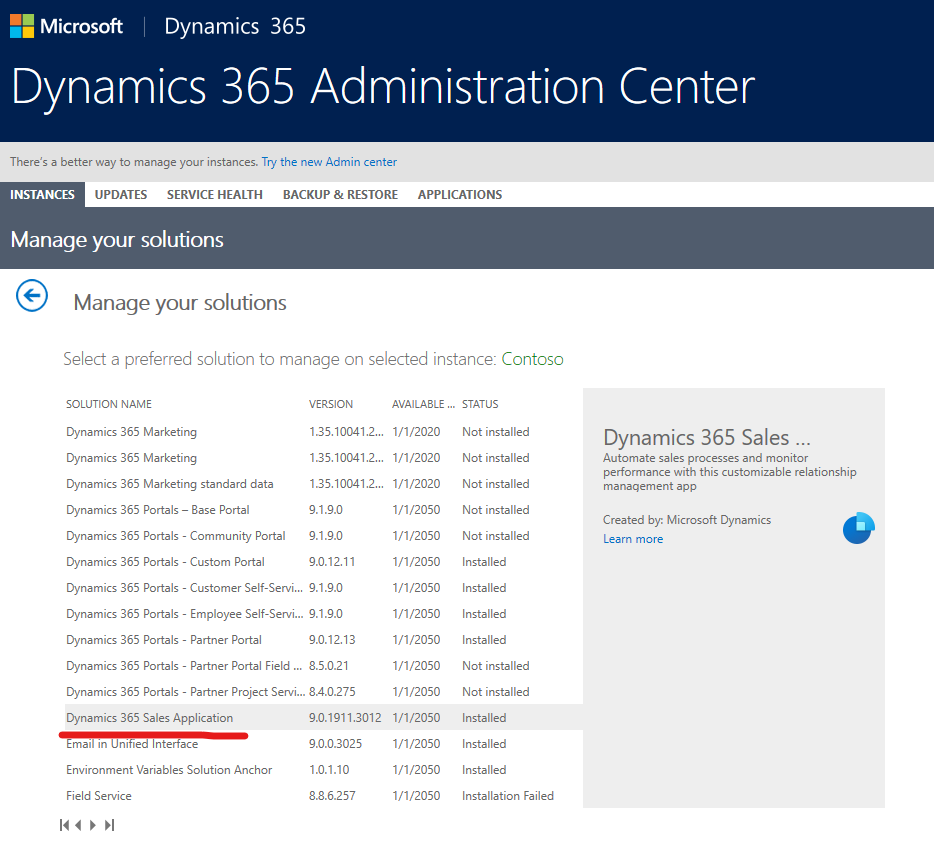
    Then you will go to Dynamics 365 Administration Center. 

    Look for and select Dynamics 365 Sales Application. If it is not installed, then you need to install it. If it is not up to date, you need to update it.
    pastedimage1575872269968v2.png

    Once you have successfully installed the latest "Dynamics 365 Sales Application" solution, as in the screenshoot, you should be able to use Sales Hub and find the "PDF Generation" feature.

    For the configuration steps of  "PDF Generation", please refer to this document:

    https://docs.microsoft.com/en-us/dynamics365/sales-enterprise/enable-pdf-generation-quote

  • Hoang2610 Profile Picture
    30 on at

    Tks u very much Lu Hao!

  • Verified answer
    LuHao Profile Picture
    40,892 on at

    Hi partner,

    If my answer helped you, don't forget to click Yes under the title to close this theme.

    Thanks.  :)

  • Hoang2610 Profile Picture
    30 on at

    Sr Lu Hoa,

    But if I install sale hub, do I have to pay for it?

  • LuHao Profile Picture
    40,892 on at

    Hi partner,

    If you can install it, you have paid for it. You don't need to buy Sales Hub separately at all.

    The premise that you can see "Dynamics 365 Sales Application" solution in the Dynamics 365 Administration Center is that you have purchased Sales.

    Keep in mind that Sales Hub is not an additional app, it should appear in your instance at the same time as the Sales app (web client).

Under review

Thank you for your reply! To ensure a great experience for everyone, your content is awaiting approval by our Community Managers. Please check back later.

Helpful resources

Quick Links

Responsible AI policies

As AI tools become more common, we’re introducing a Responsible AI Use…

Neeraj Kumar – Community Spotlight

We are honored to recognize Neeraj Kumar as our Community Spotlight honoree for…

Leaderboard > Customer experience | Sales, Customer Insights, CRM

#1
Tom_Gioielli Profile Picture

Tom_Gioielli 170 Super User 2025 Season 2

#2
#ManoVerse Profile Picture

#ManoVerse 70

#3
Jimmy Passeti Profile Picture

Jimmy Passeti 50 Most Valuable Professional

Last 30 days Overall leaderboard

Product updates

Dynamics 365 release plans



