web
You’re offline. This is a read only version of the page.
close
Skip to main content

Notifications

Announcements

No record found.

Community site session details

Community site session details

Session Id :
Microsoft Dynamics AX (Archived)

Data Import/Export Installation Error- Unable to install AOS component

(0) ShareShare
ReportReport
Posted on by

Hi Everyone

We have seperate DataBase ( with installed SQL Server Integration Services) Server and an another Server ( Installed AX 2012 R2). Following the installation guide for DIXF, I have installed DIXF services on DB Server and now about to install the AOS and client components on the other server. 

One of the steps while installing the components is as follows:
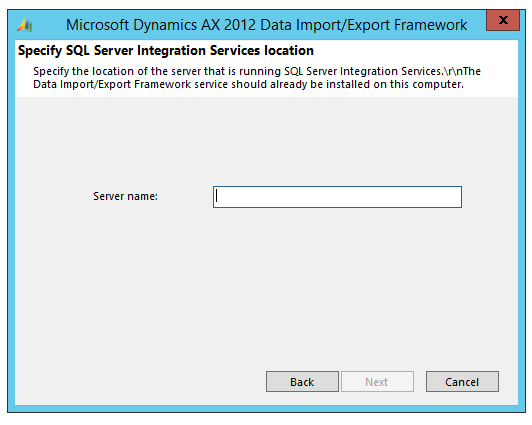
Installation-error1.png

However, following is the error I get, when I enter the DB Server name
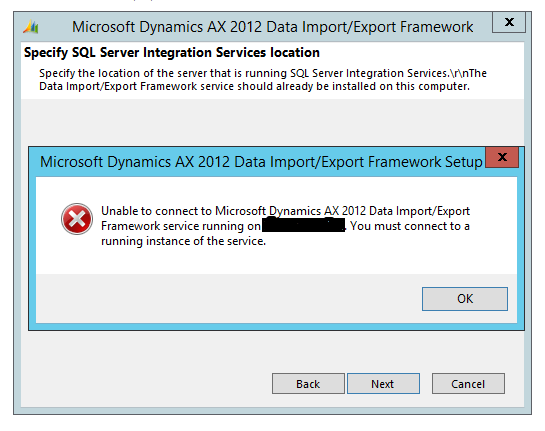
Installation-error.png

What exactly am I supposed to specify for the server name? 

*This post is locked for comments

I have the same question (0)
  • Suggested answer
    Vilmos Kintera Profile Picture
    46,149 on at

    Provide the fully qualified domain name of the server where your SSIS instance is running, where you also have installed the DIXF server-side component. Also make sure the DIXF service is in a Running state in the Services screen before you attempt to continue with the wizard. If it still does not work, maybe your network firewall is blocking the connection. Check with your network administrator if it is hardware/software-based, and also make sure you change the Windows firewall settings on SSIS to temporarily allow all Domain profile connections to see if it gets through like that.

  • Community Member Profile Picture
    on at

    Thank you Vilmos. Will try all of the above suggested solutions .

  • Community Member Profile Picture
    on at

    Hi Vilmos

    Tried all of the above suggestions. However, I face the same issue. Is it anything related to the ID with which SQL integration services are installed?

  • Suggested answer
    Vilmos Kintera Profile Picture
    46,149 on at

    If you have not used default instance name, try to provide that as ssisserver.your.domain\ssisinstancename

  • Community Member Profile Picture
    on at

    Hi Vilmos

    I uninstalled the DIXF service from the DB service and installed it again using the ID of AOS account. And then installed the AOS and the client components on the AOS server,respectively.

    It worked.

    Do I have to install any model file before I proceed for configuration through the DIXF Parameters?

    P.S : Application version is AX 2012 R2

    Thanks for all your suggestions !

  • Verified answer
    Vilmos Kintera Profile Picture
    46,149 on at

    There were some Microsoft blog posts about applying a hotfix to be able to run DIXF without any issues, but I am unsure if that only applies to R3. You may try to search for the blog post and also for DIXF hotfix on LCS and see if it is listed for R2 as well.

  • Community Member Profile Picture
    on at

    Thanks

Under review

Thank you for your reply! To ensure a great experience for everyone, your content is awaiting approval by our Community Managers. Please check back later.

Helpful resources

Quick Links

Responsible AI policies

As AI tools become more common, we’re introducing a Responsible AI Use…

Neeraj Kumar – Community Spotlight

We are honored to recognize Neeraj Kumar as our Community Spotlight honoree for…

Leaderboard > 🔒一 Microsoft Dynamics AX (Archived)

#1
Martin Dráb Profile Picture

Martin Dráb 4 Most Valuable Professional

#1
Priya_K Profile Picture

Priya_K 4

#3
MyDynamicsNAV Profile Picture

MyDynamicsNAV 2

Last 30 days Overall leaderboard

Featured topics

Product updates

Dynamics 365 release plans



