web
You’re offline. This is a read only version of the page.
close
Skip to main content

Notifications

Announcements

No record found.

Community site session details

Community site session details

Session Id :
Customer experience | Sales, Customer Insights,...
Answered

PDF conversion error while sending email using flow

(0) ShareShare
ReportReport
Posted on by 105

Hello,

 I have created workflow to attach word document in notes section when quote is created. I'm using flow to convert note's attachment to PDF and send email with this attachment. following this link - https://community.dynamics.com/crm/f/microsoft-dynamics-crm-forum/386320/convert-word-document-attached-with-note-to-pdf. I want this flow to be on demand because I want to call it when I click on custom button. So, It triggers when record is selected. Here, I'm getting error in file conversion. 

3716.Screenshot-_2800_12_2900_.png

Here's my flow:

Screenshot-_2800_6_2900_.png

Screenshot-_2800_7_2900_.png

IMG_5F00_20201020_5F00_195835.jpg

IMG_5F00_20201020_5F00_195854.jpg

IMG_5F00_20201020_5F00_195910.jpg

I have tried to resolve it by following this -> https://powerusers.microsoft.com/t5/Building-Flows/Convert-Word-to-PDF-Word-Can-t-Open-Document/td-p/260057

But it didn't work. So my questions are: 1. Why I'm getting error in PDF Conversion? 2.In Send an email step, The file which we want to convert , how to get it in attachment section?

Thanks in Advance

I have the same question (0)
  • Verified answer
    Community Member Profile Picture
    on at

    Hi partner,

    1.For first question:” Why I'm getting error in PDF Conversion?

    At the beginning, I also meet the same error.

     pastedimage1603272991975v4.png

    Then I resolve it with following way:

     pastedimage1603272493013v2.png

    base64ToBinary(outputs('Compose'))

    2.For second question:” In Send an email step, The file which we want to convert , how to get it in attachment section?

    You can add them as following screenshot:

    pastedimage1603272313051v1.png

    3.Test:

    pastedimage1603272589488v3.png

    Regards,

    Leah Ju

    Please mark as verified if the answer is helpful. Welcome to join hot discussions in Dynamics 365 Forums.

  • _nanu2208 Profile Picture
    105 on at

    Hi Leah,

    Thank you so much! It's working now.. Just one thing, In email, To section, How can we get account or contact email id. I tried Get record action(Account) -> In item Identifier i'm not able to get account unique identifier. 

    Screenshot-_2800_16_2900_.png

    Actually i'm trying to send email to potential customer of quote.

  • Verified answer
    Community Member Profile Picture
    on at

    Hi Partner

    Do you want get account or contact related to the selected Quotes?
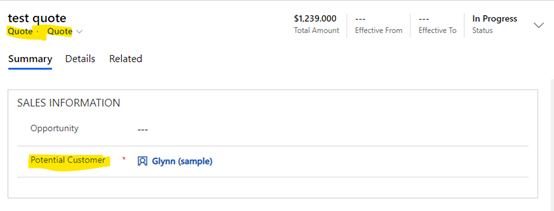
    pastedimage1603333891358v1.png

    The ‘Potential Customer’ field type is customer, which value from Account and contact two entities, so which type the quote selected is very import.

    You can refer following steps:

    1.Add ‘Get record’ step.
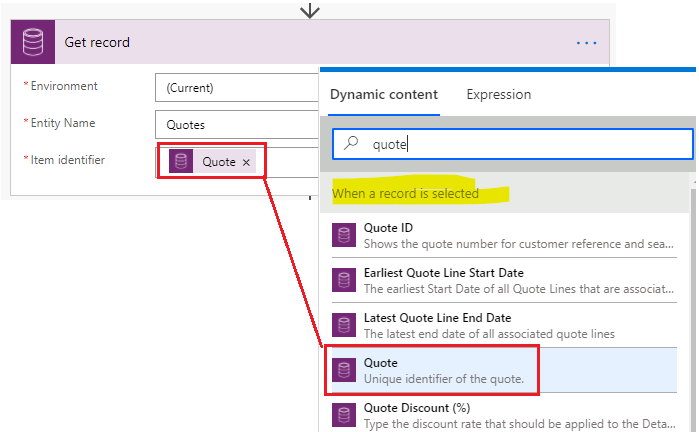
    pastedimage1603333925937v2.png

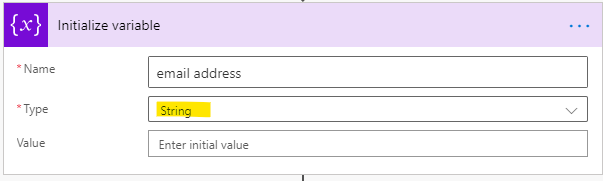
    2.Add ‘initialize variable’.

    pastedimage1603333955146v3.png

    3.Add ‘condition’ to add a split based on the entity type in the “Customer-Field” do either load a contact or an account.
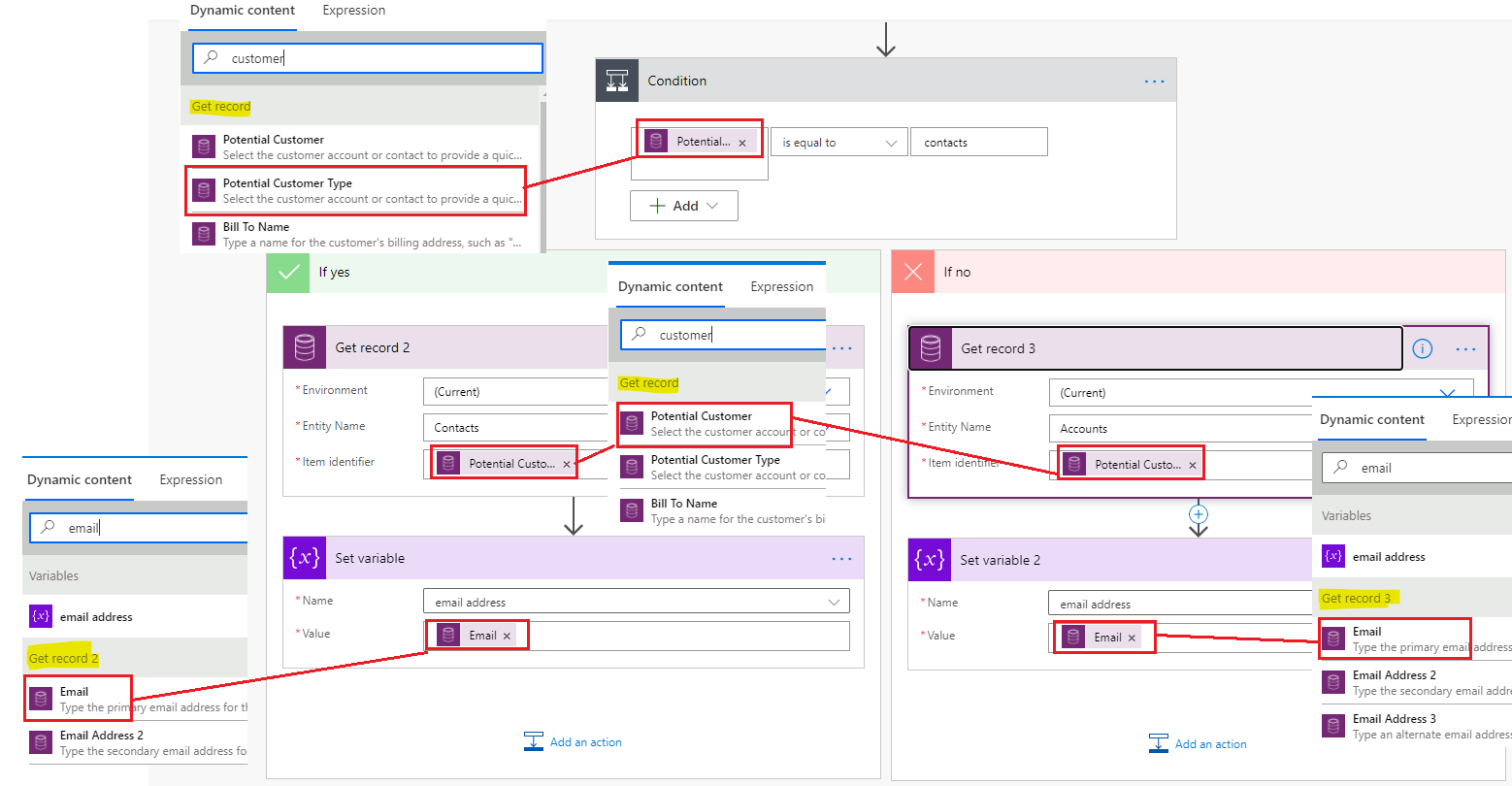
    pastedimage1603334893407v5.png

    4.fill email ‘To’ field with the ‘email address’variable value.
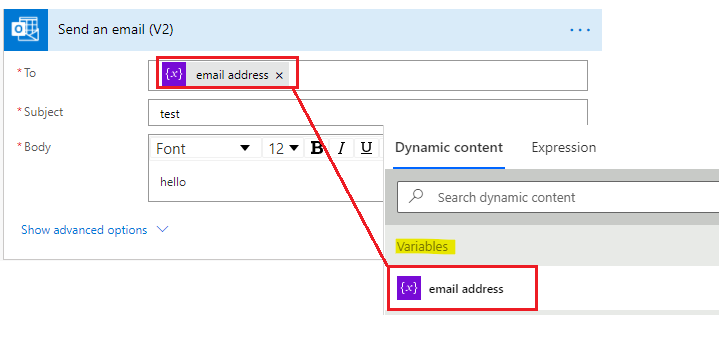
    pastedimage1603335215438v6.png

    Regards,

    Leah Ju

    Please mark as verified if the answer is helpful. Welcome to join hot discussions in Dynamics 365 Forums.

  • _nanu2208 Profile Picture
    105 on at

    Hi Leah,

    Thanks for helping me out ! It worked gracefully.

  • _nanu2208 Profile Picture
    105 on at

    Hi Leah,

    Can we set name of attachment file dynamically? Like, Suppose Quote Id is Q-123-XYZ then, can we set this quote ID as a file name which we are attaching in email?

    Thanks in Advance

  • _nanu2208 Profile Picture
    105 on at

    Hi,

    ok. So, I have achieved this using Move or Rename a file using path.

Under review

Thank you for your reply! To ensure a great experience for everyone, your content is awaiting approval by our Community Managers. Please check back later.

Helpful resources

Quick Links

Responsible AI policies

As AI tools become more common, we’re introducing a Responsible AI Use…

Neeraj Kumar – Community Spotlight

We are honored to recognize Neeraj Kumar as our Community Spotlight honoree for…

Leaderboard > Customer experience | Sales, Customer Insights, CRM

#1
Tom_Gioielli Profile Picture

Tom_Gioielli 170 Super User 2025 Season 2

#2
#ManoVerse Profile Picture

#ManoVerse 61

#3
Gerardo Rentería García Profile Picture

Gerardo Rentería Ga... 52 Most Valuable Professional

Last 30 days Overall leaderboard

Product updates

Dynamics 365 release plans