web
You’re offline. This is a read only version of the page.
close
Skip to main content

Announcements

News and Announcements icon
Community site session details

Community site session details

Session Id :
Customer Service forum

Auto populate specific data from Case details field to Customer Details field

(0) ShareShare
ReportReport
Posted on by

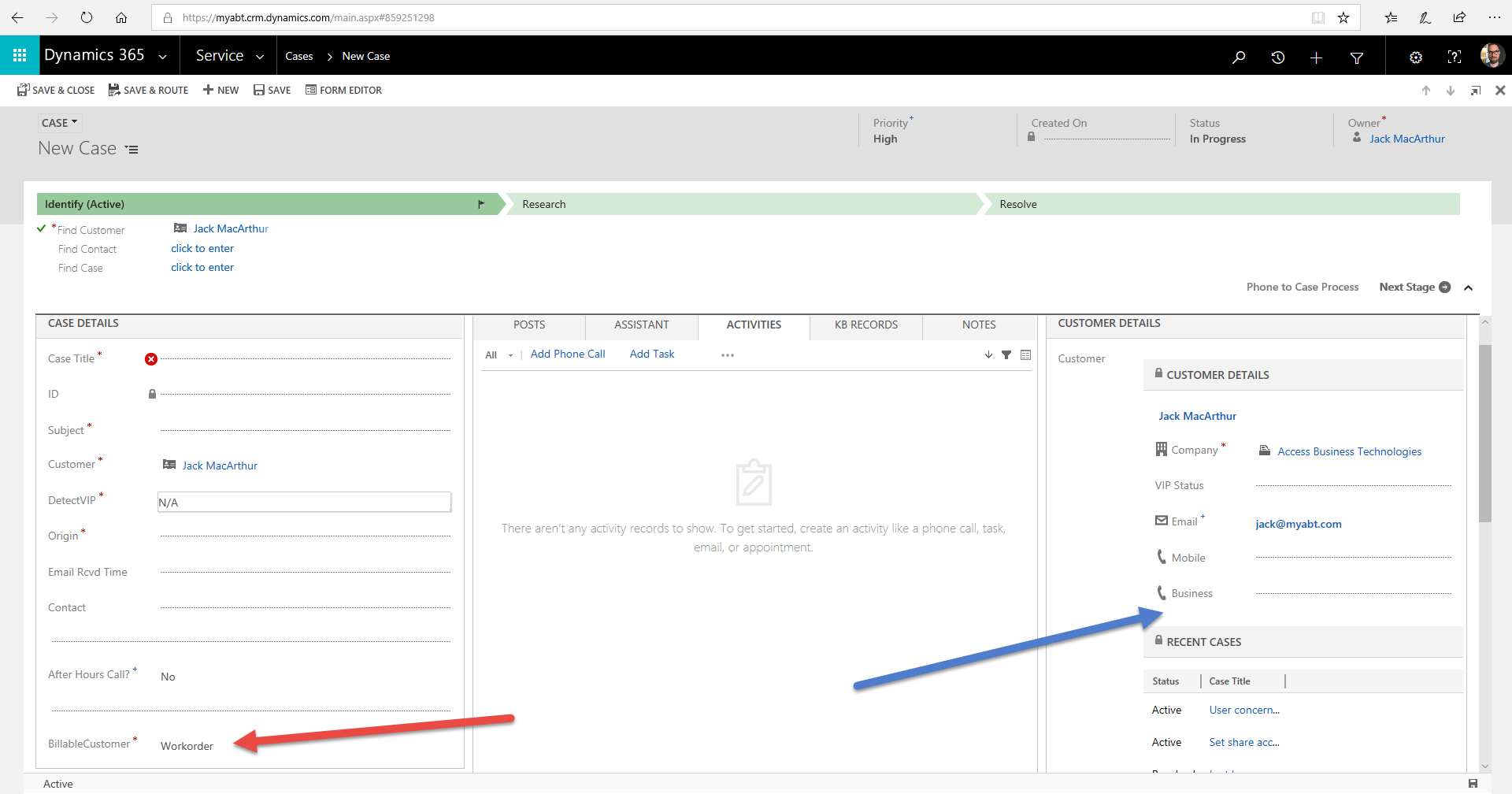
In Cases >I have a custom field under the "Case Details" section called "BillableCustomer". The user can select either "Yes" or "No" in that field (marked with red arrow in screenshot). I would like whatever choice they make to then permanently auto populate in a new custom field under "Customer Details" (marked with blue arrow).

The idea is - as a customer calls in for support, we'll know right away if that customer is a Work Order Customer or not simply by glancing at their "Customer Details" section, then we'll know how to assist them. Hope this makes sense. I'm pretty new to Dynamics 365 so please bear with me (CRM is a BEAST)! Thanks so much in advance!
2018_2D00_08_2D00_07_5F00_10_2D00_42_2D00_57.png

Categories:
I have the same question (0)
  • Verified answer
    RaviKashyap Profile Picture
    55,410 Moderator on at

    Hi,

    You can achieve this by creating the real time workflow. First you need to ensure that you create the same field as Billable Customer on both Account & Contact entity. This is because the Customer on case can be either a contact or Account.

    Now create a real time workflow for the case entity. This should trigger on create and update of Billable Customer entity. Within the steps, you need to first check if the customer is contact, if yes then update the contact. If customer is Account, then update the account.

    You can refer this to understand more about real time workflow.

    blog.clickdimensions.com/using-real-time-synchronous-workflows-in-dynamics-crm-2013

    Refer the below sample screenshot for the workflow-

    case2.png

    case2.png

    Hope this helps.

  • Community Member Profile Picture
    on at

    Thanks Ravi. While this technically does answer my question, I'm having difficulties executing the solution due to its complex nature. But I will keep trying to figure it out. Thanks!

  • RaviKashyap Profile Picture
    55,410 Moderator on at

    Hi,

    Post here if you face any issue. Will try to solve/fix together :)

  • Community Member Profile Picture
    on at

    Where it says "Set Properties" Do I need to specify anything in there?

  • Suggested answer
    RaviKashyap Profile Picture
    55,410 Moderator on at

    Hi,

    Yes, you need to set the value from the case record to Account & Contact for billable customer. This is to ensure that you get the same value on your account/ contact record.

    You can refer this video to understand how to set the properties. Basically you need to click set properties, put the cursor on the field (billable customer) and then right hand side, select the illablecustomer >> add and then okay. It will set the value from case (yellow highlighted)

    www.youtube.com/watch

    Hope this helps.

Under review

Thank you for your reply! To ensure a great experience for everyone, your content is awaiting approval by our Community Managers. Please check back later.

Helpful resources

Quick Links

November Spotlight Star - Khushbu Rajvi

Congratulations to a top community star!

Forum Structure Changes Coming on 11/8!

In our never-ending quest to help the Dynamics 365 Community members get answers faster …

Dynamics 365 Community Platform update – Oct 28

Welcome to the next edition of the Community Platform Update. This is a status …

Leaderboard > Customer Service

Last 30 days Overall leaderboard

Featured topics

Product updates

Dynamics 365 release plans
