web
You’re offline. This is a read only version of the page.
close
Skip to main content

Notifications

Announcements

Community site session details

Community site session details

Session Id :
Customer Service forum

Some buttons do not show up in Unified Interface

(0) ShareShare
ReportReport
Posted on by

Hi, 

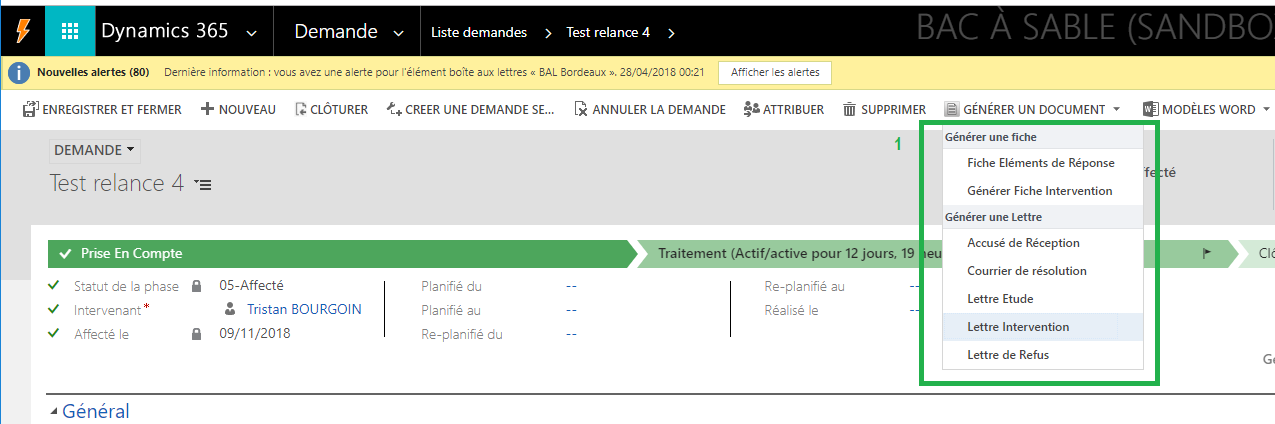
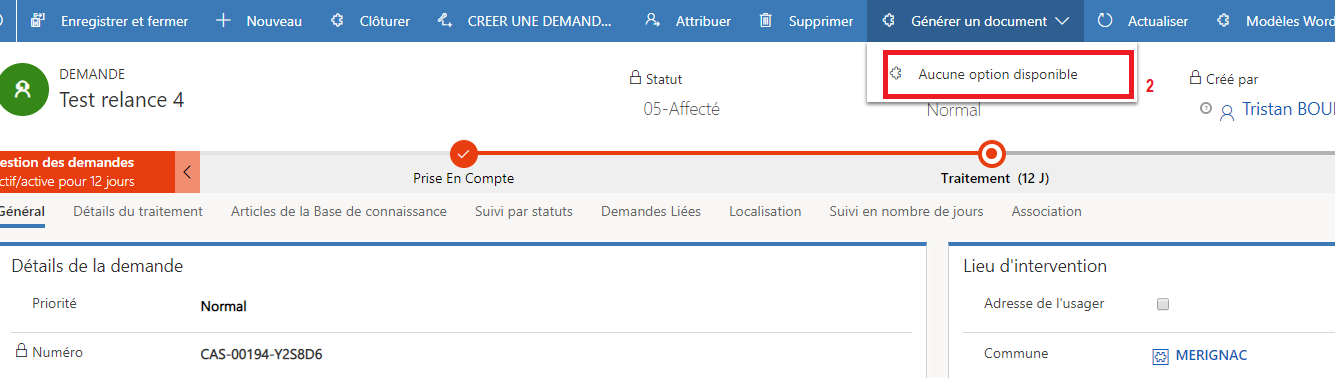
I'm facing an issue with my buttons in Unified Interface. We have started a migration v8.2 to V9 and I'm learning how to use and configure UI but I have seen that some off my button aren't visible. 

This is the V9 old style : 
Button-V9-norm.png

1- This is what i want in UI 

And this the UI : 
Button-UI.png

2 - "It say no action available"

Buttons calls on demand workflows, this how i have maked them in Ribbon Workbench : 

button-ribbon.PNG

Someone know how to make my buttons working ? 

Thank a lot for your help

Tristan

Categories:
I have the same question (0)
  • uahmed Profile Picture
    310 on at
    1. Can you please share what was an issue and did you solve it?
  • RaviKashyap Profile Picture
    55,410 Moderator on at

    Hi Tristan,

    If you have got the answer to your questions, please close the thread my marking the suggestion as verified. This will help other facing the same/similar issues.

  • Verified answer
    RaviKashyap Profile Picture
    55,410 Moderator on at

    Hi,

    There are some limitation currently for unified interface so what you see in web ,may not be available/ supported in UI yet. Check the below article for the limitation:

    docs.microsoft.com/.../about-unified-interface

    crmfunda.wordpress.com/.../dynamics-365-v9-limitations-of-unified-interface

    However, custom ribbon button should still appear in UI as long as you are not using any unsupported customization/ JavaScript. I do see that you have used internal methods which could be the reason why the button is not available i.e. UI may not have that internal method.

    Can you share some more details on your ribbon button as it is hard to understand it from the screenshot. What is this ribbon button for, is this custom, and what all options you have under that button is it dynamically generated?

    Hope this helps.

Under review

Thank you for your reply! To ensure a great experience for everyone, your content is awaiting approval by our Community Managers. Please check back later.

Helpful resources

News and Announcements

Season of Giving Solutions is Here!

Quick Links

November Spotlight Star - Khushbu Rajvi

Congratulations to a top community star!

Forum Structure Changes Coming on 11/8!

In our never-ending quest to help the Dynamics 365 Community members get answers faster …

Dynamics 365 Community Platform update – Oct 28

Welcome to the next edition of the Community Platform Update. This is a status …

Leaderboard > Customer Service

Last 30 days Overall leaderboard

Featured topics

Product updates

Dynamics 365 release plans
